• 110 Product updates

The roadmap, product ideas, and product plans are subject to change without notice. This roadmap plan is the current plan for new capabilities in the company’s product lines. However, these plans may be refined, updated, or revised from time to time, based on customer input and market conditions. The plan described herein is provided solely for information purposes, and is not a commitment, promise, or legal obligation to deliver any material, code, or functionality.

Introducing ToolSmith: build, edit, and debug plugins with AI

ToolSmith enters Controlled Availability on September 22, 2026, bringing a conversational way to build and maintain plugins in Tool Studio.Describe the workflow you want, review the proposed plan, and let ToolSmith help create and test the pieces behind it. You can also bring an existing plugin into the conversation to make a change or investigate a failure.What you can do with ToolSmithBuild a new plugin from a description. Explain the outcome and the systems involved. ToolSmith researches available APIs and existing assets, proposes a plan, and builds after you approve it. Edit an existing plugin. Describe what needs to change, review the proposed approach, and work through the update and testing in the same conversation. Debug a failing plugin. Provide the issue and relevant conversation context. ToolSmith can inspect execution logs, investigate the cause, and propose a fix.For example, start with: “Build a plugin that shows my open Linear issues.” Or bring an existing plugin and ask: “Add a priority filter.”Review the plan. Stay in control.You can refine the plan in plain language before approving it. When credentials are needed, ToolSmith collects them through a secure configuration card. It also asks for approval before taking external actions, including tests that change data in connected systems.Your conversation keeps the plan, progress, and results, so you can return and continue where you left off.Join Controlled AvailabilityWe’re starting with a selected group of customers who have a real workflow to build, edit, or debug and a participating developer with access to Tool Studio and the relevant third-party systems.Interested? Request early access to ToolSmith by telling us about your team, the workflow you’d like to build or improve, and the systems it uses. Our team will review your nomination and coordinate next steps with your account team. Submitting a request does not guarantee access. Selected participants will receive a kickoff, guidance on their first use case, and ongoing opportunities to share feedback.During CA, start with a focused workflow involving one or two systems. Results vary by system and workflow complexity, so review and test generated changes before relying on them. When editing shared assets, check their dependencies in Tool Studio because ToolSmith does not display those dependencies in the conversation.Want to experience ToolSmith live? Join us at now[dev]26 in San Jose for two days of hands-on building with engineers and product teams.What would you like to build—or improve—with ToolSmith? Tell us in the replies.

Related products:Agent Studio

🧩 Chunk Context Enhancement: Better answers from longer documents

 🔄 What's changingLong documents, such as a detailed policy or a multi-step procedure, often hold an answer across more than one section: a prerequisite in one place and the steps that follow it in the next. Today, Moveworks answers from the passage that best matches a question, so an answer that spans multiple sections of a long document sometimes comes back incomplete.Two things happen when someone asks a question, and they want different things from a passage:Finding works best when passages are small and precise. The tighter the passage, the more accurately it matches a question. Answering wants the opposite. More surrounding context makes the answer more comprehensive.Until now, one passage did both jobs. Going forward, we will separate them: search still runs on the same small, precise passages, and once the right one is found, Moveworks assembles a wider window around it — the neighboring passages from the same document — and hands the Assistant that fuller context. When several passages from one document rank highly, Moveworks treats it as a strong source and pulls in more of it.✨ What this improvesLong procedural articles: Steps and their prerequisites often sit in different sections, and the Assistant now sees both of them together, so the answer covers the whole procedure rather than one part of it. Policy documents with nested headings: A subsection is read alongside its neighboring sections and its document title, so the meaning it inherits from the material around it carries through to the answer. Questions that span multiple sections: An eligibility rule and the process that follows it are returned as a single complete answer instead of two separate results.✅ What you need to doThere is no configuration needed from the admin or user. This update will be rolled out to all customers by 9/30/26. Refer to our roadmap: here.  

Toxicity Filter Upgrade

We’re upgrading the AI Assistant’s toxicity filtering to consider the full context of a conversation rather than evaluating content in isolation. This provides a more accurate understanding of user intent and helps identify genuinely harmful content.The upgrade also reduces false positives, allowing safe conversations to continue without unnecessary interruption.Example OutputContent safety is now handled directly by the Assistant's reasoning engine, which evaluates each request in the full context of the conversation. Instead of a context-blind checkbox, the Assistant understands what you're actually asking for before deciding whether it can help. When a request genuinely crosses a line, the Assistant issues a clear, consistent refusal.The old "Specific Topic Toxicity" model, with its fixed five fixed categories, has been replaced by a free-form custom topic prompt. In the new model, six categories remain blocked by default in the background, and you can now add your own on top of them.Default blocked categoriesThese six categories are blocked by default for every organization:Violent — physical violence Non-violent Illegal Acts — requests to carry out unlawful activity that isn't violent Sexual Content — sexually explicit content Unethical Acts — content promoting unethical behavior Politically Sensitive — contentious political content Jailbreak — attempts to bypass the Assistant's safety instructions Note: Core anti-jailbreak protections always remain in place and cannot be overridden. Rollout Schedule/ TiersFrontier: 9/2/2026Standard: 9/8/2026Basic: 9/10/2026 What improvedFar fewer wrongly-blocked requests. The old filter frequently flagged benign messages as unsafe. Across 5,000+ live production conversations, the new approach produced zero user-visible false refusals, so legitimate requests get answered. Better at catching genuinely unsafe content. On calibrated safety benchmarks, the new approach catches roughly twice as much truly harmful content as the previous filter. Context-aware judgment. The Assistant can now tell the difference between, for example, "a colleague is harassing me, how do I report it?" (helped) and harassing content itself (refused). It also holds up regardless of framing, whether fiction, roleplay, hypotheticals, or jokes. Broader, more sensible coverage. Requests like "help me download movies and software without paying" are now correctly declined. New: per-organization safety customization. Enhanced content-safety control for your organization.Every other aspect of the Assistant's behavior is unchanged. This only affects when and how genuinely unsafe requests are declined.How to check it out in your orgSee it in action. No setup required. The upgraded safety behavior is enabled for your organization automatically as part of our staged rollout. You can simply keep using the AI Assistant, and legitimate requests that may have been over-blocked before should now go through cleanly.Customize safety rules for your organization. A new Additional Organization Safety Instructions setting lets you extend the built-in safety categories with your own rules. For example:Find in: Chat Platforms -> Display Configurations > Moveworks AI Assistant Display Settings & Disclaimers > Safety Guard: Allowed Content Categories New AdministrationOld Administration (Replaced)Update Settings if Needed: This free-text setting replaces the previous category allow-list. If your org previously configured the content-safety categories, you will want to customize the new instructions accordingly.Adding topics your organization wants the Assistant to decline, or Defining approved exceptions (for example, authorizing your security team to request phishing-simulation drafts for awareness training).More information in the help documents here. 

Related products:Agentic Reasoning Engine
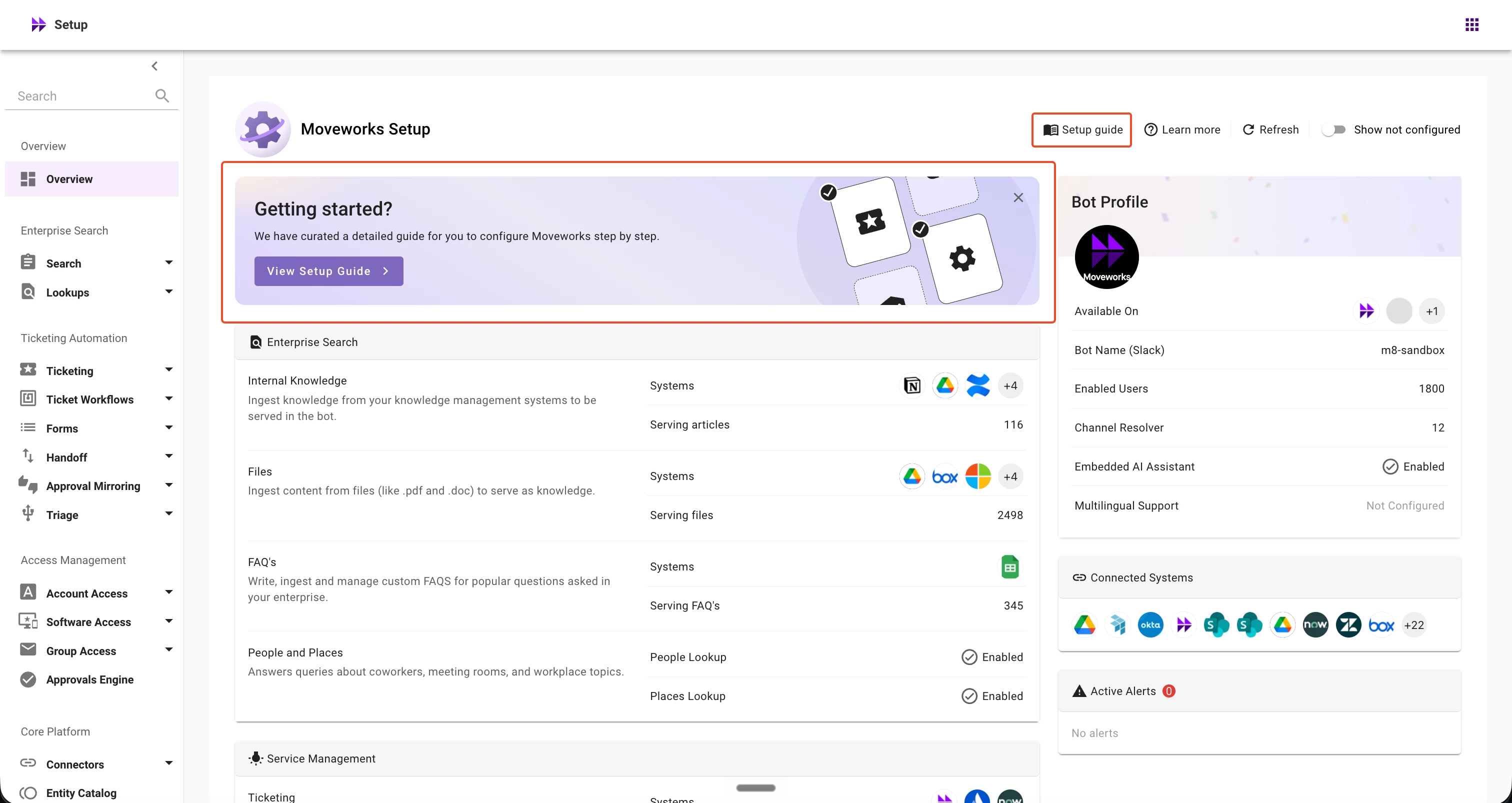
Moveworks Setup Overview Page

🚀 New in Moveworks Setup: A Guided Setup Journey for Moveworks Admins

We’re introducing a new Setup guide directly within Moveworks Setup Overview page to guide admins through the recommended sequence of configurations during onboarding. Instead of relying solely on help documentation to understand the recommended setup sequence, admins can now see the full journey and navigate directly to each configuration step from within the product.🧭 What’s new?For organizations currently onboarding to Moveworks, the Setup Overview now includes a 'Getting started?' banner that provides a direct entry point into the Setup guide. The guide brings the complete onboarding journey together in one place, with each step providing:A description of what needs to be configured An estimated time to complete the step A link to detailed documentation A Start action that takes you directly to the relevant configuration pageThe guide also includes a Jump to section navigation, making it easy to quickly understand the full setup journey and move between different stages of onboarding.⭐️ Why this mattersSetting up Moveworks spans multiple configuration areas, and understanding the recommended sequence can be difficult when guidance is spread across documentation and different Setup surfaces. The new Setup guide helps admins:Understand the complete setup journey and the recommended order of configuration Know where to start and what to do next during onboarding Navigate directly to each configuration page from the relevant setup step Access setup guidance without leaving Moveworks Setup📍How to access the Setup guideFor organizations currently in onboarding stages,Navigate to the Setup Overview page in Moveworks Setup. Select View setup guide from the Getting started? banner. Review the setup journey and select a section to see the recommended configuration steps. Select Start next to any step to navigate directly to the relevant configuration page and begin configuring.✋🏻 What to knowThe banner is shown only when an organization is in onboarding stages. A permanent Setup guide link is always available from the Setup Overview header, so admins can return to the guide whenever needed. The guide provides recommended setup guidance and navigation but does not currently track completion of individual configuration steps.📚 Learn moreFor additional details, see:Getting Started Guide Moveworks Setup HomepageHave questions or feedback? Please post them on the Moveworks Community, where our team will be happy to assist.Thank you, Moveworks Setup Team

Related products:Moveworks Setup

Agent Studio Version Control

 What’s newAgent Studio now provides Version History and Revert for Agent Studio assets, a new version-control capability that records every publish and makes it simple to inspect or return to a previous known-good state.Release type: New capabilityProduct area: Agent StudioAvailability: All customers, all data centers. No configuration required.🧭 What’s includedVersion History tab on Plugins, Conversational Processes, Data Types, Actions (HTTP and Script), Event and Webhook Listeners, and MCP Servers. Commit messages: the Publish modal accepts an optional message describing the change. Version chips in the editor header and in the tab strip to show which version is open. Open any earlier version directly in the editor to inspect its contents. Publish from an opened earlier version to create a new version based on that content. One-click revert with a confirmation modal that lists related child artifacts the revert will affect.🌟 Why this mattersBefore this release, publishing an update overwrote the prior asset immediately and teams needed external backups to keep a change history or recover from mistakes. With Version History and Revert:Developers get an auditable history of publishes (author, timestamp, optional commit message). Teams can easily inspect previous versions without rebuilding from scratch. Reverting to a previous version is simple and safe, reducing risk and speeding recovery from bad publishes.✋ How revert behavesRevert is additive and non-destructive:Reverting an asset, for example, currently at V4 back to V3 will create a new version V5 containing V3’s contents. V4 remains in the history and is still viewable. Nothing is deleted so a revert itself can be reverted later. The revert confirmation modal lists the child artifacts that will be impacted so you can confirm the downstream scope before proceeding.⚠️ Known limitationsRevert unavailable for some sub-configurations: plugin utterances, certain Data Type sub-configs, plugin triggering configuration, and slot resolution strategies inside Conversational Processes are versioned and viewable, but cannot be reverted today. Agent Studio surfaces inline flags where these limitations apply. Support for revert on these items is planned as a fast follow. Drafts are not versioned: Version History applies only to published assets. Platform updates are recorded: When Moveworks applies schema migrations or other platform changes to an asset, those updates appear as versions attributed to a Moveworks administrator. Version numbers can advance without a developer publish. No side-by-side diff: To compare two versions, open each one. A diff view is planned for a future release. No staged testing of drafts: You cannot test an unpublished Conversational Process in a staging mode that prevents immediate replacement of the live asset in this release. Staged testing is planned for a future update. One-asset revert only: There is no batch revert and no cross-asset activity log in this release.📌 Notes for developers and adminsEvery publish is recorded with an author and timestamp. Consider adding a descriptive commit message when publishing to make history easier to scan. Because reverts create new versions rather than deleting history, you can always traverse and restore any prior state. Review the revert confirmation modal carefully — it shows child artifacts that will be affected so you can understand impact before proceeding.📚 Learn moreDetailed documentation and usage guidance is available in the Agent Studio docs. If you have immediate questions or feedback, please post them in the community forum and our team will respond.Thanks,The Agent Studio Team 

Related products:Agent Studio

🚀 New in Moveworks Setup: Delete More Configurations Directly from Setup

We’re expanding Configuration Delete in Moveworks Setup, giving admins more control to remove configurations that are no longer needed.Starting August 25, 2026, Configuration Delete will be available for 10 additional configuration types, making routine configuration cleanup more self-service and reducing the need to contact Moveworks Support. 🧭 What’s new?You can now delete the following configurations directly from Moveworks Setup:Connectors SSO Chatbot User Identity Forms Software Access Live Agent Handoff Permission Rules Mirror Permissions Channel ResolverThis expands on the existing delete capabilities available for Enterprise Search (Max Capacity), Rich Ticket Filing (RTF), and Ticket Workflows.Where applicable, Moveworks Setup checks whether a configuration is referenced by other configurations before allowing deletion. If dependencies are found, you’ll be prompted to remove those references first before proceeding with the deletion. 🌟 Why this mattersConfiguration cleanup is a common need during implementation and after go-live, and many of these tasks previously required assistance from Moveworks teams. With expanded Configuration Delete, admins can now handle more routine cleanup directly in Moveworks Setup, including:Cleaning up configurations created during implementation and testing Removing configurations that are no longer in use Managing routine configuration cleanup directly from Moveworks Setup, reducing the need to contact Moveworks Support ✋ What to know before you deleteThe impact of deletion varies by configuration type. Please review the confirmation message and associated impact carefully before proceeding.Connectors A new connector cannot currently be created with the same name as a previously deleted connector. If needed, use a different connector name. Deletion may be blocked if the connector is referenced by another configuration that cannot yet be deleted through Moveworks Setup. If you’re unable to resolve the dependency, please contact Moveworks Support for assistance. Connector references defined through DSL configurations are not automatically detected. Review the DSL Configurations to Review before deleting a connector. User Identity User Identity deletion is available only for organizations that are not yet live. Deleting User Identity immediately removes all ingested users, including manually created users. Manual users are automatically added back within approximately 1 hour. User-associated data is permanently removed within 24 hours. Access to Moveworks Setup will be temporarily unavailable after deletion. Once manual users have been restored, admins can sign in using the magic-link login. If there are no manual users configured, admins will not be able to regain access through the magic-link flow. Verify that the required manual users are configured before proceeding. SSO SSO deletion is available only for organizations that are not yet live. Deleting an SSO configuration immediately disables sign-in through that identity provider. Admins can continue to access Moveworks Setup using the magic-link login, provided an eligible manual user is available. Chatbot Deleting a Chatbot configuration removes the associated chat platform. Users will no longer be able to access the Assistant through that surface. The default Web chatbot configuration provided by Moveworks cannot be deleted through Moveworks Setup. If you need to delete this configuration, please contact Moveworks Support for assistance. Forms Deleting a Forms configuration permanently removes all associated indexed forms data within a few hours. Permission Rules Deleting Permission Rules may immediately affect access to content from Knowledge Bases, Files, or Max Capacity, depending on the access controls configured for that content. Mirror Permissions Deleting a Mirror Permissions configuration immediately stops permissions ingestion for the associated ServiceNow Knowledge Bases or forms. Software Access Deleting a Software Access configuration means the associated software entity can no longer be used for software provisioning. Live Agent Handoff Deleting a Live Agent Handoff configuration makes the associated live-agent handoff unavailable immediately. Channel Resolver Deleting a Channel Resolver configuration stops channel resolution for the associated Slack channel.  🚨 Important NotesConfiguration deletion is permanent and cannot be undone. Associated configuration and data may be permanently purged as part of deletion. Before confirming, verify that you have selected the correct configuration and understand the downstream impact. Config Change History and SIEM logging for these delete actions are not yet supported. We plan to add this capability in future. 📚 Learn moreFor detailed guidance, see:Configuration Delete DSL Reference Guidance Reference Configuration Locator Have questions or feedback? Please post them on our community forum where our team will provide appropriate assistance. Thank you,Moveworks Setup Team

Related products:Moveworks Setup

🚀 Improvements made to the New User Identity Journey within Moveworks Setup!

Hi Moveworks Community! 👋Effective 7th August 2026, we've fixed all issues and made improvements to the New User Identity Journey in Moveworks Setup. Here's what's now better:Configure Source Mapping ScreenYou can now map internal fields using DSL mappings or JSON-based mappings (via the JSON editor) Edit pre-configured user_id_info fields (used for identity plumbing)Add a new user_id_info field (used for identity plumbing) -- especially useful for cross-mapping usecases (ex: I want to set the chat platform as web assistant for all users that are ingested from ServiceNow)  MS Graph comes pre-configured with default filters and attribute lists — so you get the attributes you need without extra setup   More fields are available for mapping, including user_id_info fields (user_email), password metadata (password_meta_info), and others.   Override Mapping ScreenYou can now map internal fields that weren't available before:user_id_info.user_email geocodes employment info field timezone password metadata manager resolver field   Test with User ScreenAll attributes now show in the final user profile — both system and custom attributes Geocodes now have a preview so you can see the data before your users are ingested   System attributes are grouped by integration source, so you know where each piece of data comes from for a sample user   All other internal fields are visible during testing, so you can verify everything works before going live▶️ Learn more Detailed Help Doc here. DSL reference for mappings (used in Configure source mapping and Override field mapping screens)Thanks,The Moveworks Setup Team

Related products:Moveworks Setup

LLM Actions just got a major upgrade

We've upgraded the LLM Actions you already use, generate_text_action and generate_structured_value_action, with a boost in performance and a batch of powerful new capabilities. Best of all, it's a drop-in upgrade. Everything you've already built keeps working exactly as before, with nothing you need to change. ⚡ Better performance, no work requiredYour existing Compound Actions and Conversational Processes now benefit from improved model quality and efficiency automatically, especially on reasoning-heavy tasks. Same inputs, same outputs, better results.✨ What's new📄 File input Pass documents straight into the model, no preprocessing required. Supports PDFs, spreadsheets (Excel/CSV/TSV), rich documents (Word/RTF/ODT), presentations (PowerPoint/Keynote), and a wide range of text and code formats. 🎞️ Images and files together Combine images and files in a single request, and pass multiple of either as a list, from a single List[File] slot or mapped from separate File slots: file: [data.contract, data.addendum] 🌐 Web search Turn on enable_web_search to let the model pull live information from the web into its context instead of relying only on its training data. Want to keep it focused? Optionally scope results with web_search_allowed_domains or web_search_blocked_domains (up to 100 domains each). Available on all models except gpt-5 with minimal reasoning. 💡 TipFor image and file inputs, we recommend using gpt-5 or newer for the best results.🛠️ What you can build- OCR and document Q&A- Comparing multiple files (for example, contract vs. addendum)- Structured extraction from receipts, invoices, and forms- Answering questions that need up-to-date, real-world information🛡️ A note on safe useWeb search and file input let the model read content from outside sources. When designing flows that mix sensitive data, external content, and outbound actions, follow the security guidance in the docs to stay protected against prompt-injection risks.📖 Full details, examples, and the model reference: https://docs.moveworks.com/agent-studio/actions/llm-actions 

Related products:Agent Studio
BriefMe Upgrade: MultiModal/Image Understanding for PDFs

BriefMe Upgrade: MultiModal/Image Understanding for PDFs

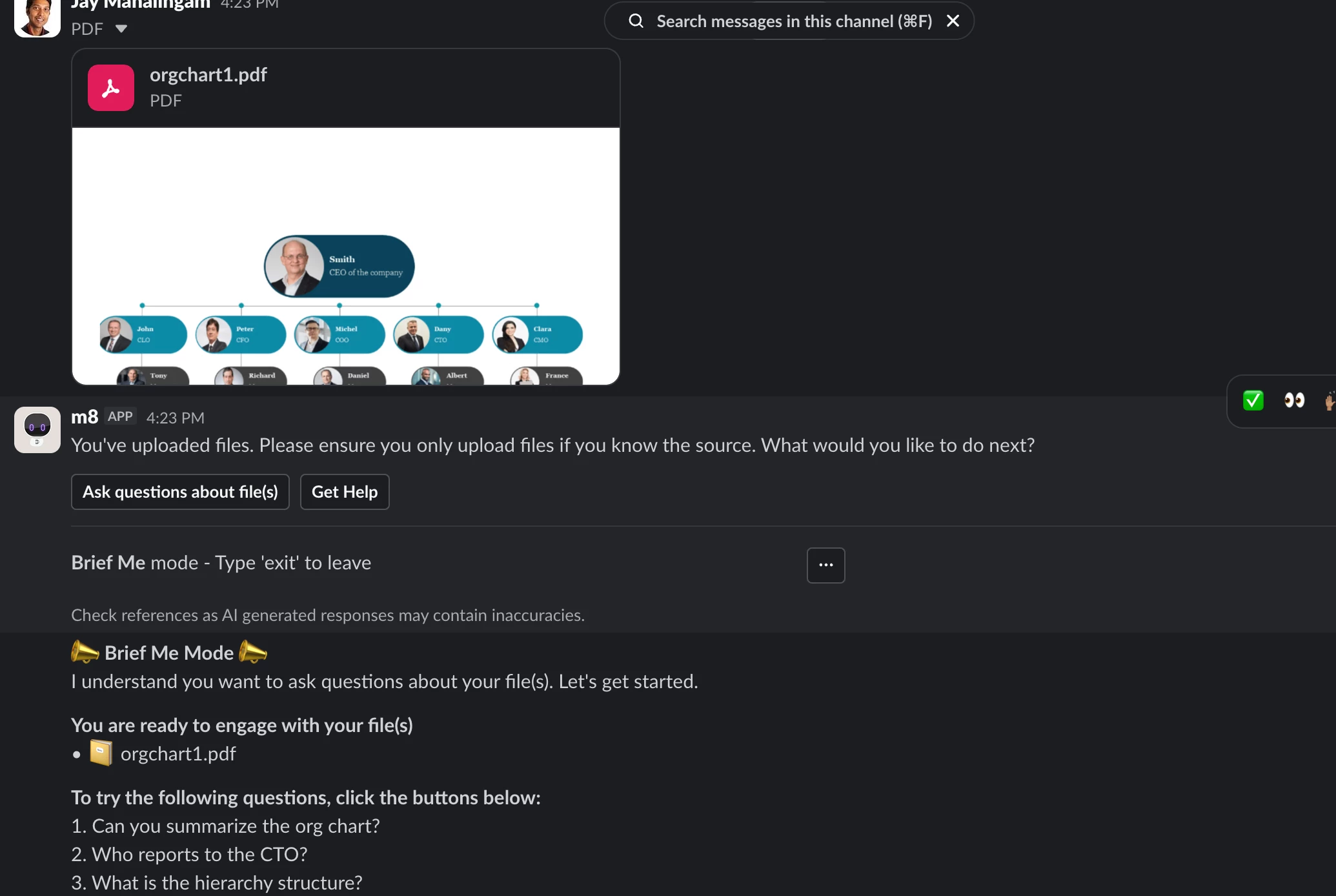
🎉Coming Soon: BriefMe Multimodal Understanding for PDFs. 🎉We're excited to share that an important upgrade to BriefMe will be available early-mid August! What is BriefMe Multimodal Understanding for PDFs?BriefMe can now "see" and interpret the image elements inside uploaded PDFs. Instead of just reading the raw text, your assistant can now contextually understand these types of images - pictures, charts, tables, and complex diagrams. This means you can upload visually enriched files and have a seamless, more accurate conversation with the assistant about the document. Who it’s for: Initially, this feature will be available to BriefMe (Slack/Teams) users in US, CA, and EU regions. In the coming months, we plan to make it available in all other regions. Also, we plan to extend Multimodal Understanding to DOCs and PPTs in the coming weeks. What this unlocks:Process Visual Data: Effortlessly extract answers from trend lines, stock curves, and complex tabular images. BriefMe can perform cell value lookups and accurately interpret X/Y plots. Complex Diagram Interpretation: Process flowcharts, IT architecture diagrams, and org charts are now fully readable. BriefMe understands blocks, directional arrows (top-down, left-right), dotted lines, and color schemes. Cross-Image Analysis: Upload multiple visual PDF files at once—like a generic process flow PDF and a specific departmental org chart PDF — and ask questions that require connecting the dots between images across files. Multilingual Support for Images also: We currently support multilingual abilities for text. We are extending that ability for images as well. We will be able to analyze and summarize visual flows even if the embedded text is in a non-English language. (For example, uploading a Spanish chemical plant flowchart and asking for an English summary). A few ways you can use this feature:HCM & HR: Upload a company org chart to instantly analyze reporting structures, or upload a complex holiday calendar PDF to filter mandatory vs. optional dates. IT & Engineering: Upload an IT support tier diagram to find the right escalation path, trace data paths in architecture diagrams, or even upload a PDF document with screenshots of code to get rewriting suggestions. Finance: Upload a chart from an annual report and ask BriefMe to calculate specific investment growth over time based on the trend line. Marketing: Upload a slide deck in PDF format and extract key insights from the entire deck.  Learn more here. Read how to get started here. Questions? Drop them in this thread! Our team and the broader community will jump in. Once you start using Multimodal Understanding for PDFs, we'd love to hear from you! 

Related products:AI Assistant