Initiative Designer is LIVE in the AI Agent Marketplace
We’re excited to announce Initiative Designer, now available on the AI Agent Marketplace. Your automation backlog isn't a prioritization problem. It's a starting problem.
You know what processes are broken and you know what should be automated, but you may not always know where to begin or how to turn "we should automate expense management" into an actual, enterprise-ready solution.
Initiative Designer helps you translate an idea into a structured, business system-centric plan.
How It Works
- Login to the AI Agent Marketplace
- Highly recommended to share and save your progress
- In the nav bar, head to to “Create” —> “Initiatives”
- Click on “Generate” and describe the workflow →
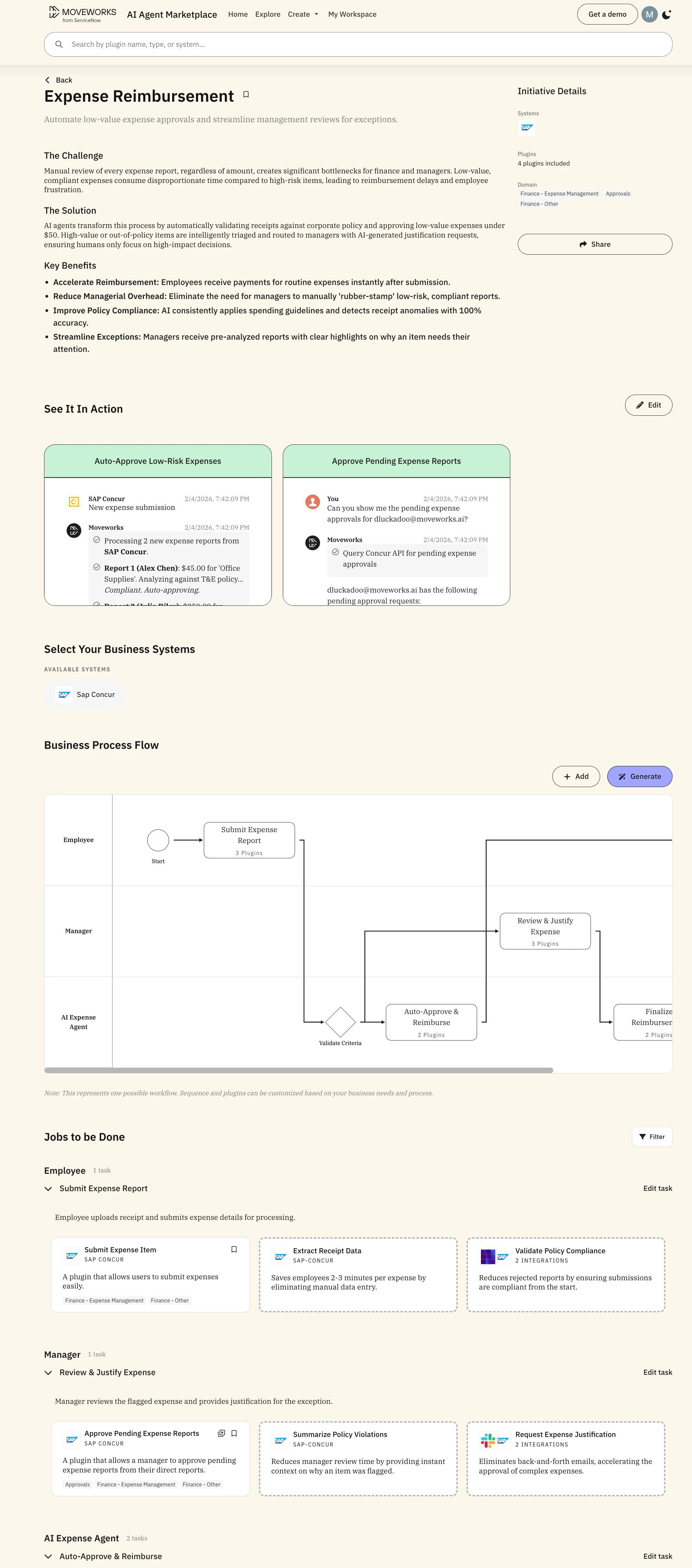
- e.g., "Automate our expense management process. An employee submits an expense, and if it’s under $50, within policy, and includes a valid receipt, it’s automatically approved and reimbursed, but higher-value or out-of-policy expenses are routed to the manager with a request for justification before payment is processed."
- We recommend providing as much detail as you can about your bespoke business process to generate the best results
- AI maps the process → actors, tasks, dependencies, bottlenecks
- Customize → View the output and customize it to meet your bespoke business needs, add or remove steps, specify your specific systems — all in natural language
- Build → save or share the Initiative link and turn the business process blueprint into real automation using Agent Studio
What It Does
Initiative Designer takes any workflow you describe in plain English and designs a complete automation blueprint you can build from.
What you get:
- Actors and swim lanes – who does what, and when
- Task sequences with handoffs – how work flows between teams
- Pain points at each step – where things break today
- System integrations – auto-suggested from your tech stack (ServiceNow, Workday, Okta, Salesforce, and 120+ connectors)