


AI Assistant Chat Playback — New troubleshooting tool in Moveworks Setup [ Available to all ]

Related products:Moveworks Setup
  • April 20, 2026
  • 8 replies
  • 265 views

vpawar
Forum|alt.badge.img+3

Why this matters

When the AI Assistant delivers an unexpected response, the first question is always why. Until now, answering that meant filing a support ticket and waiting for Moveworks to investigate. Chat Playback puts that diagnostic power directly in your hands.


What's new

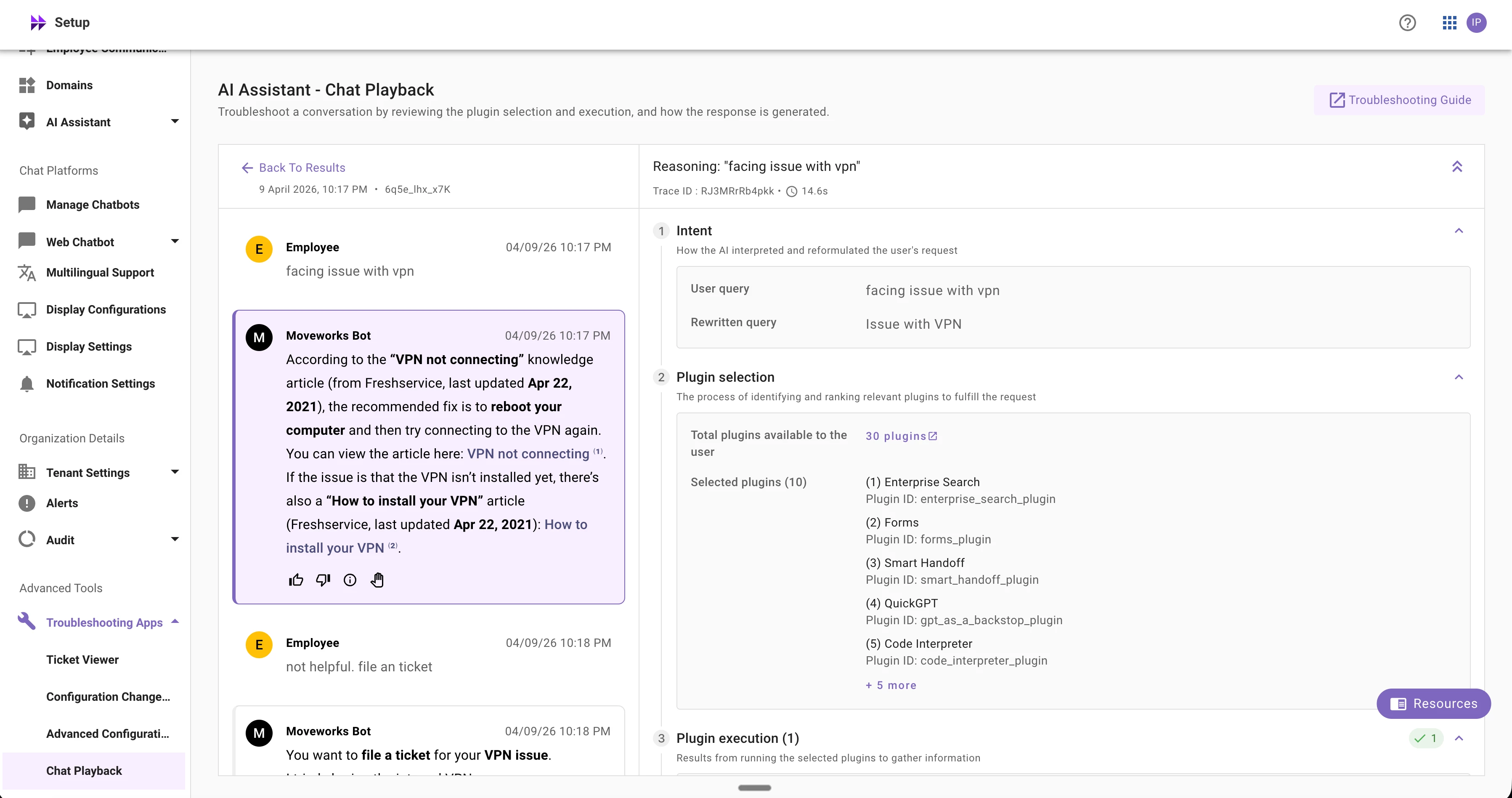
AI Assistant Chat Playback is a troubleshooting tool in Moveworks Setup that lets you replay any user conversation and inspect the assistant's reasoning process step by step. Paste a conversation ID and see exactly how the assistant processed the request across four stages:

  1. Intent — How the assistant interpreted and reformulated the user's query. Compare the original message against the rewritten query to spot misinterpretations.
  2. Plugin Selection — Which plugins were available to the user and which ones the assistant chose as relevant.
  3. Plugin Execution — What arguments were passed, what resources were returned, and whether execution succeeded or failed — including specific error codes.
  4. Response Generation — Which resources were cited in the final response, and where they came from.

This makes it straightforward to pinpoint whether an issue originated from intent misinterpretation, plugin selection, a downstream execution failure, or a citation relevance problem.

Availability

Chat Playback is live today for partner-managed orgs. It will be enabled for all orgs by April 27.

Key Notes

  • Access is role-gated. Chat Playback displays sensitive conversation data. Only Super Admins and users with the PII Authorized Viewer role can access it.
  • Conversation ID required. Playback is scoped to a single session — you cannot search by user email or browse conversation histories. This is by design for privacy.
  • All access is audit-logged. Every lookup is recorded with the accessing user, conversation ID, and timestamp for compliance review.
  • Transcripts available after ~3–4 hours. Conversations need time to process before they appear in Chat Playback.
  • Action plugin failures? Copy the Trace ID from the reasoning panel and look up the full error chain in API Audit Logs for the downstream API call details.

Resources
 

8 replies

nicole.hulst
Forum|alt.badge.img+8
  • Known Participant
  • April 20, 2026

This is great! When will it be available? I am Superadmin and cannot see it.

Question: Are there any plans to make a dedicated support role? IMHO Support colleagues should not get SuperAdmin or even Setup Admin to use this feature but should be able to use it.


Ajay Merchia
Forum|alt.badge.img+3
  • Community Manager
  • April 20, 2026

This is great! When will it be available? I am Superadmin and cannot see it.

Question: Are there any plans to make a dedicated support role? IMHO Support colleagues should not get SuperAdmin or even Setup Admin to use this feature but should be able to use it.

It will be enabled for all orgs by April 27.


vpawar
Forum|alt.badge.img+3
  • Author
  • Community Manager
  • April 20, 2026

Hello ​@nicole.hulst , 

I am assuming the support colleagues are from Siemens Healthineers, not from Moveworks (please correct me if this is otherwise). Support users can access this tool by having this role combination: Moveworks Setup user + Moveworks Setup PII viewer role - They do not need to be Super admin or Moveworks admin 


nicole.hulst
Forum|alt.badge.img+8
  • Known Participant
  • April 20, 2026

Hello ​@nicole.hulst , 

I am assuming the support colleagues are from Siemens Healthineers, not from Moveworks (please correct me if this is otherwise). Support users can access this tool by having this role combination: Moveworks Setup user + Moveworks Setup PII viewer role - They do not need to be Super admin or Moveworks admin 

Yes they are our internal support colleagues. The thing is as you know having the Moveworks setup user role still allows you to change configurations and in an ideal setup, pure Support Engineer should not be able to change configs, and may not necessarily need to see other data connected with PII viewer role. That is the reason I am asking. I would like to keep accesses as minimal as possible :)


vpawar
Forum|alt.badge.img+3
  • Author
  • Community Manager
  • April 20, 2026

Thanks ​@nicole.hulst  At the moment, this specific role is not on our roadmap. Please feel free to file a product idea https://community.moveworks.com/ideas - We will consider it in our roadmap. 


nicole.hulst
Forum|alt.badge.img+8
  • Known Participant
  • April 21, 2026

Thanks ​@nicole.hulst  At the moment, this specific role is not on our roadmap. Please feel free to file a product idea https://community.moveworks.com/ideas - We will consider it in our roadmap. 

Our Team already asked for something similar Providing read only access to Moveworks setup | Community a year ago. This has the same purpose enabling support staff but not allowing them to edit anything or see what they are not supposed to.

I would rather not create yet another idea that is not being fulfilled within one year, then the first one is still pending. I do expect a robust role concept with need to know basis for something so essential as Moveworks Setup.


vpawar
Forum|alt.badge.img+3
  • Author
  • Community Manager
  • April 21, 2026

Thanks for sharing this ​@nicole.hulst - I will go through the product idea and review how we can get this into our roadmap. 


vpawar
Forum|alt.badge.img+3
  • Author
  • Community Manager
  • April 28, 2026

Hello Moveworks Community, 

We are excited to announce that this product is available to all customers in all regions.