

New Productivity Boost Feature: Web Search in QuickGPT
We're excited to announce that starting today (July 1, 2025) you will be able to fetch live web results using Quick GPT in your AI Assistant. This new capability in Quick GPT allows the Assistant to pull in web results with citations when answering questions that require up-to-date information. Think of it like Google’s AI Overview but embedded in the place where you find company info or take action at work.
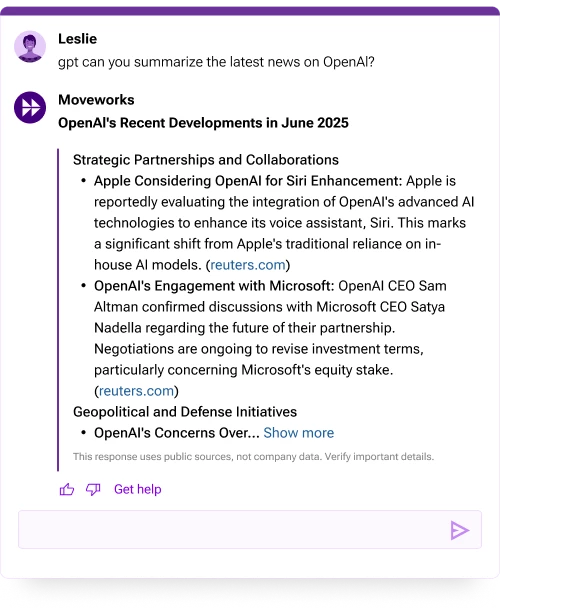
How it works
To run a web search, simply add “gpt” at the start of your question and ask a question about the weather, current events, or the latest developments in an area of interest.
Web search is powered by a newly released OpenAI model that intelligently decides whether to rely on its built-in knowledge or supplement the response with content from the web. If running a web search, Quick GPT will use the OpenAI model to intelligently synthesize web content, prioritizing high-ranking webpages. Cross-check important details using citation links.
Try it out for yourself!
- “GPT, what’s the weather like this week in Vancouver, BC?”
- “gpt, give me the top 5 news stories in construction this month”
- “Gpt, prepare a brief of today’s news from on the following stocks…”
- “Hey gpt, what are the top events or conferences for supply chain/logistics this year?”
Enterprise-grade web search, without the costly spend
- Moveworks' enterprise controls provide a safer, managed search experience: All searches are covered by our zero day retention policy, so your inputs are never used to train models. Admins can also set additional parameters, work-appropriate filters, and topic exclusions if that’s helpful.
- With Quick GPT, Moveworks covers the cost of AI-driven web search. This can offload the costs of running your own GPT model where you’ll be charged for every API call or paying separately for ChatGPT.
Note on availability: Are you in US, CA, EU, and AU regions and already a part of our Quick GPT Limited Preview? This feature will automatically turn on for you tomorrow. Web search in Quick GPT is not yet available for GovCloud customers or those who declined direct OpenAI use. See the help docs for details.
→ Want Quick GPT in your AI Assistant? Talk to your account team or sign up for the Limited Preview.
→ Read more in the launch blog