

June 2025 Product Release Notes
AI Assistant: Web Search now available in Quick GPT
Fetch live web results using Quick GPT in your AI Assistant. This new capability in Quick GPT allows the Assistant to pull in web results with citations when answering questions that require up-to-date information. Think of it like Google’s AI Overview, but embedded in the place where you find company info or take action at work.
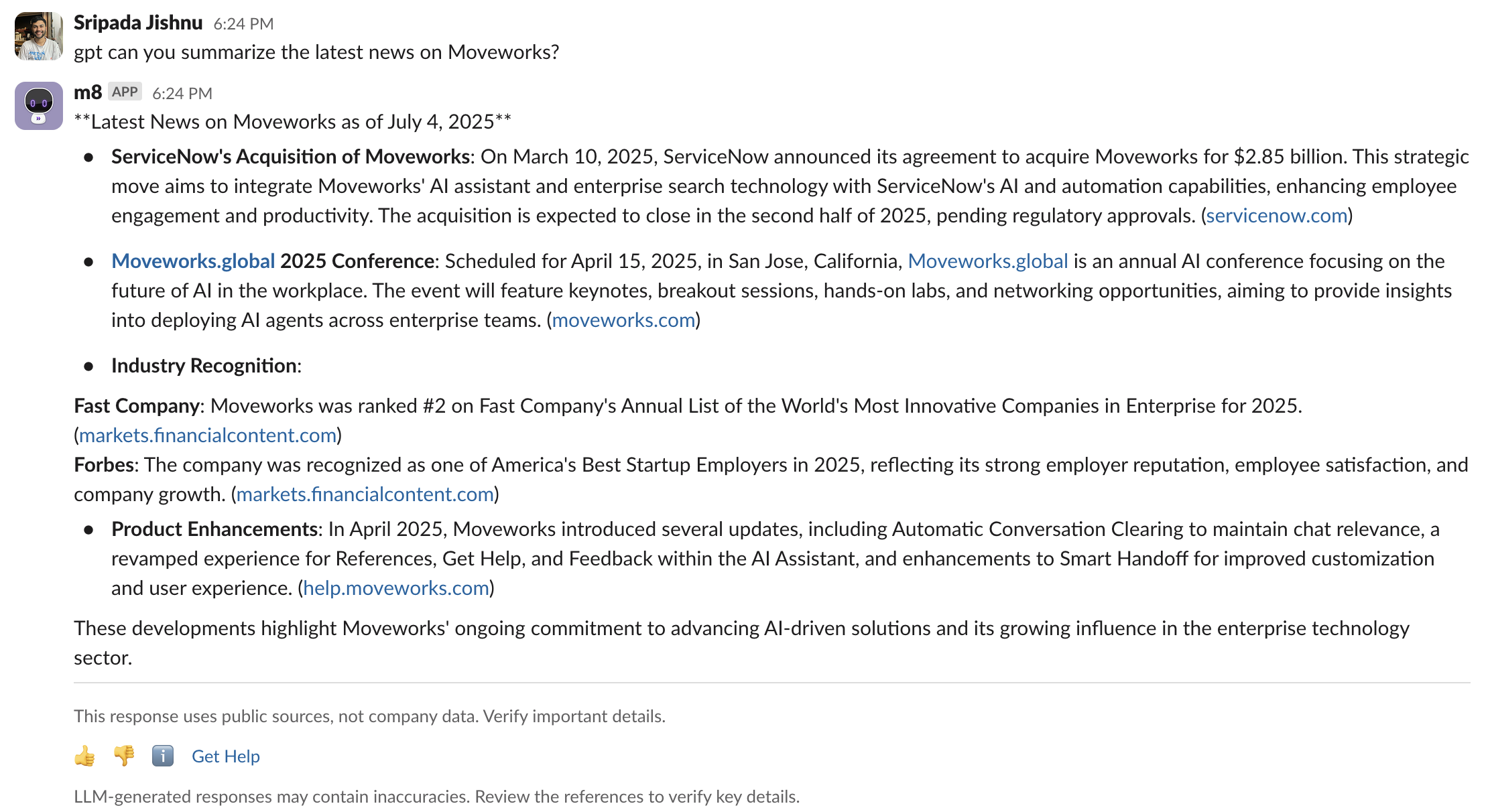
Web search gives you the latest insights you need about current events, market news, or trend shifts while staying in the flow of work. Citations are included, so you can verify important details. Web search is covered by Moveworks’ zero day data retention for a trustworthy search experience.
For more info, read our:
- Web Search Blog
- Web Search Community post
- Moveworks Help documentation on how to use Quick GPT
AI Assistant: New upgrade to GPT 4.1
Moveworks AI Assistant is now using GPT‑4.1 as part of its Reasoning Engine. This model upgrade brings smarter responses, better reasoning, and faster performance — helping your assistant get even better at solving complex tasks across your enterprise.
What are the benefits with GPT 4.1?
- Faster performance: Up to 38% lower average latency compared to GPT‑4.0, resulting in snappier, more responsive interactions across common assistant tasks.
- Better response quality: Improved comprehension and reasoning across long and complex queries
- Stronger reasoning execution: Improved ability to determine which plugin is best suited to answer a given question, leading to smarter selection, better argument filling, and higher task success rates.
For more info, read our GPT 4.1 upgrade post in Moveworks Community.
AI Assistant: Smart handoff for Channel Resolver
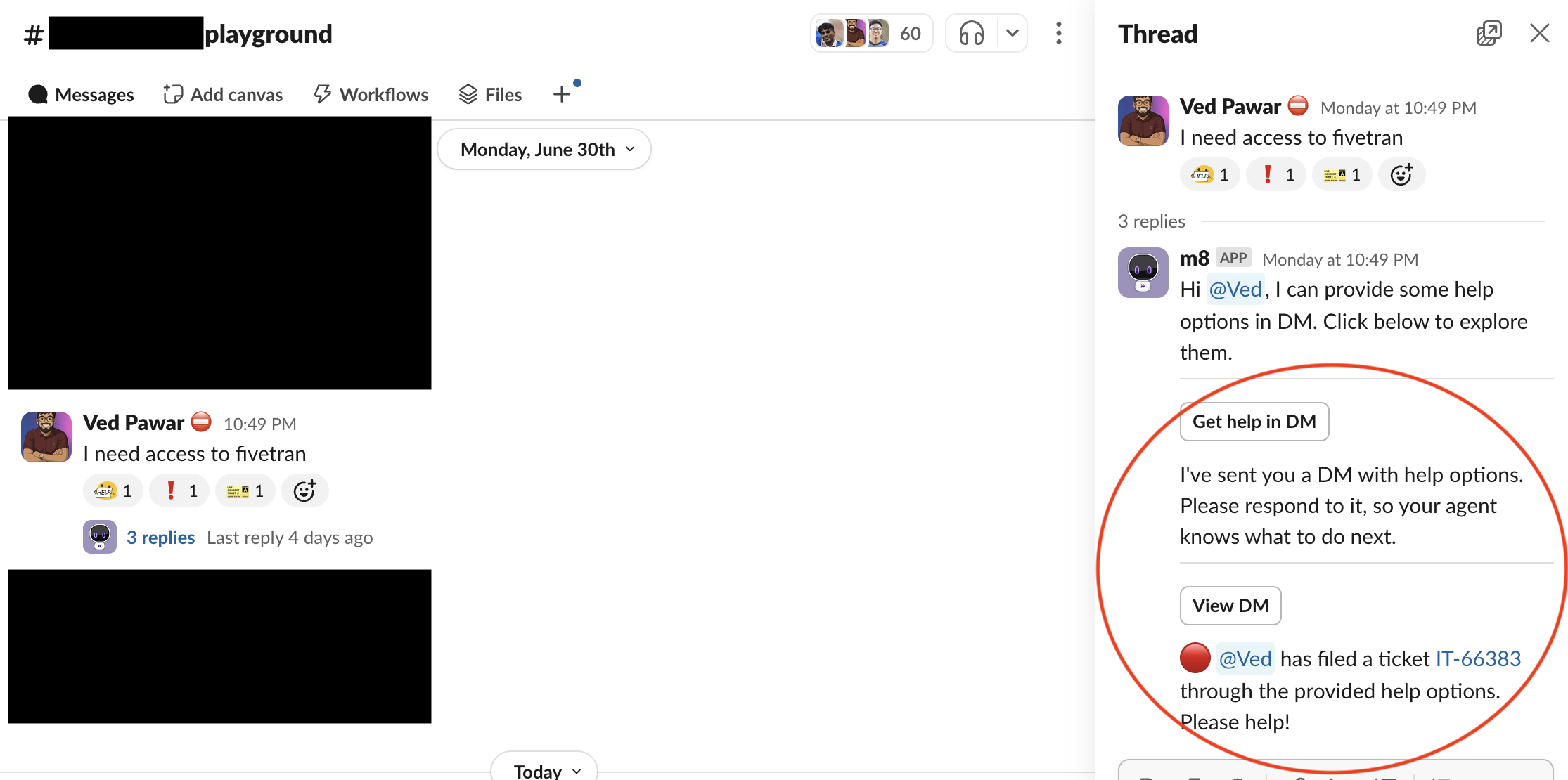
New support for handoff through Channel Resolver is now available. Previously, when the Moveworks AI Assistant couldn't find relevant knowledge or helpful workflows via the Channel Resolver, it would simply add a "no resolution" emoji to the thread, requiring end users to wait for a Slack agent to manually assist.
With this new enhancement, the AI Assistant can now initiate a smart handoff directly in a DM when no relevant information is found in the channel. This allows end users to immediately request additional help by either connecting with a live agent or filing a ticket (provided automatic ticketing is not enabled).
Key Features:
- New configuration available in Moveworks setup at the channel level
- AI Assistant initiates DM handoff only when no relevant information is found and based on user signal for additional help
- Does not respond to messages from disabled domains
- Original thread remains marked with "no resolution" emoji and stays unresolved if user proceeds to file a ticket or contact a live agent
-
For more details, read our Smart handoff for channel resolver post in community
Agent Studio: New plugins available on the AI Agent Marketplace
A total of 50 new installable plugins are now available in the Moveworks AI Agents Marketplace. Below is the summary of new plugins across different systems👇
- DocuSign (2 plugins)
- Salesforce (7 plugins)
- ServiceNow (4 plugins)
- Okta
- SAP Success Factors (17 plugins)
- Look up Pending Time Off Approvals
- Look up Employee Hire Date
- Update Mobile Phone Number
- Look up Payroll Information
- Look up Timesheet Information
- Update Personal Email
- Look up Employee ID
- Look Up Employee Profile Details
- Look Up Direct Reports on PTO
- Look Up Open Jobs
- Add Personal Goals
- Look Up Personal Goals
- Look Up Your Time Off Balances
- Request Time Off
- Look Up Employee Hire Date
- Update Pronoun
- Look Up Job Offer Approval Status
- Workday (17 plugins)
- Look up Assigned Trainings
- Look up Stock Equity Grant
- Look up Personal Goals
- Look up Tax Elections
- Add Personal Goals
- Look up Employee ID
- Look up Start Date
- Look up Personal Employee Information
- Look up Bonuses
- Look up Team's Training Completion
- Look Up Company Holiday Schedule
- Update Employee Address
- Look Up Payslips
- Look Up your Total Compensation
- Look Up Time Off Requests Needing Approval
- Look up Team’s Performance Rating
- Look Up Tasks Assigned to Me
- PagerDuty
- Greenhouse