


Question

how to add password trigger in dialogue

  • May 14, 2024
  • 4 replies
  • 88 views

EJAX
Forum|alt.badge.img+2
  • Known Participant

Hi, new to Moveworks, we’re also using co-pilot fyi…

was curious on how to set up a trigger that gives both a related response and an action button when users mention a specific site or word.

So for example, users usually have expired password issue if they try to sign into a specific site, but was looking for the bot to both:

  1. give instructions/quick dialogue
  2. then have a button trigger or triggers that can set to reset and/or unlock their account.

Before we added in the FAQ and Knowledge Articles, the bot only went to reset request.

At the moment I can set up the trigger to file a ticket but was looking to skip the step of filing a ticket and wanted to immediately give the option to update password along with any specific helpful text dialogue


So for this example, it immediately ONLY asked to update, was looking to include both instructional text and an option to reset the password along side each other.. or how to set up a dialogue, with the next set of responses triggering a password reset or unlock next
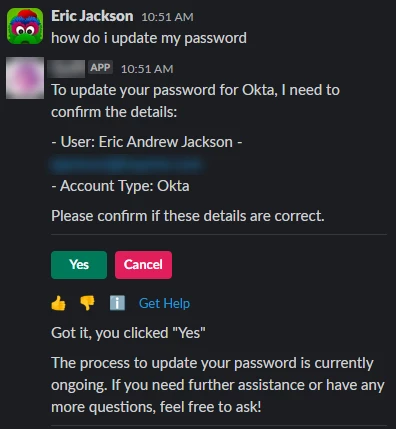


This next photo is how I would like it to sort of LOOK to perform, where it both has text and also an action included…

 but in this example, Password issue and Lockout issue just redirect to file tickets, as opposed to performing those actions directly in the bot


4 replies

jgo
Forum|alt.badge.img
  • Employee
  • May 31, 2024

Hey Eric, this is a great question and feel free to skip to the bottom for your answer. 

Otherwise, there’s a fair bit to unpack so let me try to step back.  Here’s how I approach desired bot behavior.

  1. For any use case or workflow, what is the desired resource or outcome for the user?  As you’ve identified, you’re looking for:
    1. An option for users to reset their password.  This we see in the first screenshot.
    2. Information on what the user needs to do (aside from following 1.1 and click through the bot).
  2. What can the bot do to address the overall problem (for anyone, not just your bot)?  The common options are:
    1. Native password reset for systems like Okta or OneLogin
    2. Serve answers through knowledge articles or FAQs
    3. Serve Forms to kick off specific tickets or workflows

Since we have an existing behavior (your screenshots), we can look at what the bot is doing now.  In the first screenshot, the bot is serving a native reset.  In the second screenshot, two of your ingested forms are serving.  All resources/options seem relevant to an utterance like “how do i update my password” and the difference of input is likely pretty minute.

If we want to remove forms from serving, then we should stop ingesting and indexing them.  Or if there is value in keeping them but for more nuanced or specific use cases, let’s detail that.

As for the actual experience you’re looking for, we need information on what specifically you want detailed by the bot (1.2).  Is it a small blurb or is it an existing resource?  Based on this, we can try to determine how exactly to tie this together with a native reset. 

At a glance, this is more challenging to do with Copilot’s generative AI but we should get a better understanding of what ideal is before going too far down one route.


EJAX
Forum|alt.badge.img+2
  • Author
  • Known Participant
  • June 2, 2024

I was looking to get the bot to respond in two parts.
First, with a small custom blurb, similar to an FAQ response limit.
Then followed up with the native reset request.

For the example listed in the beginning, a 'how' type question seems to respond with jumping to conclusions with starting an action. I was looking to have a middle ground, where the bot could explain their actual requests, then follow up to ask if that's something they would like to take action on


EJAX
Forum|alt.badge.img+2
  • Author
  • Known Participant
  • July 2, 2024

Still having an issue with this request-


Also want to set something up for resetting MFA’s but I don't see how to set that up in Creator Studio.


We have multiple different MFA’s (Okta/Slack/Google) but when asked to reset MFA in Moveworks our responds poorly in Channel-resolver so we had to disable that and it doesn't look to allow specific requests to work in Creator Studio how I hoped.

Since we have multiple MFA’s I want to create a path in Creator Studio.. added the button triggers, but cant figure out how to get it to trigger the MFA reset for OKTA?
I have 5 options, none work

  1. Ask a question- 
  2. Present an answer/text response
  3. Present a form
  4. Execute an API
  5. Smart Handoff


I thought a smart handoff would work but it only triggers creating a ticket issue and doesn't give the option to actually reset the MFA, which we have enabled.


jgo
Forum|alt.badge.img
  • Employee
  • July 23, 2024

Triggering Creator Studio use cases in a Slack channel is something that’s on our roadmap, although I don’t have a definitive date for it: 


With regard to DM, it sounds like you’re trying to add a fourth option:

  1. Native password reset for systems like Okta or OneLogin
  2. Serve answers through knowledge articles or FAQs
  3. Serve Forms to kick off specific tickets or workflows
  4. Trigger a Creator Studio Path

If your bot is offering options outside of your Creator Studio option, then the other results are likely bidding above your use case as “more relevant.”  You may need to disable some of the other options as they do sound relevant to users and their requests but not necessarily what you want the bot to be showing.