
How are you organizing your knowledge writing practice?

  • July 26, 2023
  • 11 replies
  • 172 views

Philip Kibbey
Forum|alt.badge.img+2

This follow up question by @Jared  to @ArmentanKM in the Driving Adoption of Little Joe discussion made me curious how each of you are organizing your knowledge writing practices to make your bot’s smarter. 

Do you have dedicate knowledge writers? Or do agents use carve out hours or days to write knowledge? Are there certain dashboards or metrics you use to identify articles and topics to be written or improved?

What has been this community’s most effective strategies?

11 replies

Jared
Forum|alt.badge.img+5
  • Inspiring
  • July 27, 2023

Great follow-up question, Philip. Thanks for the shout-out! I’ll mention how we’re doing it, but we’re also quite new to the Moveworks landscape and still trying to find the right formulas for good article formatting and ingestion. 

We have “working groups” within our Support org, one of which is focused on documentation and education. We also have a team under our “internal products” team dedicated to the broader topic of “Content” which manages the tools we use for content, but also have expertise on what we put into those tools. 

These groups work together to review metrics, understand which articles are rated less effective and focus on those as easy wins. It’s harder to identify “missing” articles, so I’d love to see more answers to your question about best ways to identify those. 

In the distant past we’ve had something similar to a “hackathon” event where we’ve put all-hands-on-deck to review, revise. write and re-write articles as needed. We’ve considered doing something similar in the near future if we can’t get traction on the content that needs attention. 

All that said, we’re struggling in the area of “making our bot smarter.” We’re either missing the memo on optimizing content, or the changes we’re making just aren’t working. What are the “ah-hah!” moments you’ve all had that made your content more friendly for both employees and your bots? 


Andrew
Forum|alt.badge.img+8
  • Inspiring
  • July 27, 2023

For our team, the creation and re-validation of knowledge articles is the responsibility of our Service Desk and Desk Side support technicians to complete. As part of our yearly goals cycle, they are assigned a goal for the # of articles that they need to submit and have published. Depending of the availability of technicians due to projects we at times we may only get the # required in goals. 

Once an article has been updated/reviewed/created, our Knowledge Manager formats, reviews, and publishes the article. After we purchased Moveworks, we made the investment in a Knowledge Manager because we recognized the importance of the knowledge articles that we were producing for Harold to be successful. For us, it has paid off because it has not only allowed us to have a professional editor who can clean up grammar and ensure uniform formatting standards, but we purposely sought out someone without a heavy technical background to vet that articles are simple, easy to follow, and are not full of technical jargon. 

Andrew


Philip Kibbey
Forum|alt.badge.img+2
  • Author
  • Community Manager
  • July 27, 2023

Great insight @Andrew -- how were you able to justify the additional spend of the knowledge manager?


Andrew
Forum|alt.badge.img+8
  • Inspiring
  • July 28, 2023

@Philip Kibbey prior to having a knowledge manager, the review and approval/publishing was handled by a small group of managers in IT support. We started by taking the avg hours spent on knowledge reviewing and approving along with the avg hourly rate of the group to show how much time and money was spent by this group on knowledge reviewing and approving. We also baselined the time from when an article was submitted to when an article was approved/published, as well as the number of times an article was sent back to the author for formating or grammatical clean up to see how much time and money was spent there.

The end result was a bunch of high numbers that showed we were spending a lot of money and time to very slowly get articles edited, formatted, reviewed, and published. Since Moveworks was live for us, we used the data from the Answers dashboard to articulate that based on the number of questions that no article was being served, it was going to take XXX hours and XXXX in hourly wages just to review/edit/publish articles that would answer those questions based on the process at the time (we didn't even get into the actual creation of the articles). 

-Andrew


Andrew
Forum|alt.badge.img+8
  • Inspiring
  • July 28, 2023

@Philip Kibbey  in our old process, knowledge articles were reviewed/approved/published by a small group of IT Support managers. We took the avg hours being spent a month by that group and combined that with an avg hourly wage to give us the avg cost of what were spending on knowledge management. Additionally, we calculated how long technicians on the support teams spent adjusting formatting and making grammatical errors with their avg hourly wage. 

We then looked at the Moveworks Answers Dashboard for the avg number of questions a month with no answers and calculated out based on the info above, how long it would take us to review/approve every new article we wanted created. 

All of the data above allowed us to articulate that we would be unable to scale the knowledge in a timely manner without an increase to the time available to review/approve/publish articles. Not to mention we looked at the time technicians were unavailable to work tickets because they were editing/formatting knowledge. 


Philip Kibbey
Forum|alt.badge.img+2
  • Author
  • Community Manager
  • July 29, 2023


These groups work together to review metrics, understand which articles are rated less effective and focus on those as easy wins. It’s harder to identify “missing” articles, so I’d love to see more answers to your question about best ways to identify those. 


All that said, we’re struggling in the area of “making our bot smarter.” We’re either missing the memo on optimizing content, or the changes we’re making just aren’t working. What are the “ah-hah!” moments you’ve all had that made your content more friendly for both employees and your bots? 


Hey @Jared - really good questions. I’ll answer them in the order they came up in your post: 

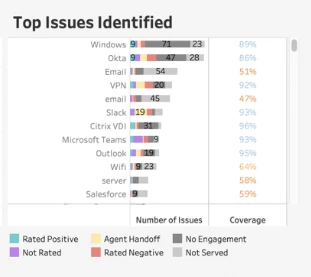
For identifying “missing” articles or knowledge gaps, I’d recommend using the “Answers Insights” dashboard in the analytics suite to look at topics where the bot didn’t find an article that passed its relevance threshold to respond to users’ queries. The Top Issues Identified chart is where you can look. 

I usually advise customers to either to a simple search of issues with low coverage. The percentage represents the percentage of time the bot found an article within that topic to answer a user’s query. That should give you a list of topics where you may be messing knowledge that is relevant to the questions users are asking. 

You can even go a step further by: 

  1. Clicking a topic you want to explore in more depth
  2. Filtering the dashboard to “Not Served”
  3. Looking at the User Interactions table in the dashboard to see the exact questions users are asking within that topic where they are not getting a response. 

If that user filed a ticket, I’d recommend using the agents resolution notes as the starting point to create the article that would solve that query. 


For “Ah ha” moments, to making articles better, a few stand out to me

  1. Brevity is key. I’ve reviewed a lot of KBs that had long preambles before finally getting to the solution. Even when the bot snippetized the right areas the snippets were filled with irrelevant information that surrounded the answer. When users clicked into the articles they didn’t want to read this long article to get  to answers, either. 
  2. Combine brevity with simplicity. The best performing articles usually have a sentence or two and then a list of 4-5 steps to solve a problem and that’s it. 
  3. Articles should solve standalone problems. Often we see really long articles that combine all the ways to troubleshoot an application or a master “How to” guide to answer questions about an app. Users typically find these hard to manage and because of the generic title and lack of consistent formatting (more on that below), the bot may struggle to consider these articles as highly relevant to solve specific problems. 
  4. Sometimes formatting is the issue, not content. I worked with a customer who just simply updated formatting to make it easier for the bot to properly index the articles when ingested and it boosted their article performance by 20% to 30%. This article from our documentation site nicely details how to update formatting on articles to boost article performance in the bot. 

Hopefully these help! I’m also curious what other “ah ha” moments folks have had when writing knowledge articles for the bot. 


Philip Kibbey
Forum|alt.badge.img+2
  • Author
  • Community Manager
  • July 29, 2023

@Philip Kibbey  in our old process, knowledge articles were reviewed/approved/published by a small group of IT Support managers. We took the avg hours being spent a month by that group and combined that with an avg hourly wage to give us the avg cost of what were spending on knowledge management. Additionally, we calculated how long technicians on the support teams spent adjusting formatting and making grammatical errors with their avg hourly wage. 

We then looked at the Moveworks Answers Dashboard for the avg number of questions a month with no answers and calculated out based on the info above, how long it would take us to review/approve every new article we wanted created. 

All of the data above allowed us to articulate that we would be unable to scale the knowledge in a timely manner without an increase to the time available to review/approve/publish articles. Not to mention we looked at the time technicians were unavailable to work tickets because they were editing/formatting knowledge. 


This is really interesting! I love your analytical approach to articulating the cost of writing and editing articles, compared with that of a dedicated knowledge manager. Appreciate you sharing @Andrew !


Forum|alt.badge.img+5
  • Known Participant
  • August 4, 2023

We have implemented Knowledge Author roles across our organizations, meaning anybody can elect to create documentation but knowledge managers are the final approval for anything that is shared outside of a single group.

My knowledge team has monthly meetings to host some trainings, re-trainings, and Q&A with knowledge authors. We have provided templates for both Bot Ready articles as well as internal articles (HR, IT, Supply chain). 

My knowledge manager team as well as Service Desk lead review EXI dashboards weekly to see what was missed by the bot and how we can improve the documentation. Our team works with SME groups or updates documents, depending on how in depth the issues are. 


Forum|alt.badge.img+5
  • Participating Frequently
  • August 15, 2023

We have several domains participating in Little Joe (our chatbot) - IT, HR, US Payroll & Finance so far. I have a chatbot analyst who performs analysis monthly on the following:

  1. Negative rated articles - Drill into the data to understand why the negative rating and if there are opportunities to improve content, or even if the right content was missing. This may involve reviewing ticket details or reaching out to end users for more information. We do find that when our process dictates them to contact the service desk or submit a ticket, the negative rating may be associated with the fact that the bot could not handle their request/issue (like unlocking their account, they must call the service desk).
  2. Articles not served - Download the utterances and share this across all domains so that they can see what questions are not being answered and add content.
  3. Ticket created or Agent handoff - We also look if the chatbot interaction results in handoff to chat with a live agent or a ticket was submitted to ensure the handoff was appropriate or if knowledge could have prevented it.
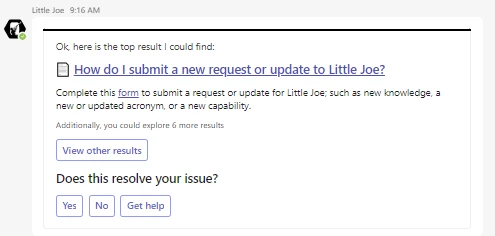
  4. We also added a FAQ in Little Joe that links to a SharePoint form where people can submit their idea to improve Little Joe or add knowledge.


Our domain leaders are expected to participate as follows:

  1. Monthly metrics meetings - We are starting to see our other domains pay more attention to this data as they are involved in our monthly metrics meeting with our CSM and they hear what we are doing. Our domain leaders outside of IT have needed more coaching on what to do with the data around their content.
  2. All FAQ content requires review every 6 months by the content owners. The domain leader is required to work with the content owners in their areas to ensure that happens. This effort has helped us to identify content where links broke or content is outdated. 
  3. Toolkits - We have created a toolkit for our domain leaders that includes both Moveworks and our (service owner) guidance. As domains join the chatbot, we do a thorough review of metrics and how to identify missing or poor articles, but we found they were not as proactive as we would like. They asked for help, so we pulled it together for them...so far, we are seeing increased involvement.


Forum|alt.badge.img+2
  • New Participant
  • September 20, 2023

my org uses a lot of SharePoint “Pages” ingestion.  is there any good articles or KBs out there with “Page” creation instruction?  I have new content creators being assigned from other depts all the time.  i don't have anything clean and concise to give them directions.


Brian Drivas
Forum|alt.badge.img+1
  • Employee
  • September 22, 2023

Hi @mimiller. For SharePoint knowledge ingestion, I’d like to call out the difference between “Pages” and “Site Pages.” For our integration with SharePoint, knowledge in the form of modern Site Pages and Classic Wiki Pages are supported. However, non-Wiki Classic Pages such as web part pages, blog pages and publishing pages are not supported using a modern user interface.

This page on the Moveworks Documentation site provides an overview of the distinction among these different source types. Additionally, this article on the Microsoft SharePoint documentation site provides instructions on how to transform these classic pages into the new modern page experience and outlines their own recommendation to make these updates.

Please reach back out if you have any follow up questions. Thanks!