Is it possible to customize ticket resolved ticket notification to include a link to a survey? Or what is the recommended way to build this out using Agent Studio to serve up the survey?
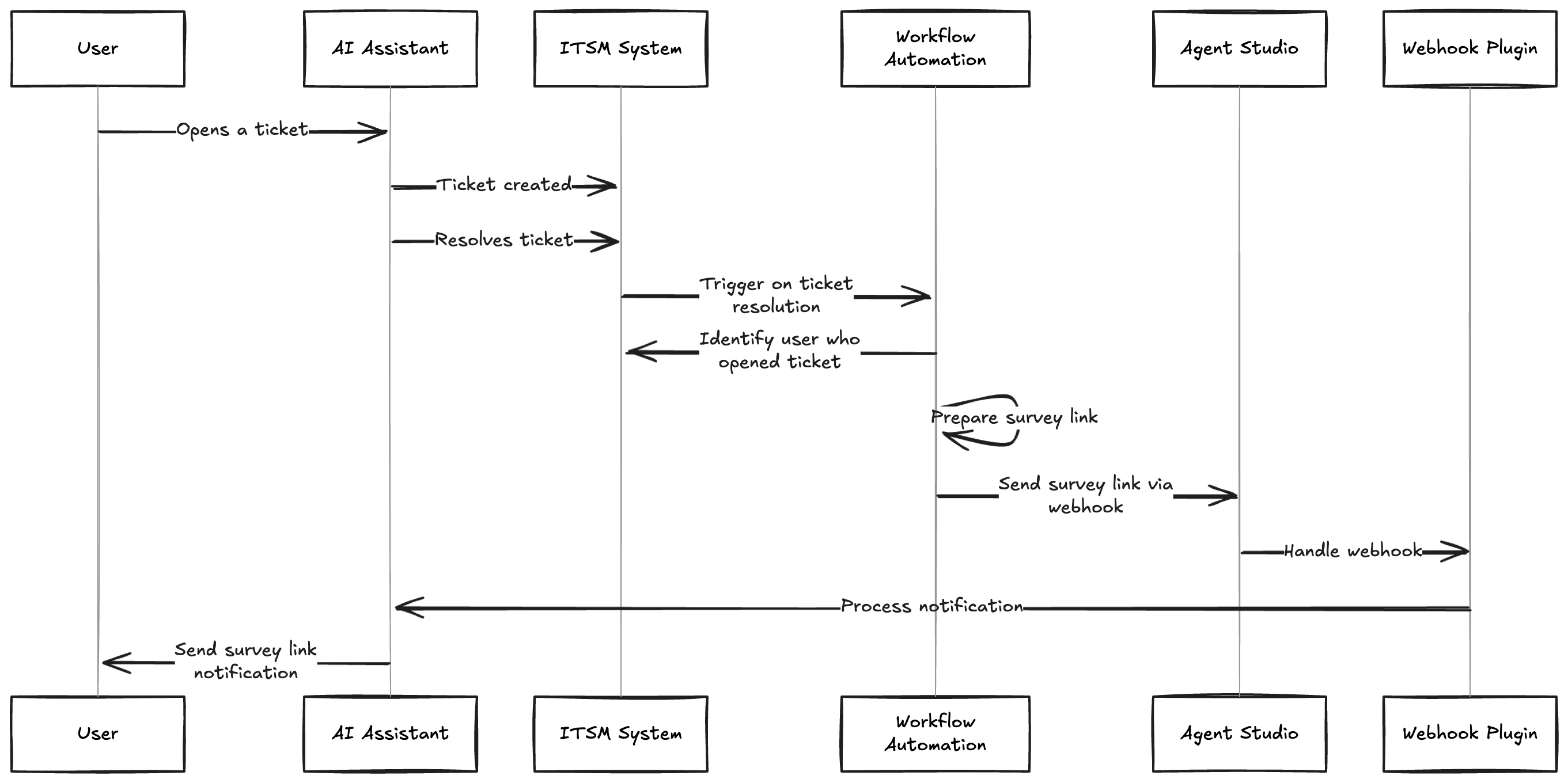
This isn’t possible with the regular core skill, but it is doable with Agent Studio. Given that the ITSM has a workflow or can trigger webhooks on ticket resolution the following can be done:
Flow:
The User opens a ticket via the AI Assistant.
The AI Assistant creates the ticket in the ITSM system.
The AI Assistant resolves the ticket - once it is solved by agent/etc
The ITSM system triggers the Workflow Automation upon ticket resolution.
The Workflow identifies the user who opened the ticket.
The Workflow prepares a survey link.
The Workflow sends the survey link to Agent Studio via a webhook.
Agent Studio's Webhook Plugin handles the incoming webhook.
The Plugin processes the notification and passes it to the User.
This isn’t possible with the regular core skill, but it is doable with Agent Studio. Given that the ITSM has a workflow or can trigger webhooks on ticket resolution the following can be done:
Flow:
The User opens a ticket via the AI Assistant.
The AI Assistant creates the ticket in the ITSM system.
The AI Assistant resolves the ticket - once it is solved by agent/etc
The ITSM system triggers the Workflow Automation upon ticket resolution.
The Workflow identifies the user who opened the ticket.
The Workflow prepares a survey link.
The Workflow sends the survey link to Agent Studio via a webhook.
Agent Studio's Webhook Plugin handles the incoming webhook.
The Plugin processes the notification and passes it to the User.
If you're a Moveworks customer, you can click the SSO button below to login-even if it's your first time. Everyone else can use email or click create an account above to register.
If you're a Moveworks customer, you can click the SSO button below to login-even if it's your first time. Everyone else can use email or click create an account above to register.