


Question

How do customize the output using output mapper

  • September 25, 2025
  • 5 replies
  • 61 views

Guruprasad.Marathe
Forum|alt.badge.img+2

Hello,

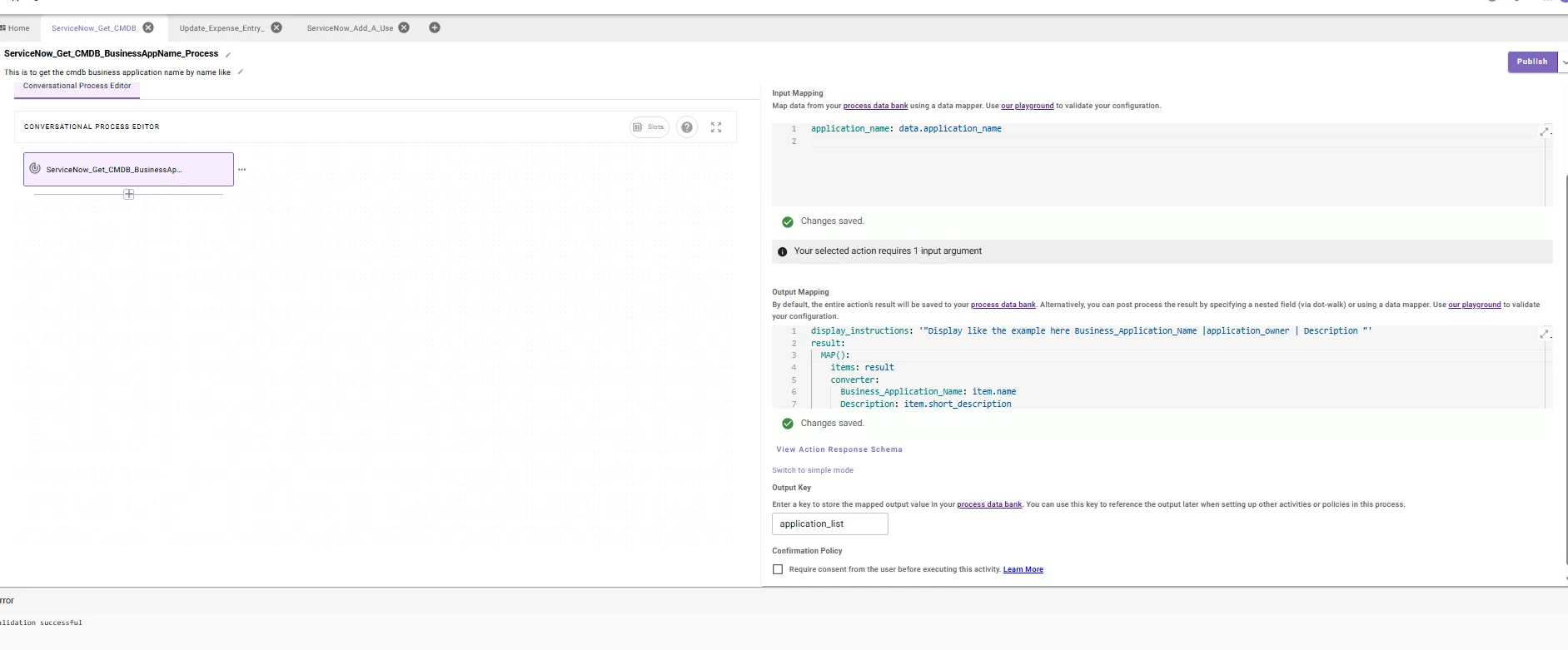
I have a cmdb lookup skill which returns the business application list, I am been trying to instruct the LLM to display only name, description and application owner. tried below map code also tested on data mapper playground, but getting response saying no records. without below code, it does display all the results. when there is single result, i would like to show something like below, but no much information on logs and no failures also bot is saying just ,,”No ownership information was found in the business application database or internal knowledge sources.”

please help me to identify the issue. also give me a good documentation back end supported syntaxes like system_prompt, display_instructions, I want to study deep here.


{

  "result": [

    {

      "short_description": "Sample description of the application or service.",

      "u_tower": {

        "display_value": "Tower Name",

        "link": "https://example.com/api/u_tower/placeholder"

      },

      "assignment_group": {

        "display_value": "Support Group Name",

        "link": "https://example.com/api/sys_user_group/placeholder"

      },

      "application_manager": {

        "display_value": "Application Manager Name",

        "link": "https://example.com/api/sys_user/placeholder"

      },

      "it_application_owner": {

        "display_value": "IT Application Owner Name",

        "link": "https://example.com/api/sys_user/placeholder"

      },

      "name": "Application Name",

      "u_stack": {

        "display_value": "Stack Name",

        "link": "https://example.com/api/u_stack/placeholder"

      },

      "assigned_to": {

        "display_value": "Assigned User Name",

        "link": "https://example.com/api/sys_user/placeholder"

      }

    }

  ]

}


5 replies

Kevin Mok
Forum|alt.badge.img+1
  • Community Manager
  • September 25, 2025

Hey ​@Guruprasad.Marathe - The problem is this line

items: result

it should be:

items: response.result


To be able to access the response of the action you need to use the response keyword. We are actively working on the documentation to make it easier for you to follow. 


Guruprasad.Marathe
Forum|alt.badge.img+2

thanks for the fix, can you help me with two things?

  • I want to learn what are the possible things i can do, I got to know about system_prompt and display_instruction only by seeing videos, if i want to do advance topics, can you point me to documentation or back end technology learning links?
  • mw.* all built-in actions how to use them properly? like the approval, generate text, …..I already seen the documentation on developer docs but it seems needs an updation. if you could point me to some videos or workspace gallery usecaes video where its actually implemented would be nice, even if some demo videos if you have share it with me privately.


for others: this is how i fixed my code..


Kevin Mok
Forum|alt.badge.img+1
  • Community Manager
  • September 26, 2025

@Guruprasad.Marathe What did you find lacking of the built-in action documentation and what needs to be updated? We have been steadily improving our docs and I would like to hear your feedback. Recently, we created a new https://help.moveworks.com/docs/llm-actions document that provides a more in-depth look at the LLM built-in actions.


Additionally, what types of advanced topics are you interested in? Some advanced topics in mind would be:

I understand that these are reference guides, and we are working to develop more comprehensive guides that include in-depth implementations and examples.


Guruprasad.Marathe
Forum|alt.badge.img+2

Hello Kevin,

Thank you for the LLM action page, this is exactly I wanted..  it would be great if you cover how to use moveworks built-in functions with one example in your next training video. like multi level native approvals, https://help.moveworks.com/docs/built-in-actions which are listed here.

also how to retrieve the results from the built in functions so i can use it in next actions. I remember you were able to pass this info from system_prompt to decision action by accessing some variable.. Need for info on those outputs variables. 

I tried to search “Display_instruction” in the help docs, nothing was hitting in search. I am curios what else such functions listed and how it can be used.. so i started searching in google to find more such function found two below, from which technology these functions are deriving? I want to learn few basics first to think on writing these prompt first and then advance prompting, if movework using any tech backend, pls share some docs link so i can learn more and advance my skills.

  • developer_prompt 

  • user_prompt 


Kevin Mok
Forum|alt.badge.img+1
  • Community Manager
  • September 29, 2025

You can use `system_prompt` or `display_instructions`; there isn’t a best practice in place at this time, and they all work the same way. These aren’t functions; they are hints for the LLM to display information in different ways. I would not rely on these for significant changes, but rather for more minor UI/UX tweaks that you may have.

If you want to learn more about prompting, I recommend https://cookbook.openai.com/examples/gpt4-1_prompting_guide