

Participating Frequently
June 15, 2026
Solved

Having issues with mailto link in Notification

  • June 15, 2026
  • 5 replies
  • 72 views

I am trying to send a notify message with a mailto link as part of the template but the link isn’t rendering properly. Trying to understand why. Other links in the message are rendering properly. 

I thought it may be the ** in the hyperlink text but its the same result without it. I saw another post mention mailto so I thought this should work but their approach was with the message coming from a variable in HTML and being manipulated back to the normal text whereas I want the template to include it each time as normal. Agent Architect also says that the normal markup hyperlink format should work.  
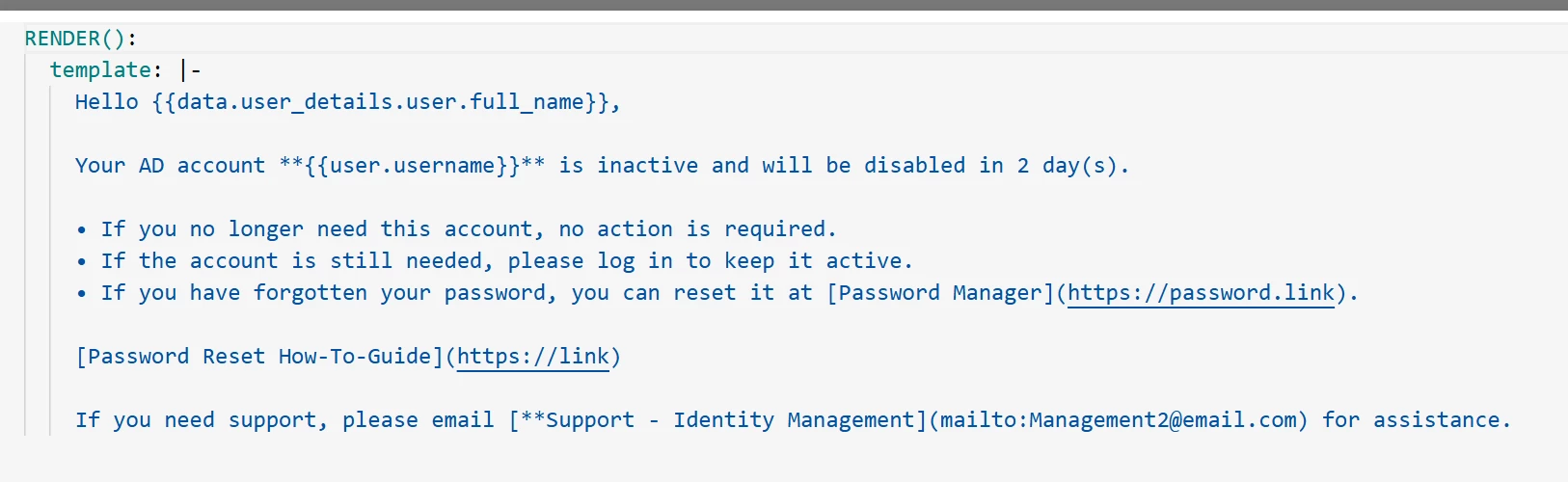
 

This is the output. 


Best answer by Kevin Mok

@Joel.Matias I am not a big fan of using HTML in render, but could you try something like 

If you need support please emal <a href="mailto:someone@example.com">Support Identity Management</a>

5 replies

Kevin Mok
Community Manager
June 15, 2026

Hey ​@Joel.Matias -

Template doesn’t have access to data so you will need to create an arg in RENDER such as

RENDER():
args:
user_fullname: data.user_details.user.full_name
template: |-
Hey, {{user_fullname}}
...


For the mailto link can you remove the ** at the beginning that may be messing it up

Participating Frequently
June 15, 2026

Hey ​@Joel.Matias -

Template doesn’t have access to data so you will need to create an arg in RENDER such as

RENDER():
args:
user_fullname: data.user_details.user.full_name
template: |-
Hey, {{user_fullname}}
...


For the mailto link can you remove the ** at the beginning that may be messing it up

Thanks Kevin.

My specific issue is getting the mailto link to work. I’ve tried many variations of the mailto link with and without the ** and nothing is working to render that link. I dont have any issues getting the rest of the message showing as needed. 

Kevin Mok
Kevin MokAnswer
Community Manager
June 15, 2026

@Joel.Matias I am not a big fan of using HTML in render, but could you try something like 

If you need support please emal <a href="mailto:someone@example.com">Support Identity Management</a>

Participating Frequently
June 15, 2026

@Joel.Matias I am not a big fan of using HTML in render, but could you try something like 

If you need support please emal <a href="mailto:someone@example.com">Support Identity Management</a>

That worked. Not sure why the normal markdown linking doesn’t pick it up. Thank you. 

New Participant
June 17, 2026

I am trying to send a notify message with a mailto link as part of the template but the link isn’t rendering properly. Trying to understand why. Other links in the message are rendering properly. 

I thought it may be the ** in the hyperlink text but its the same result without it. I saw another post mention mailto so I thought this should work but their approach was with the message coming from a variable in HTML and being manipulated back to the normal text Hypic Old Version whereas I want the template to include it each time as normal. Agent Architect also says that the normal markup hyperlink format should work.  
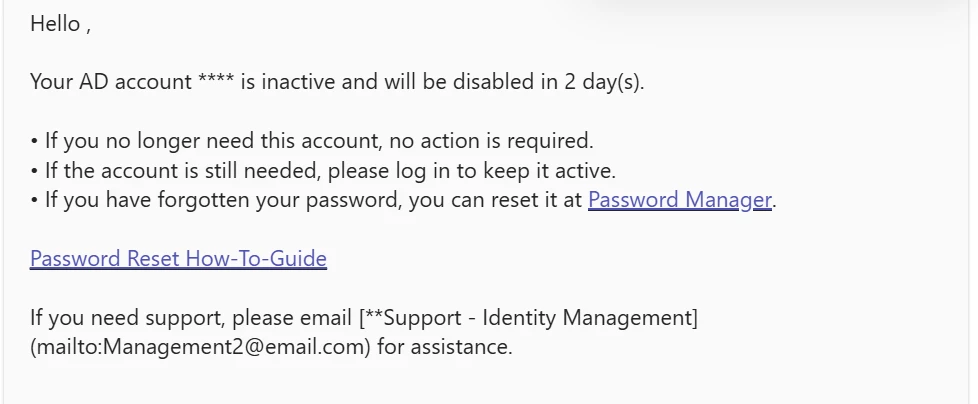
 

This is the output. 


If you're experiencing issues with a mailto link in notifications, the problem can stem from several factors, including incorrect link formatting, email client configuration, or limitations within the notification platform itself. A properly formatted mailto link should open the user's default email application and automatically populate the recipient's address, subject line, or message body if specified.