


Extend Contractor Expiration
I am building an extend expiration date for contractor skill in agent studio, agent architect really helped me a lot. this skill I already developed on creator studio (legacy). now building in agent studio
Looks like Data type with resolver strategy is not kicking of.. backend logs i dont even see the API being called
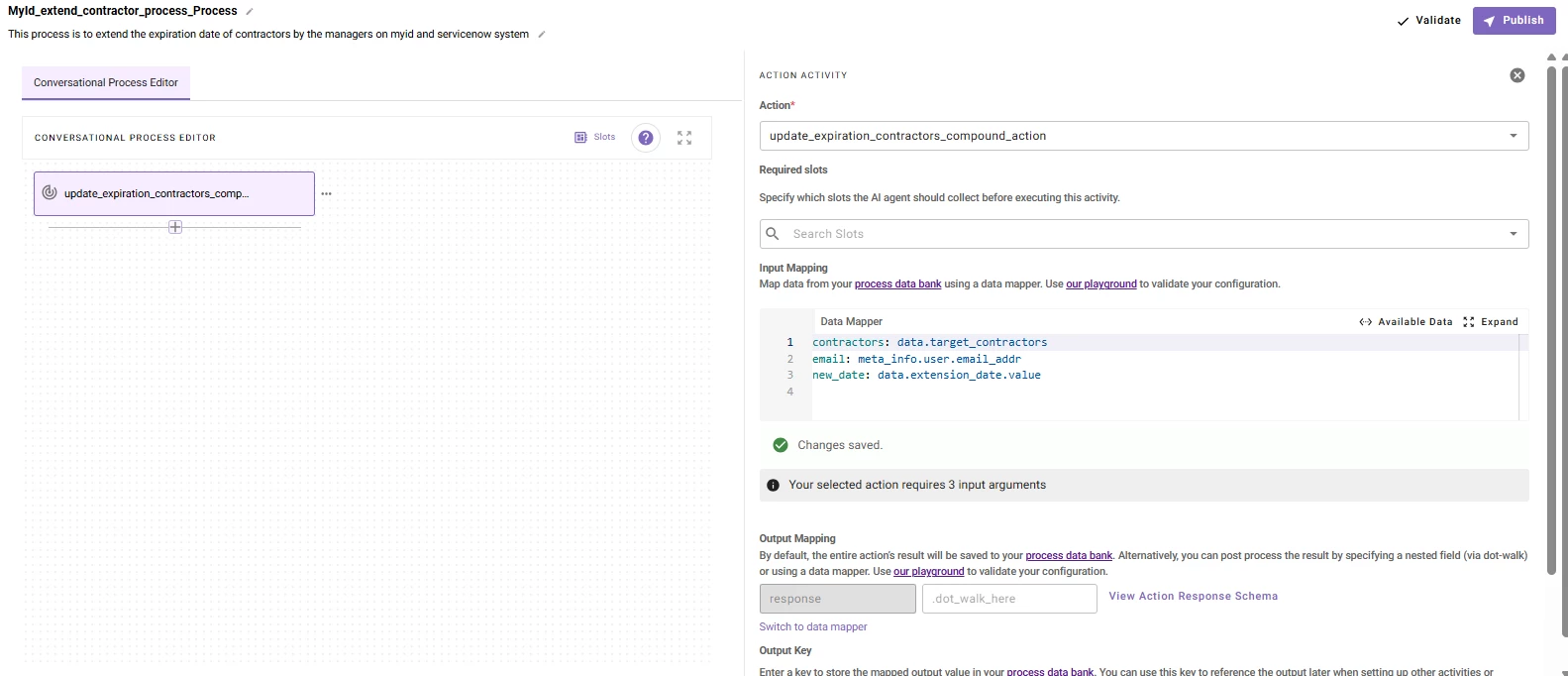
because of this i am getting error in data.contractors not having the data to perform for each.. (check snapshot)
how do i troubleshoot?
I do have a 2 http one to get contractors for the user so among that only user can extend it.
API: get_manager_reportees_action
input: email
{
"result": [
{
"u_termination_date": "2026-03-17",
"u_commonname": "Joe Doe",
"email": "Joe.Doe@abc.com"
}
]
}
another to update the dates PowerAutomate_update_user_expiration_action
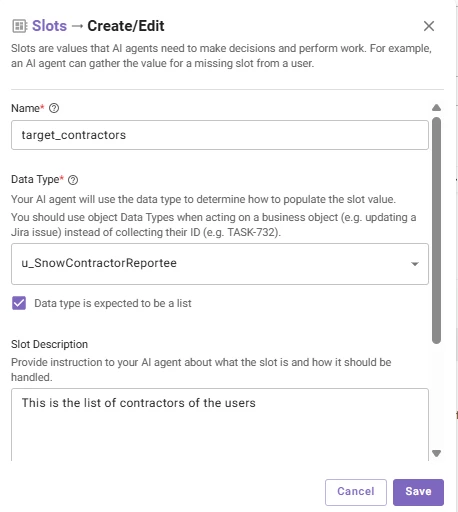
Created a data type with resolver strategy
input: email: meta_info.user.email_addr
schema:
{
"$schema": "http://json-schema.org/draft-07/schema#",
"type": "object",
"properties": {
"current_expiration": {
"type": "string"
},
"email": {
"type": "string"
},
"full_name": {
"type": "string"
}
},
"$id": "https://moveworks.ai/u/SnowContractorReportee.schema.json",
"required": [
"full_name",
"email"
]
}
Method: lookup_my_contractors
Type: Dynamic
Input: get_manager_reportees_action
Resolver strategy
.result.$MAP(user => { "full_name": user.u_commonname, "email": user.email, "current_expiration": user.u_termination_date })
Created a Compound Action
steps:
# 1. LOOP THROUGH SELECTED CONTRACTORS
- for:
each: person
in: data.contractors
index: idx
output_key: update_results
steps:
- try_catch:
# TRY: Attempt to update the user via API
try:
steps:
- action:
action_name: PowerAutomate_update_user_expiration_action
input_args:
email: data.email
contractor_user_email: person.email
date: data.new_date
output_key: api_result
# On Success: Return success object
- return:
output_mapper:
status_report:
status: "success"
name: person.full_name
email: person.email
# CATCH: If API fails, return failure object so loop continues
catch:
steps:
- return:
output_mapper:
status_report:
status: "failure"
name: person.full_name
email: person.email
# 2. GENERATE FINAL REPORT CARD
- return:
output_mapper:
final_report:
RENDER():
template: |
<h3>Processing Complete</h3>
{{#has_successes}}
<p>✅ <b>Successfully Extended to {{date}}:</b></p>
<ul>
{{#success_list}}
<li>{{name}}
{{/success_list}}
</ul>
{{/has_successes}}
{{#has_failures}}
<p>❌ <b>Failed to Update (Please Retry):</b></p>
<ul>
{{#failure_list}}
<li>{{name}} ({{email}})
{{/failure_list}}
</ul>
{{/has_failures}}
args:
date: data.new_date
# Filter results into two lists using DSL
success_list: data.update_results.$MAP(x => x.status_report).$FILTER(item => item.status == "success")
failure_list: data.update_results.$MAP(x => x.status_report).$FILTER(item => item.status == "failure")
# Booleans for UI logic
has_successes: data.update_results.$ANY(item => item.status_report.status == "success")
has_failures: data.update_results.$ANY(item => item.status_report.status == "failure")
Created conversational process
error:

