


New troubleshooting tool in Moveworks Setup : Built-in plugin logs
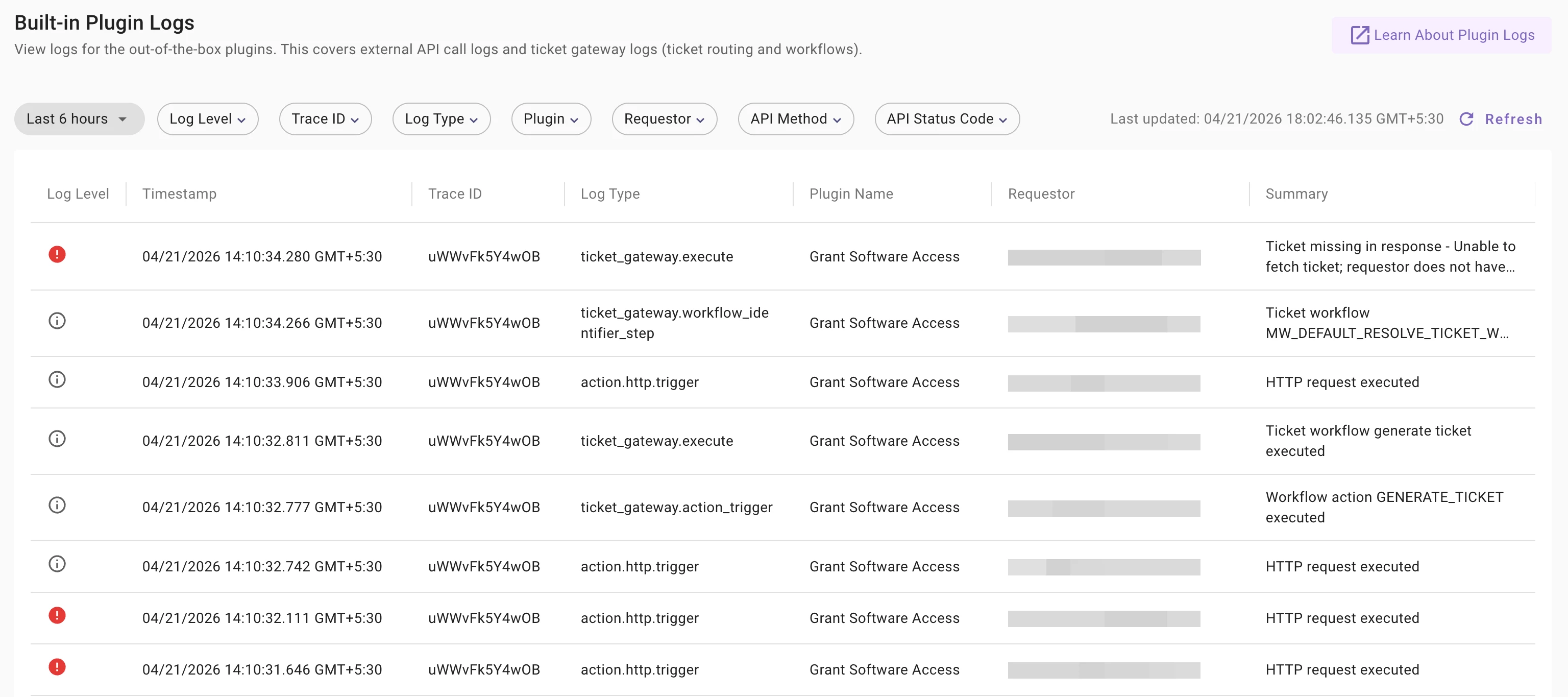
We've shipped a new log view in Moveworks Setup — Built-in Plugin Logs. You'll find it under Organizational Details → Audit → Built-in Plugin Logs.
What is this?
Built-in Plugin Logs give you visibility into the external API calls that Moveworks built-in plugins make to your integrated systems, along with workflow execution logs. This covers calls like creating tickets, provisioning software, unlocking accounts, adding comments, and more — plus the workflow steps that lead to those calls.
The view captures two types of logs:
- External API call logs (
action.http.trigger) — the actual HTTP requests and responses between Moveworks and your external systems. - Workflow execution logs (
ticket_gateway.*) — ticketing workflow steps such as which workflow was identified, which actions were triggered, and the final execution result.
What you can do with it
Each log entry includes a log level (Error or Info), timestamp, trace ID, log type, plugin name, requestor email, and a summary. Click any row to open the full detail panel with request and response data.
The trace ID is key — all log entries from a single plugin execution share the same trace ID, so you can trace from the workflow identification step through to the API call and its outcome.
Filters are available for time range, log level, trace ID, log type, plugin, requestor, API method, and API status code.
What about API Audit Logs?
If you've been using the standalone API Audit Logs page, those same external API call logs are now captured here under the log type action.http.trigger. Same data — request/response payloads, HTTP status codes, method types — just within this unified view.
We will be sunsetting the standalone API Audit Logs page on May 1st. No action needed — just start using Built-in Plugin Logs going forward.
Key notes
- Logs are captured on a forward-looking basis. Historical data is not backfilled.
- Logs are retained for 1 week on a rolling basis.
- Authentication API calls are not recorded to avoid exposing credentials.
- A single user action can produce multiple log entries — Moveworks plugins may call the same API more than once, depending on the workflow, and automatic retries are surfaced as-is.
- Access is governed by the PII Viewer role. All Setup users can see the log table, but only Super Admins and PII Viewer role users can view unredacted request/response details.
Resources