


🚀 Introducing Self-Serve Validation Failure Alerts in Moveworks Setup!
- 1 reply
- 205 views
Hello Moveworks Admins,
We’re excited to announce that Self-Serve Validation Failure Alerts will be available in Moveworks Setup on 6th July 2026. This release introduces enhanced validation alerts for Users and Forms resources, giving admins greater visibility into ingestion validation failures along with the ability to safely override certain validation failures directly from Setup when appropriate.
▶️ Validation Override
To help protect against Large Data Changes (LDCP), Moveworks performs implementation validation checks on ingestions to detect significant or unexpected changes in data. For e.g., if the number of users decreases by more than a threshold compared to the previous ingestion, a validation alert is generated and the ingestion cannot proceed until the issue is resolved or the change (if expected) is overridden by Moveworks FDEs.
A validation override is used when a validation alert is triggered, but the detected change has been reviewed and confirmed to be expected. Overriding the alert allows the ingestion to proceed and establishes the latest changed data as the new baseline.
Note: Only override a validation alert after confirming that the underlying data is accurate and that the detected change is intentional. A validation override is irreversible—the updated ingestion state becomes the new baseline and cannot be undone. If the alert indicates an unexpected or unintended change, the underlying issue should be investigated and resolved instead.
🌟 Key Benefits
- Identify validation failures with detailed alert descriptions and actionable guidance.
- Safely override supported validation failures, with mandatory justification for every override action.
- Access resolved alerts to review override details, including the user who performed the override.
- Explore common causes and recommended actions to quickly troubleshoot alerts.
🧭 What’s New?
1️⃣ Enhanced Validation Alerts: Moveworks now provides detailed validation alerts for common ingestion issues across Users and Forms, including:
- User Identity
- Significant change in user records
- Significant drop in user attributes
- Significant change in user record IDs
- Duplicate user records
- Schema validation errors
- Zero users ingested
- Record uniqueness failures
- Forms
- Significant drop in forms
- Significant drop in form field options
Each alert includes a detailed description to help you understand the issue and determine whether the change is expected or requires investigation.
2️⃣ Self-Serve Override Functionality
For supported validation failures, admins can now override the alert directly from Moveworks Setup by providing a mandatory justification. Override is available for:
- Significant change in user records
- Significant drop in user attributes
- Significant change in user record IDs
- Significant drop in forms
- Significant drop in form field options
Note:
- If the change is expected, selecting Override accepts the current ingestion as the new baseline and resumes processing.
- If the change is unexpected, select Troubleshoot to investigate and resolve the underlying issue instead.
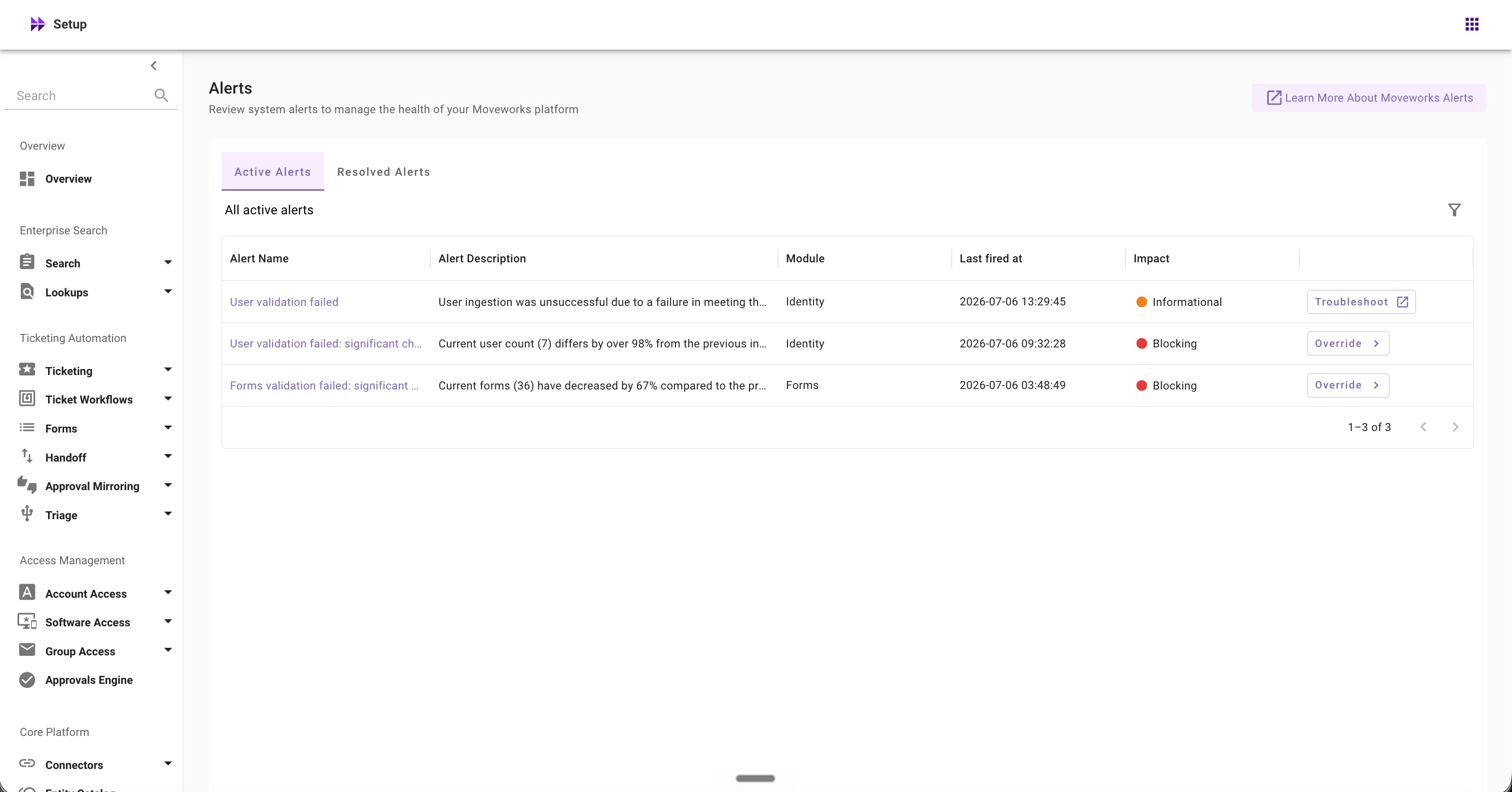
3️⃣ Redesigned Alerts Experience
The Alerts page has been redesigned to make validation failures easier to understand and act upon.
New Impact column
- Informational – An issue was detected, but Moveworks continues serving users from the previous successful ingestion. These alerts do not require an override and automatically resolve once the underlying issue is fixed.
- Blocking – Ingestion has been paused because a validation rule detected a significant or unexpected change. Resolve the issue or override the alert (where supported) to continue.
Additional UI improvements include:
- Improved the alert screen with a more intuitive and streamlined user interface.
- One-click access to troubleshooting guidance and recommended resolution steps.
- Integrated Override action for supported alerts
- Renamed Archived Alerts section to Resolved Alerts
- Moved the Acknowledge button within the alert details dialog
✋🏻 Important Callouts
- Validation Failure Alerts are currently available only for Users and Forms resources.
- Override is available only for supported validation failure types. Validation failures such as duplicate users, schema validation errors, zero users ingested, and record uniqueness failures require troubleshooting before ingestion can continue.
- Override actions are permanent and cannot be undone.
- After a successful override, the alert is moved to the Resolved tab. The new data baseline is accepted after the next successful ingestion.
Have questions or feedback? Please post them on our Community Forum, where our team will be happy to assist you.
Thank you,
Moveworks Setup Team