
Extending Custom Views to the Feedback Table in Analytics (Live on 15 October)
We're excited to share that Custom Views is now available for the View Feedback table in Moveworks Analytics.
What's new
Moveworks Analytics Admins can now create custom views from the “View Feedback” data and share curated, governance-friendly views with specific teams — giving stakeholders like ITSM admins, HR teams, or CS managers visibility into the feedback most relevant to them, with full control over what data is exposed.
What you can do
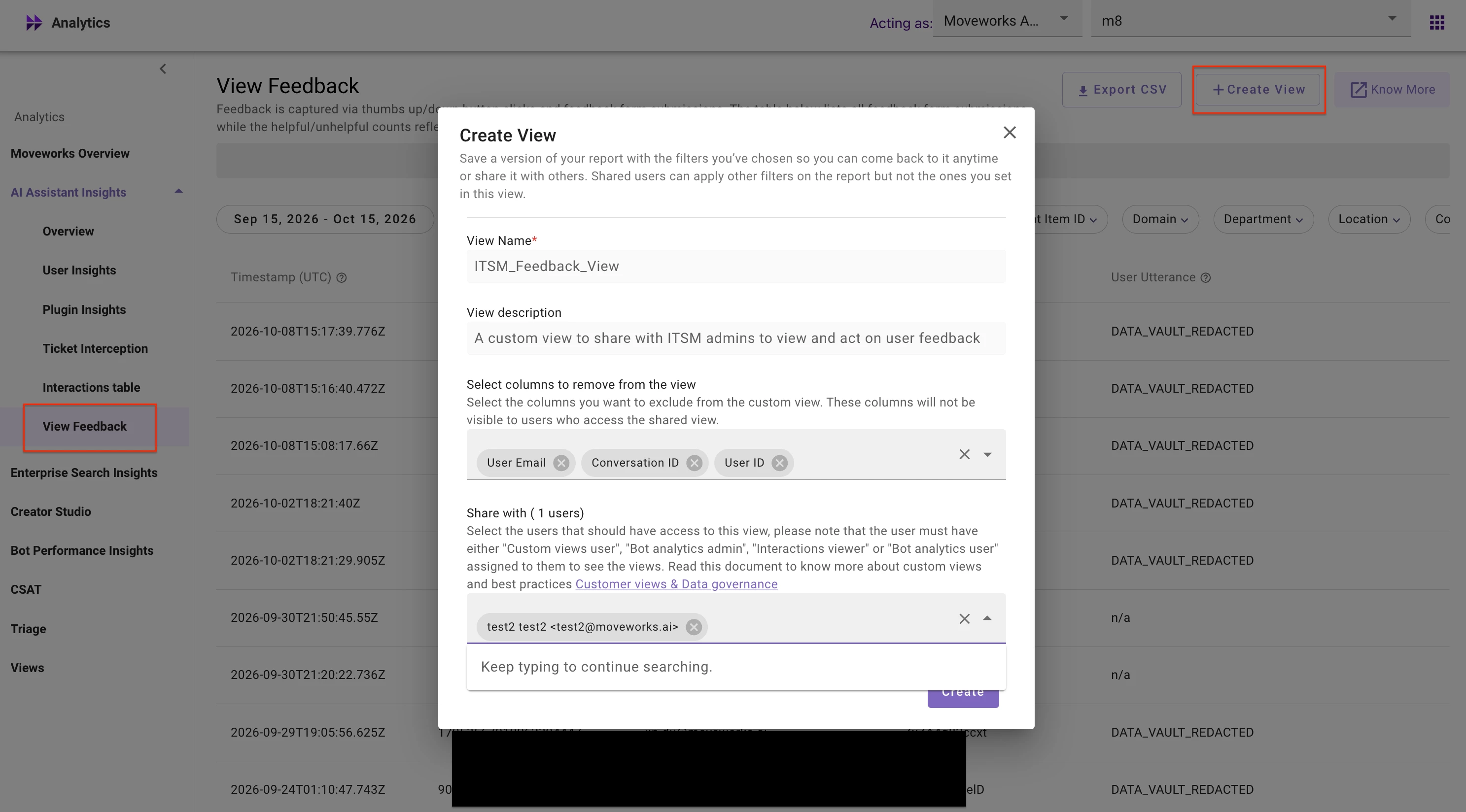
- Build a custom view from the View Feedback table, selecting only the columns you want to share (e.g., feedback type, topic, resolution status) while leaving out PII fields like user email and conversation ID
- Share the view directly with specific users
- Recipients only need the Custom Views User role — they never see the raw View Feedback table
Who can create custom views from View Feedback?
Any User with the Interactions Viewer role (found under Roles & Permissions → Bot Analytics) can access the View Feedback table and create custom views from it.
How to get started
- Navigate to Analytics → AI Assistant Insights → View Feedback
- Click on Create View
- Provide a name and description. Choose the columns that you want to remove from the view and share with specific users.
For more info, see our Custom Views Help Doc.
For any questions, please feel free to reach out here, and our team will get back to you.
Thanks,
Moveworks Analytics Team