User consent authentication for on-premises systems
What are we improving?
Employees can use Moveworks with internal applications that require individual user authorization, even when those applications and identity providers are only accessible from within the company network.
User consent authentication lets each employee connect their account and allows Agent Studio integrations to act with that employee’s existing permissions. This extends delegated authentication to private, on-premises systems without requiring customers to open an inbound connection to their network.
Note: This works for both native Tool Studio plugins as well as MCP servers you bring.
How does it work?
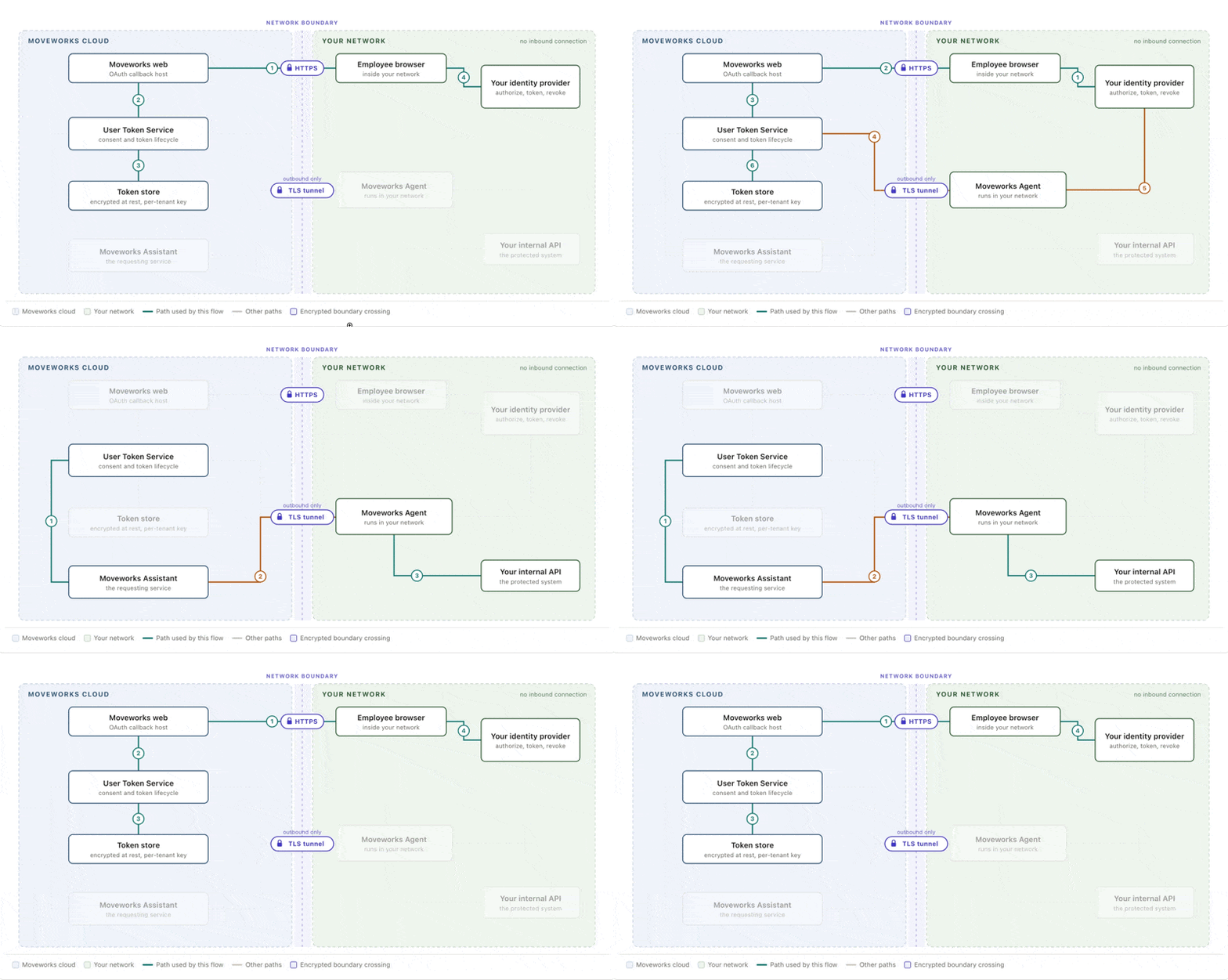
The experience starts with a familiar Connect action. The employee signs in to the organization’s identity provider and grants consent. Moveworks then uses the employee’s authorized access when the integration calls the internal application.
Requests that must reach the private application or identity provider are routed through the existing Moveworks on-premises agent. The agent maintains an outbound connection to Moveworks, makes the request from inside the customer network, and returns the response through the same protected channel.
The main authorization flows use this route:
- Exchanging the employee’s one-time authorization code for access tokens
- Calling the internal application with the employee’s authorization
- Refreshing access when a token expires
- Revoking access when the employee disconnects the integration
The initial browser authorization remains direct because the employee’s browser is already connected to the corporate network or VPN.
How is authentication data protected?
OAuth client secrets stay in the on-premises agent configuration and do not leave the customer network. User tokens are encrypted by the agent before leaving the network and are decrypted only by the agent when they are needed for an authorized internal request.
Moveworks stores and forwards the agent-encrypted values without access to their plaintext contents. Existing encryption at rest provides an additional layer of protection while the tokens are stored.
What does this unlock?
Organizations can build Agent Studio integrations that combine user-level authorization with systems that cannot be reached from the public internet. Employees keep the permissions already defined by the internal application rather than relying on a shared service account.
Examples include internal calendar, productivity, IT, finance, and business applications that support OAuth 2.0 but are accessible only from the corporate network.
What is required?
- A supported Moveworks on-premises agent must be deployed and connected.
- The internal application and identity provider must support a compatible OAuth 2.0 authorization-code flow.
- The integration must be configured to route the applicable authentication and API requests through the on-premises agent.
- Employees must be connected to the corporate network or VPN when the initial authorization page is available only internally.
- Customer administrators must configure the required service and OAuth client information in the agent.
Are there technical considerations?
The first authorization step relies on the employee’s browser being able to reach the internal identity provider. Organizations with multiple agent instances must configure them consistently so authentication requests can be handled reliably.
Support for nonstandard OAuth requirements—including mutual TLS, private-key client authentication, or other custom identity-provider behavior—should be validated during integration setup.
Availability
General Availability is planned for mid-November.