


ToolSmith
How are we improving the product?
Building enterprise automations still requires significant manual work. Developers must translate a business need into Agent Studio building blocks, research APIs, configure authentication, map data, wire dependencies, and test the result.
ToolSmith changes the job from assembling everything by hand to directing and reviewing the build. Describe the outcome you want in plain language, review ToolSmith’s proposed plan, and approve it before ToolSmith creates or updates anything.
ToolSmith can help developers build new plugins, edit existing plugins, and debug failing plugins—all through a guided conversation in Agent Studio.
How does it work?
- Describe the outcome. Start with the business result, intended users, required inputs, and what success should look like.
- Research and reuse. ToolSmith examines relevant documentation and the assets available in your organization. It reuses existing assets when possible and asks before changing them.
- Review and steer the plan. ToolSmith proposes an implementation plan that you can revise in normal language. Nothing is built until you explicitly approve it.
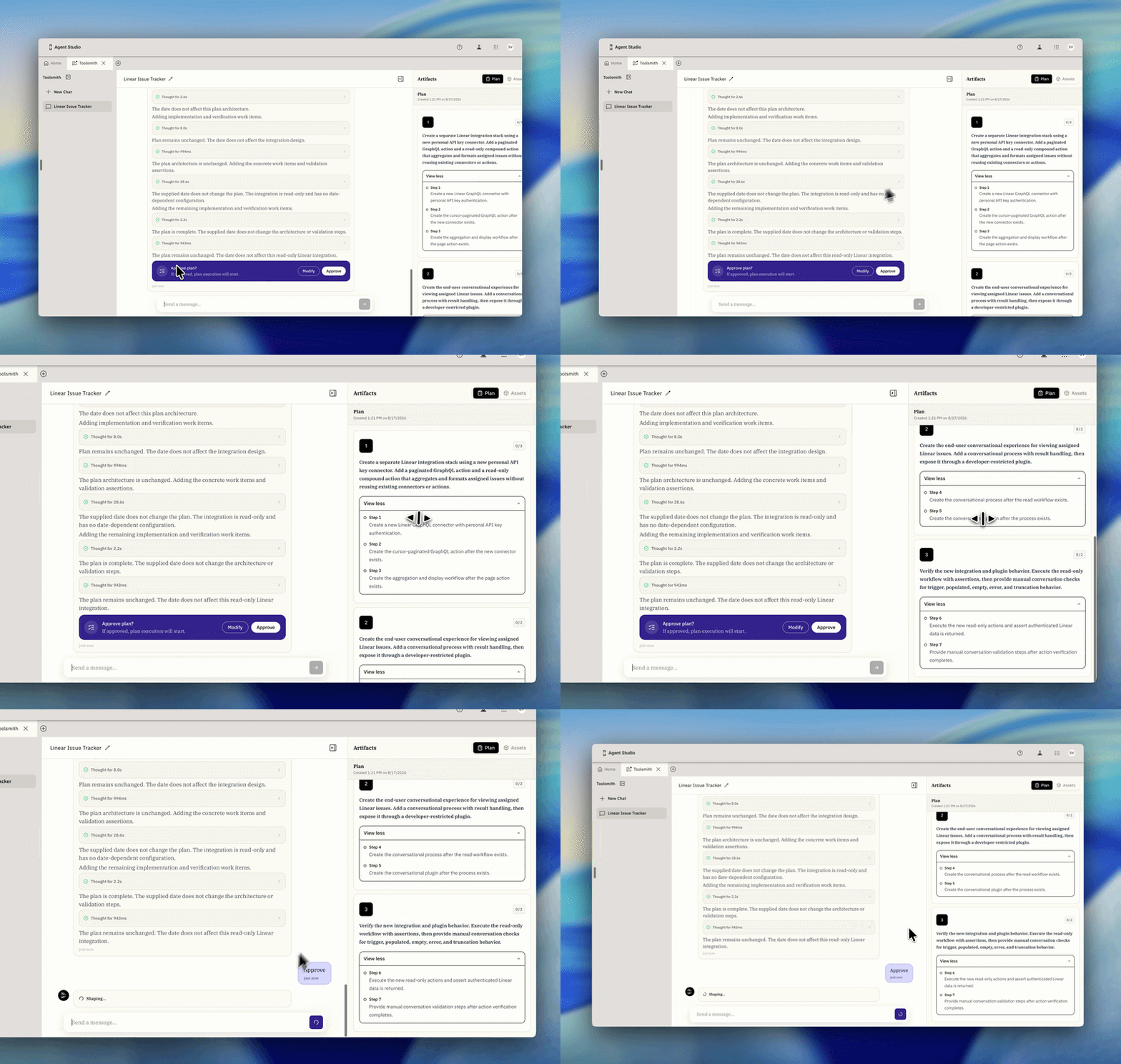
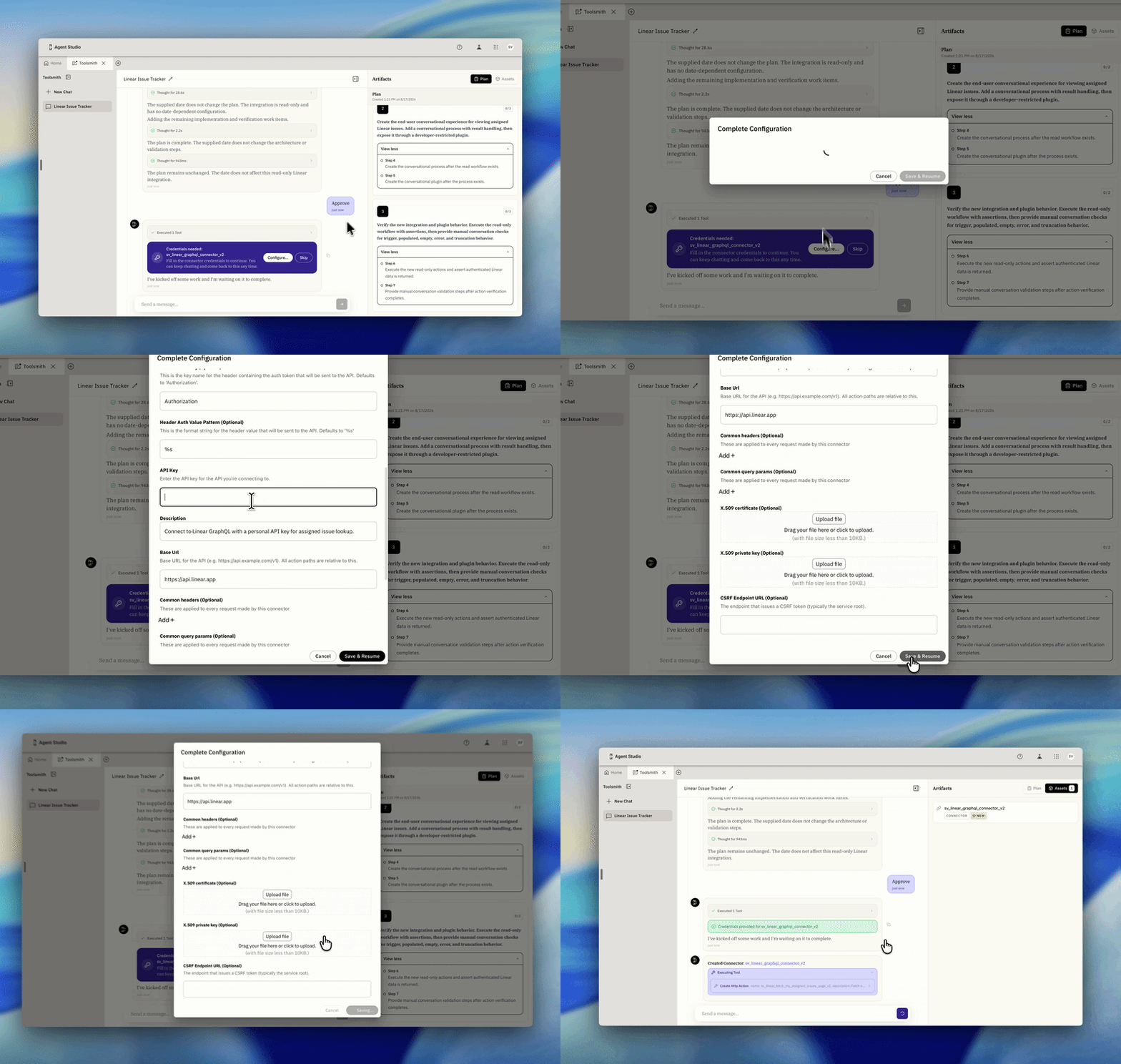
- Build with visible progress. ToolSmith executes the approved work in dependency order and reports progress and operation results in the conversation.
- Configure credentials securely. When a connector needs credentials, ToolSmith presents a secure configuration card. Credentials are not pasted into chat or stored in the ToolSmith conversation.
- Test and refine. Test the result, describe changes conversationally, and let ToolSmith update the relevant assets.
- Resume later. Your conversation preserves its plan, results, and pending credential requests so you can leave and return.
What can ToolSmith work with during controlled availability?
ToolSmith supports create, read, and update workflows for:
- HTTP, Script, and Compound Actions
- Connectors, including HTTP and MCP connectors
- Plugins
- Conversational Processes
- Data Types
- Static and Dynamic Resolvers
- Listeners
ToolSmith can also open an existing plugin so you can describe a change in plain language, review the proposed edits, and test the updated plugin in the same session. If a plugin is failing, you can point ToolSmith at the issue so it can investigate the root cause and propose a fix.
What’s next for ToolSmith?
Available now
- Guided MCP server and connector setup. ToolSmith guides builders through creating and configuring MCP servers and connectors, including secure credential collection.
Planned for November 4, 2026
- Refreshed ToolSmith workspace. Clearer plans, assets, and progress make it easier to understand what ToolSmith is doing and what happens next.
- Stop and redirect an in-progress build. Builders can interrupt current work and steer ToolSmith toward a different approach without starting over.
- Submit feedback directly in chat. Builders can report issues and share feedback without leaving the ToolSmith conversation.
- Clearer errors and recovery. More useful error explanations and better recovery from failed or stalled builds.
- Faster, more reliable long-running builds. Improvements to execution reliability and progress for complex builds that take longer to complete.
Planned by October 16, 2026
- Test plugins and conversational flows inside ToolSmith. Builders can test generated plugins and conversational processes without leaving the ToolSmith workspace.
Planned by October 31, 2026
- Automatically approve minor plan changes. ToolSmith can continue through small, low-risk adjustments without repeatedly asking for approval.
Planned for December 2026
- Improved editing and debugging of existing plugins. A stronger experience for finding an existing plugin, proposing changes, diagnosing failures, applying fixes, and retesting.
Planned for Q1 2027
- Action and Connector Catalog for discovery and reuse. Builders can more easily find approved actions and connectors, understand what already exists, and reuse assets instead of creating duplicates.
Dates and scope may change as we incorporate Controlled Availability feedback.
Licensing information
During controlled availability, ToolSmith is available without an entitlement check. To continue using ToolSmith after controlled availability, customers must be entitled through EmployeeWorks or Moveworks Standalone. ToolSmith is not included with AI Native, Heritage, or Moveworks Essentials packages.
Technical restrictions and known limitations
- ToolSmith cannot delete assets during controlled availability. This guardrail helps prevent accidental removal of a developer’s work.
- ToolSmith’s speed and accuracy vary depending on the third-party systems and APIs involved.
- ToolSmith performs best when a plugin involves no more than two third-party systems. More complex, cross-system workflows may take longer or require more developer guidance.
- ToolSmith conversations cannot currently be shared with other users.
- Builders should review and test all created or updated assets in a non-production environment before publishing them.
Interested in ToolSmith?
Upvote this product idea and leave a comment describing what you want to build, edit, or debug with ToolSmith.