


ashokmoorthy
Inspiring
February 23, 2024
4. Future Consideration

Render hyperlinks as clickable links in the classic copilot experience

Related products:Agent Studio
  • February 23, 2024
  • 9 replies
  • 125 views

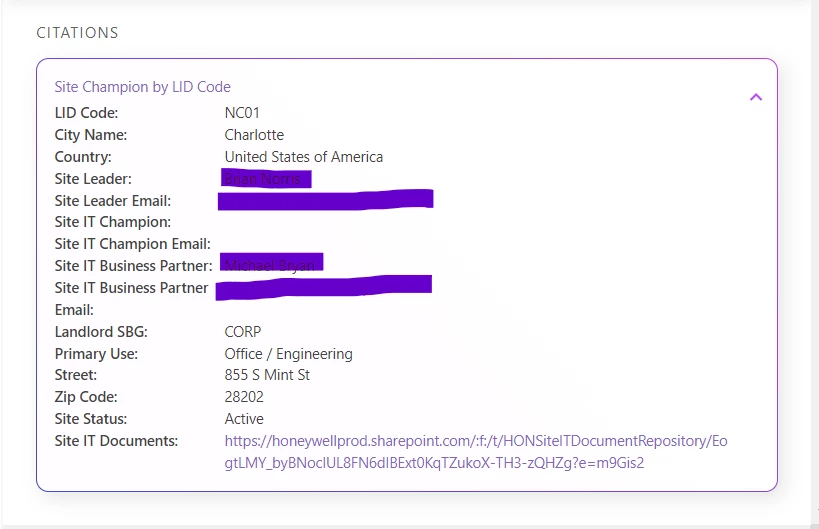
We built some use cases in the CREST Biz query. Can we showcase a link in the link format rather just as text?

That will help provide a great user experience.
 

9 replies

yagarwal
Employee
February 26, 2024

Yes @ashokmoorthy you can configure links in Queries responses using the link Markup element (e.g. <a href="https://moveworks.com"> View IT Documents here </a>).


Check out the documentation: https://developer.moveworks.com/creator-studio/reference/markup/

ashokmoorthy
Inspiring
February 26, 2024

Thanks @yagarwal for the quick update.

Without middleware or directly coming from the API end, can we still bring it as a link? Today, we are directly getting the link from the API, like below. Is there still a way to append in CREST Queries?


Ajay Merchia
Community Manager
February 27, 2024

Hey @ashokmoorthy, you will need the middleware to pre-format that content into the chat mark-up that @yagarwal shared above if you want it to affect the rendering in the citation UI too.

What would you even do for the “Site IT Documents” attribute? It actually looks like a pretty good end-user experience to me.

Ajay Merchia
Community Manager
February 27, 2024
1. New4. Future Consideration
ashokmoorthy
Inspiring
February 27, 2024

Hey @ashokmoorthy, you will need the middleware to pre-format that content into the chat mark-up that @yagarwal shared above if you want it to affect the rendering in the citation UI too.

What would you even do for the “Site IT Documents” attribute? It actually looks like a pretty good end-user experience to me.

The same applies for all the attributes that have links. Its better to show it as a link, with the current format, the user needs to copy and paste again to go over the document, rather than just click the link. In this case, we are calling the SNOW API, and again, by using middleware, it brings extra cost by building a new proxy URL. 

Ajay Merchia
Community Manager
February 27, 2024

I see -- is this link from your screenshot not clickable?


ashokmoorthy
Inspiring
February 28, 2024

This information is available under Citations and clickable only in copilot version. Not clickable in legacy bot.


Ajay Merchia
Community Manager
February 28, 2024

I see — we likely won’t be making this change for the classic bot. We added support for it in the next gen copilot and that’s where our investment is currently focused. It may be a while before we address it on the classic bot architecture


Thanks for the feedback and we’ll take it under advisement for future investment.

Alex
Employee
March 18, 2024

@ashokmoorthy You can display the link in a more user-friendly format.

In the response JSON Payload, you will need to format the link something like this:

"Link": "<https://honeywellprod.sharepoint.com/|Click here to access Site IT documents>"