

4. Future Consideration

Enhancement to keep formatting when copy/pasting Generated Content

Related products:AI Assistant
  • October 3, 2024
  • 7 replies
  • 68 views

Forum|alt.badge.img+2

When generating content via Moveworks you cannot copy/paste the content to another platform (email/teams etc) while maintaining the formatting. Once you paste the content, all formatting is lost & has to be redone. I tested in Microsoft Copilot and the formatting is retained.

Here are some screenshots showing the user experience and what happens when i copy/paste this generated content
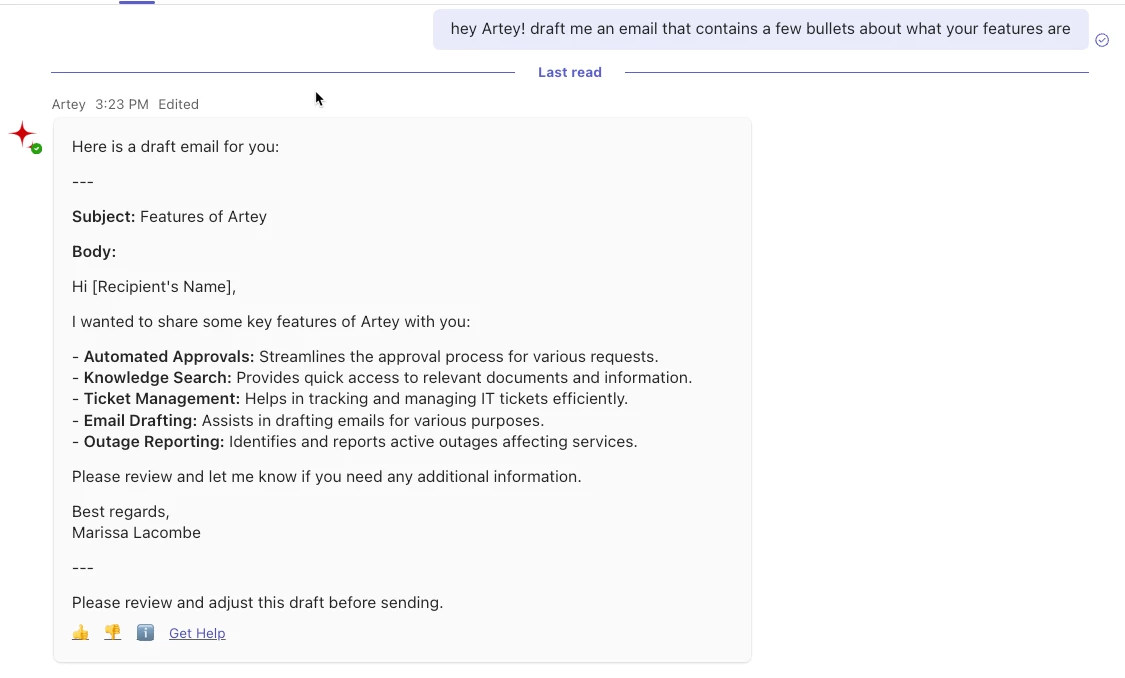


Subject: Features of ArteyBody:Hi [Recipient's Name],I wanted to share some key features of Artey with you:- Automated Approvals: Streamlines the approval process for various requests.- Knowledge Search: Provides quick access to relevant documents and information.- Ticket Management: Helps in tracking and managing IT tickets efficiently.- Email Drafting: Assists in drafting emails for various purposes.- Outage Reporting: Identifies and reports active outages affecting services.Please review and let me know if you need any additional information.Best regards,Marissa Lacombe

7 replies

dluckadoo
Forum|alt.badge.img+4
  • Employee
  • October 9, 2024

This is really entirely a result of the chat platform not playing well with clipboard. You can get improved formatted directly from a copy/paste action if you select CMD+SHFT+V (on Mac) or CTRL+ALT+V (Windows).

For example (using CMD+SHFT+V):

Subject: Re: Copy/Paste Generated Emails from MS Teams
Body:
Hi Marissa,
Yes, it is possible to copy and paste generated emails from MS Teams today.
Best regards,
Dray

Ultimately, this would be something Microsoft would need to improve as a Teams functionality enhancement.


Forum|alt.badge.img+2
  • Author
  • Participating Frequently
  • October 11, 2024

Thanks @dluckadoo  I had to use option-shift-command-V and it worked when i pasted into the same teams window but I am still unable to retain any formatting when copying from teams into an email even using those additional paste keys. 


kyril.remillard
Forum|alt.badge.img

Thanks for responding here Dray. ​@marissa.lacombe I’m going to put this into Future Consideration since your use case was not fully solved with Dray’s answer.


kyril.remillard
Forum|alt.badge.img
1. New4. Future Consideration

Forum|alt.badge.img+1
  • New Participant
  • March 24, 2025

This issue really needs to be fixed. It makes the Moveworks co-pilot experience nearly unusable for long form content generation such as a generating a job description. It requires users to reformat large blocks of text and bullets and does not match the experience offered by competitors.


Forum|alt.badge.img+5
  • Known Participant
  • June 16, 2025

Just wondering if there is a solution for this yet - or if anyone has tricks they are using to preserve the formatting - for instance using Brief Me for meeting minutes - i can copy / paste but i have to decide if i want to keep the formatting or keep the citation links..  it doesnt seem to allow me to do both - 


Has anyone figured out how to successfully cut and paste without having to then spend time formatting it nicely. 


  • September 18, 2025

Not sure which chat platform you all are using.  We have an issue with Webex where you can’t copy the bots whole message.  If there are any separate paragraphs you have to copy them one at a time.  Our workaround for now is to click on the blue “i” icon at the bottom of the message and copy it from there which keeps all the formatting and can copy the whole message.  Maybe that will work for you all for the time being?