

June 4, 2025
1. New

Ability to close Web bot "Chat with me" speech bubble

  • June 4, 2025
  • 3 replies
  • 56 views

Hi,

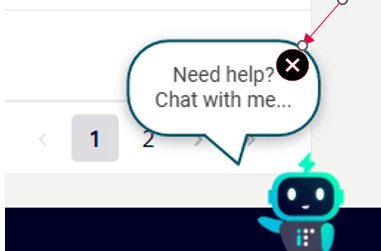
In some pages the chat speech bubble overlaps content, and it will be good to have the ability to close it so users can access page content (E.g. navigation buttons shown below). Currently we have open the chatbot and close it again before it disappears. 
 

3 replies

Andrew
Inspiring
July 29, 2025

I have the same issue. Did you find a fix for this? I have set our speech bubble timer to help reduce the real estate, but the “X” no longer seems to exist, and users follow the same steps you mentioned.

-Andrew
July 29, 2025

Hi Andrew, the x in the speech bubble is a product suggestion from our side. It does not seem to exist as a feature today. The image is a mock up suggestion of what would be good to have.

hundleymf
Inspiring
July 29, 2025

We worked with Moveworks and our website designer to add some space around our bot icon and set a timer so the chat bubble disappears after so many seconds. It took some back and forth with both teams to place the icon just right so the bubble and icon wouldn’t cover anything important. We were able to move the icon up, down, and side to side to find the best spot. We also had to make sure it didn’t overlap with the scroll bar, feedback button, "All Tickets" drop-down, or the ticket widget. As you can see in this screenshot, it is possible to adjust the icon and bubble, but you may need to work with both your website designer and Moveworks to get it just right. You also have the option to make the icon static so it stays in the same spot as you scroll, or have it move up and down the page as you scroll. We even considered moving it to a different part of the page. I’m not sure if these options will work as a solution for you as a work around, but I wanted to share what we did to help prevent the icon and bubble from covering items on our page. Best of luck! :)


Human by Day, Chatbot Whisperer by Night! 🤖