


💡 Nexthink Device Management Ambient Agents
Hello Community!
I wanted to share a set of practical use cases for managing device health that empowers end-users to take action when their hardware needs attention. While these notifications and workflows leverage Nexthink, other device management tools can be substituted using a similar architecture.
The Solution: Nexthink Ambient Agents
Nexthink offers a Remote Actions API to initiate tasks, native webhooks for real-time alerts, and Nexthink Query Language (NQL) to define data triggers. Combining these capabilities allows ambient agents to listen, notify, and assist users with actions such as:
- Clear Device/Teams Cache
- Restart Device
- Disk and Recycling Bin Cleanup
- Repair Office 365
Architecture Overview
-
Nexthink Webhook
-
Nexthink natively supports webhooks based on NQL queries. When a query condition is met, it sends a payload that Moveworks monitors in real time. The Configuring webhook NQL conditions and Configuring webhook fields: Method, Resource, and Payload are great resources for defining NQL queries in Nexthink.
-
-
Agent Studio Ambient Agent
-
Within Agent Studio, a plugin configured for System Triggers listens for and processes the incoming payload.
-
-
User Engagement
-
The payload is passed to a Compound Action, which sends a notification to the end user. These messages can include interactive buttons that trigger a Nexthink Remote Action—like clearing a Teams cache—directly from the chat interface.
-
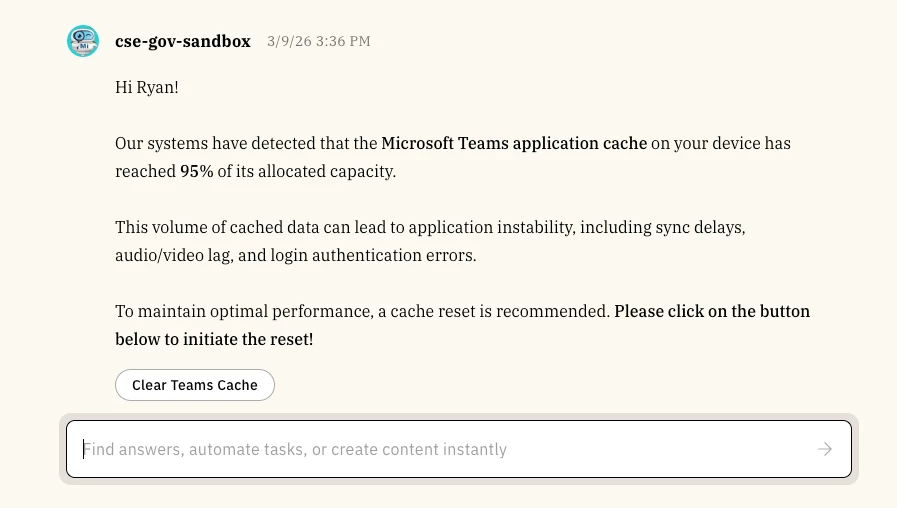
This architecture provides users with real-time, machine-related notifications and the ability to resolve issues with a single click.
Have you implemented any of these or other Nexthink-related plugins? Let me know in the comments!