

New Participant
August 6, 2026
Solved

Moveworks Incident Resolved Notification Query

  • August 6, 2026
  • 2 replies
  • 55 views

We are currently working on rolling out resolution notifications for our ServiceNow incidents.

Our goal is to make sure that once servicenow incident moves to resolved state, it should trigger a notification to user giving them two options :

  • Need more help, Reopen Issue

  • I am satisfied, Close Issue


We noticed that the native (Out-Of-The-Box) Moveworks resolution notification is already triggering when a ticket is resolved, which looks great as below
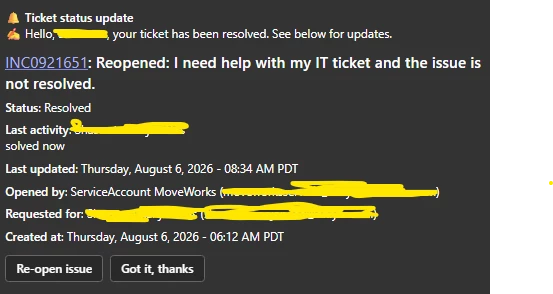


However, our business team has a few specific requirements for the user experience. We would prefer to use the native feature, if possible, but we need to know if the following customizations can be applied to the native flow:


1. Button Label Changes:
Can we change the native button labels?
- Change "Got it, thanks" to "Yes, I am satisfied. Close the issue"
- Change "Re-open issue" to "Not satisfied, Reopen the Issue"


2. Custom Behavior for the "Yes" Button:
Currently, the "Got it, thanks" button just dismisses the notification. 

We want this button to trigger a custom flow that:
a) Closes the incident in ServiceNow.
b) Makes an external API call to our survey system to fetch dynamic CSAT questions.
c) Displays those survey questions to the user in the chat.


I can build "Yes" flow using custom plugin in Agent studio, but can a native button be wired to trigger an Agent Studio Conversational Process?


3. Confirmation Message for the "Reopen" Button:
Currently, when a user clicks to reopen the issue and submits their comment, the bot does not send a final confirmation message acknowledging that the ticket was reopened. Can a confirmation message be added to this native flow?


Our Core Question:
Is it possible for Moveworks Support to wire the native "Got it, thanks" button to trigger a custom Agent Studio plugin/API call to achieve this?
Best answer by rgeroulo

Hi ​@Shas99!

While the out-of-the-box notifications are a good start, it is not uncommon to move away from the native skill if you want a more custom approach. What you described would be something configured in Agent Studio so you have full control over the messaging and user experience.

For #3, when a ticket is reopened, the assistant should natively come back to the user with a link to the newly reopened ticket. I would recommend submitting a Support case as that does not sound right and there should be a final confirmation given to the user.

If wanting to create a custom flow, this is the high-level approach that I would take:

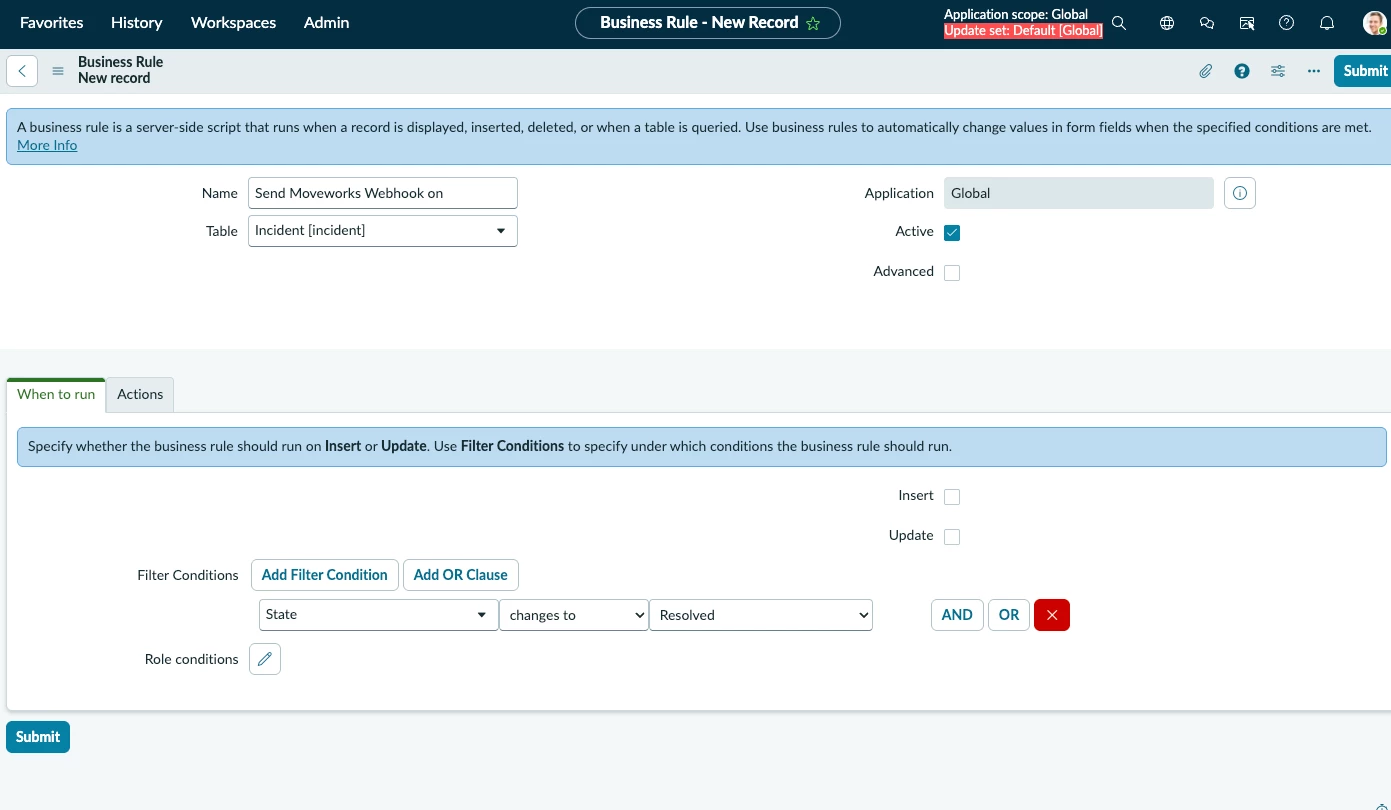
  1. ServiceNow Business Rule on the Incident table sends a webhook to Moveworks in real time when an INC state → Resolved
  2. The Moveworks webhook will handle the payload and pass it over to the linked Compound Action

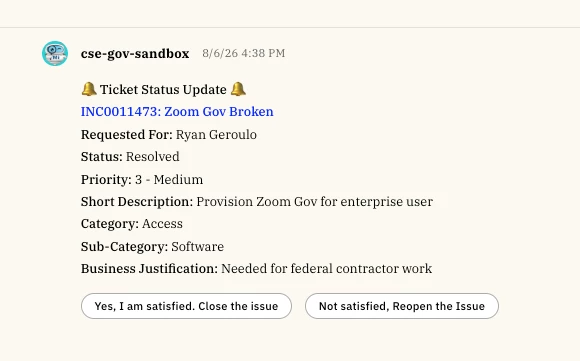
  3. The Compound Action can then parse the message, create your formatting, and create buttons that are linked to other actions
    1. Button 1: Yes, I am satisfied. Close the issue
      1. Links to a Conversational Process that has a HTTP Action to close the ticket, a HTTP Action to get your CSAT questions, and then slots to get the answers from the user and then writes these answers back to some system
    2. Button 2: "Not satisfied, Reopen the Issue
      1. Links to a HTTP Action that reopens the ticket

Let me know if that is helpful!

Best,

Ryan

2 replies

rgeroulo
rgerouloAnswer
Community Manager
August 6, 2026

Hi ​@Shas99!

While the out-of-the-box notifications are a good start, it is not uncommon to move away from the native skill if you want a more custom approach. What you described would be something configured in Agent Studio so you have full control over the messaging and user experience.

For #3, when a ticket is reopened, the assistant should natively come back to the user with a link to the newly reopened ticket. I would recommend submitting a Support case as that does not sound right and there should be a final confirmation given to the user.

If wanting to create a custom flow, this is the high-level approach that I would take:

  1. ServiceNow Business Rule on the Incident table sends a webhook to Moveworks in real time when an INC state → Resolved
  2. The Moveworks webhook will handle the payload and pass it over to the linked Compound Action

  3. The Compound Action can then parse the message, create your formatting, and create buttons that are linked to other actions
    1. Button 1: Yes, I am satisfied. Close the issue
      1. Links to a Conversational Process that has a HTTP Action to close the ticket, a HTTP Action to get your CSAT questions, and then slots to get the answers from the user and then writes these answers back to some system
    2. Button 2: "Not satisfied, Reopen the Issue
      1. Links to a HTTP Action that reopens the ticket

Let me know if that is helpful!

Best,

Ryan

Shas99Author
New Participant
August 7, 2026

Thanks, It helps and I was thinking in same lines but since we have the “not satisfied, reopen the issue” flow natively, I was thinking it would have been great if I could have just been able to add the custom “YES” flow rather than building the complete flow now.