

Solved

How do I keep the Moveworks bot from returning resolved input arguments?

  • November 19, 2025
  • 8 replies
  • 75 views

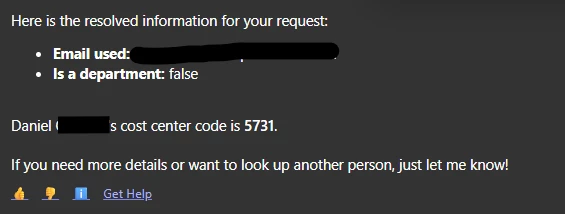
How do I keep the bot from returning the resolved input arguments in a reply back to the user? I have tried adding the instruction to “NOT show resolved input arguments in the message to the user if information needed to be resolved” in the plugin description.  Haven’t had any luck with this though in Agent Studio. This was not created via a compound action, but does involve a decision policy with 2 actions. The required slot for the decision policy is is_department. Any help would be appreciated!
 

Best answer by Kevin Mok

@L_Tran96 you could add instructions in the output mapper to not show the resolver information, regardless this is not something ideal and we will investigate on our end

8 replies

Kevin Mok
Forum|alt.badge.img+1
  • Community Manager
  • November 19, 2025

Hey ​@L_Tran96 - Thanks for reporting this, I let the team know internally to investigate the issue. To clarify, is this happening consistently in your plugin?


  • Author
  • New Participant
  • November 19, 2025

Hey Kevin, the plugin was not initially presenting the resolved information when I was testing it out, but at some point it started to consistently present the resolved info. Maybe there is another place where I could instruct the bot to not present this information?


Kevin Mok
Forum|alt.badge.img+1
  • Community Manager
  • Answer
  • November 19, 2025

@L_Tran96 you could add instructions in the output mapper to not show the resolver information, regardless this is not something ideal and we will investigate on our end


  • Author
  • New Participant
  • November 19, 2025

Okay, thanks Kevin! I’ll give that a try and keep you updated.


Kevin Mok
Forum|alt.badge.img+1
  • Community Manager
  • November 24, 2025

Hey ​@L_Tran96 - We are going to deploy some enhancements this week, so the resolver information doesn’t show up in the message. 


  • Author
  • New Participant
  • November 24, 2025

Hey Kevin, using the display_instructions_for_model keyword was able to help solve my issue! The output mapper if anyone wanted to reference: 

I know that it’s red, but still saves and works.


  • Author
  • New Participant
  • December 2, 2025

@Kevin Mok Hey Kevin! Hope all is well! Was that update already rolled out? Using the display_instructions_for_model keyword only worked for a couple days before reverting back to showing the resolvers. It’s also now asking users to define the parameters of the slot when before, the default value was already given in the slot description and to not ask the user explicitly. Also just put in a ticket for this.


Kevin Mok
Forum|alt.badge.img+1
  • Community Manager
  • December 2, 2025

@L_Tran96 - It should be fixed now! Sorry for the delay.