💡 Architecture for Outage Detection agent
I wanted to share a practical Agent Studio plugin idea we’ve had success with: using a scheduled ambient agent to scan recent support tickets and proactively notify responders when an outage pattern emerges.
The problem this solves
In many environments, the first signal of an outage isn’t monitoring — it’s a sudden spike of tickets describing the same issue.
Example: within an hour, several users report symptoms like:
- “VPN won’t connect”
- “SSO login failing”
- “VDI keeps disconnecting”
- “Email delayed / cannot send”
If responders only notice once tickets are manually triaged, you lose valuable time. The goal here is to detect the pattern automatically and alert a targeted responder group with a crisp summary and relevant ticket IDs.
High-level approach
Schedule: Every 30 minutes
Lookback window: Tickets created in the last 60 minutes
Detection rule: If 3+ tickets match the same underlying issue → treat as likely outage/incident
Response: Send a message to a predefined responder/on-call group with:
- an impact-first outage description
- the list of related ticket IDs
Note: I prototyped this with Jira Service Desk, but this pattern is replicable across any ticketing/ITSM system (e.g., ServiceNow, Zendesk, Freshservice, etc.) as long as you can query “tickets created in the last X minutes” and retrieve relevant fields.
Architecture overview
- Scheduled trigger runs every 30 mins
Use a Scheduled Trigger to invoke the plugin on a fixed cadence.
- Collect recent tickets (ITSM query ticket action)
Query your ITSM system for tickets created in the last X minutes (I set this to 60 minutes)
Pull only the fields you need for detection + messaging
Minimum ticket fields needed:
- Ticket ID / key
- Created time
- Short description / summary
- Description body
- Service / category / assignment group (optional but great for routing)
Optional: exclude known noise sources (test requesters, auto-generated tickets, maintenance categories)
- Detect outage (LLM step)
Use generate_text_action to review the provided tickets and determine whether there appears to be a widespread issue, defined as “3+ tickets describing the same issue in the lookback window.”
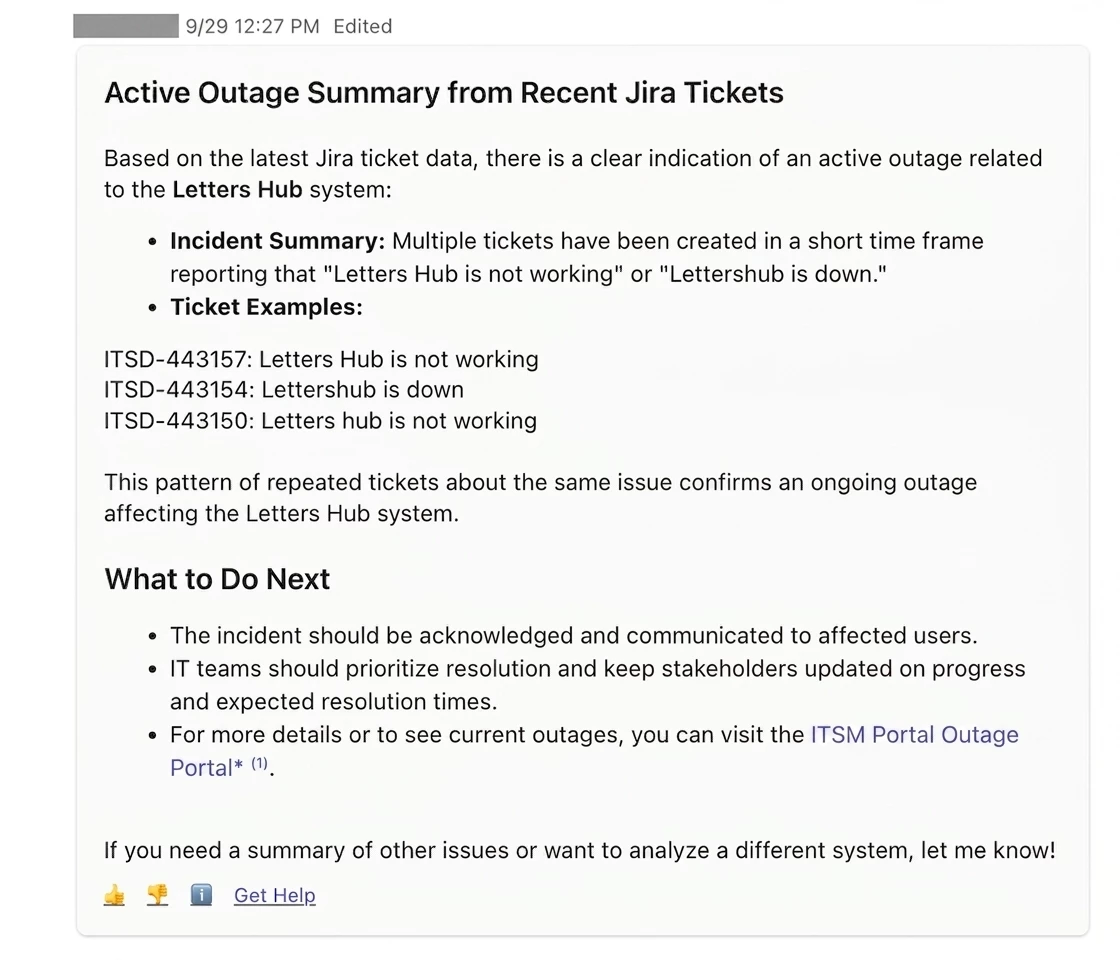
Output should be impact-first and include only the related ticket IDs (no unrelated summaries, no hypotheticals).
- action:
      action_name: mw.generate_text_action
      output_key: outage_summary
      input_args:
        model: "'gpt-5-mini'"
        reasoning_effort: "'medium'"
        user_input: $CONCAT(["Your task is to analyze the provided JSON payload of Jira issues. First, extract the summary and
          the text content from the description for each issue. An outage or incident happens when 3 or more tickets are
          created about the same issue. If a widespread issue is found, generate a brief, clear outage description
          summarizing the impact at the beginning of the message and mention all the ticket numbers with the outage
          issue. Do not include ticket summaries for tickets that are not related to the outage. Always include a brief
          description of the issue at the beginning of the message and the ticket numbers with the outage issue. Only
          include ticket summaries for tickets with the outage issue detected. Do not send hypothetical or example data
          in the response. Strictly use the given ticket data as the input", "\\nHere is the ticket data:",
          $STRINGIFY_JSON(data.recent_jira_tickets)])
- Outage notification gate (LLM action)
Feed the drafted summary into a second generate text LLM action that returns only true or false in plaintext.
If this returns true: notify the responder/on-call list with the outage summary + ticket IDs.
If false: do nothing (or return a simple “no outage detected” result).
Purpose: keep downstream logic deterministic and prevent accidental notifications from ambiguous summaries.
- Route + notify responders
Use notify to send the detected outage with the summary + ticket IDs to your audience
Tips / knobs you can tune
1) Threshold & window sizing (precision vs. speed)
-
Start with 3 tickets / 60 minutes if volume is moderate.
-
High volume environments:
-
raise threshold to 4–6, and/or
-
shorten window to 30–45 minutes
-
-
Low volume environments:
-
keep threshold at 3, extend window to 90–120 minutes
-
Tune so you get alerts during real incidents but almost none on normal days.
2) Message format (make it actionable in 5 seconds)
A strong alert is short and structured:
-
Impact statement (what’s broken + who’s impacted)
-
Signal strength (ticket count + time window)
-
Ticket IDs (clickable if your system supports deep links)
Example structure:
-
Possible outage: Users unable to log in via SSO (last 60 min)
-
Signal: 5 similar tickets created since 06:30 PT
-
Tickets: INC-1xx, INC-1xx, INC-1xx, …
3) Metrics to validate it’s working
Track:
-
time from first ticket → first alert
-
false positive rate
-
alert-to-acknowledgement time
-
incidents detected via agent studio plugin before a formal incident is opened
Example screenshot of detected outage: