đź’ˇ Architecture for Managing Agent Studio Notification Preferences

  • December 8, 2025
  • 5 replies
  • 117 views

rgeroulo
Forum|alt.badge.img

Hello Community!

I wanted to share a useful architecture for managing Agent Studio Notifications that allows end-users to opt-in or opt-out of specific proactive messages.

The Solution: A Moveworks Notifications Table

To support custom user notifications, this strategy involves provisioning a Moveworks Notifications Table (e.g., in ServiceNow or any iPaas tool) dedicated to housing user notification settings.

  • This table tracks user preferences for specific proactive use case notifications (e.g., approval reminders, training due reminders, direct report birthday reminders).

Any proactive message sent—whether triggered by a Moveworks Scheduled Job, a ServiceNow Flow Designer Flow, an Azure Function, or any other system—has the ability to cross-check this Moveworks Notifications Table. The message is only sent if the user has actively opted-in for that specific use case.

Streamlining Notification Table Population

The below recommendations should allow for easy notification management and to populate the table quickly:

  1. Mass Notify method (One-Click Opt-In):

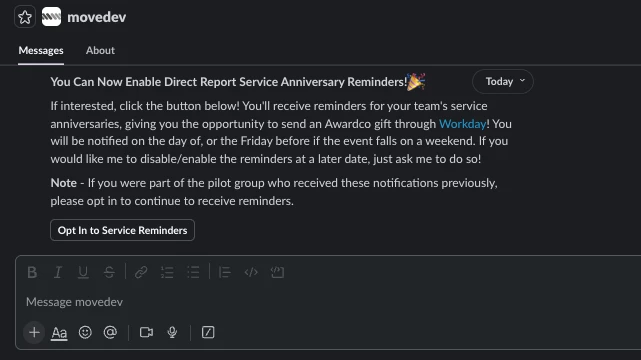
    • Utilize mass notify messages to present users with a simple, one-click experience. On button click, the notification table will be directly updated with the user's choice.

    • The screenshot below shows an example notify message/button for a "Direct Report Service Anniversary Reminder" use case. This button is connected to an HTTP Action which will update the notification table immediately.
       

  2. Conversational Flow method:

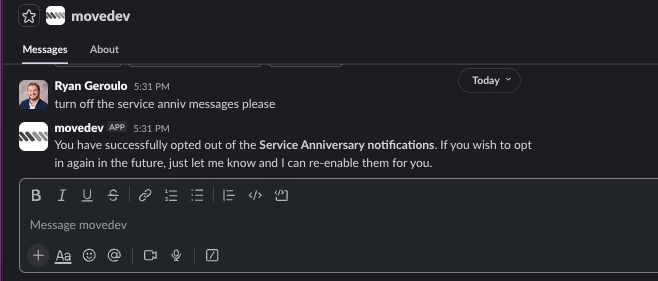
    • Users can also manage their preferences via a conversational flow (as shown in the screenshot below).

    • This can be implemented as a Conversational Process plugin, allowing users to type a query like, "stop sending me the service anniversary messages”

    •  

This approach creates a slick and intuitive process for users to control which notifications they receive! Please comment below if you have any questions or have implemented something similar! 

5 replies

JenHanley
Forum|alt.badge.img+1
  • Community Manager
  • December 8, 2025

This is great! Thank so much for sharing. 


afleury
Forum|alt.badge.img+3
  • Inspiring
  • December 9, 2025

This is a great update!

Could this be applied to proactive ticket notifications for Changes/Requests/Incidents as well? We’re currently managing the ticket notification noise by having team opt-in / opt-out of suppression security groups to suppress each notification type.

It would be wonderful if we could suppress notifications for a period of time too (e.g. if the user is out of office - “stop sending me change request notifications for this week”).
Also on our Wishlist granular control of proactive notifications would be icing on the cake (e.g. “only send me Change notifications for the Production environment, I don’t care about Non-Production environment changes”).


rgeroulo
Forum|alt.badge.img
  • Author
  • Employee
  • December 9, 2025

​@afleury the out-of-the-box notifications like Approvals, Ticket Updates, Ticket Nudges, etc. would be a different approach, but it is possible.

All of these native notifications are controlled via DSL rules within Moveworks Setup. An example DSL rule would be the Ticket filter for Nudges or Concierge Ticket Activity updates Filter.

These DSL filters utilize the user object and ticket object to determine who gets notifications and who doesn’t. It is common to add custom fields on the user roster like custom_attribute.nudge_notifications for example to tag people and use in DSL rules. Once populated, you can add DSL rules like the following to only send nudges notification to users who have this field set to true:

ticket.requested_for.custom_attributes.nudge_notifications IN ["true"]


These fields can be populated via the user ingestion modules by using this Configure User Identity document. Either the native user ingestion connectors or a custom Content Gateway can be used to populate these fields on the Moveworks roster.

I hope this helps!


Forum|alt.badge.img+2
  • New Participant
  • December 11, 2025

Thanks for sharing and it looks promising for user control and opt-in/opt-out functionality.

Before we can evaluate this approach, we need clarification on the data integration layer, which wasn't covered in the documentation:

  1. Data Integration Process: How do notifications from third-party systems (Fieldglass, Workday) get into the ServiceNow Moveworks Notifications table?
    • Do we write custom integration code?
    • Use ServiceNow Integration Hub?
  2. Table Schema Design: What is the actual schema/structure of the Moveworks Notifications table?
    • How do we handle different source systems with different data structures?
    • Is there a standardized format for all notification types?
    • Can you share a sample table definition?
  3. Transformation Logic: Where does data transformation from source system format to Moveworks format happen?
    • ServiceNow Flow Designer?
    • Custom middleware?
    • Moveworks backend processing?
  4. Implementation Example: Can you provide a concrete example showing how data flows from a source system (e.g., Fieldglass timesheet approval) into your notification table?


Thank you so much.


rgeroulo
Forum|alt.badge.img
  • Author
  • Employee
  • December 11, 2025

​@hong.xia please see below!

  1. Data Integration Process: How do notifications from third-party systems (Fieldglass, Workday) get into the ServiceNow Moveworks Notifications table?
    • There is no need to directly integration ServiceNow with other third-party systems. The Moveworks Notifications table is going to house a mapping of Agent Studio plugins to users. Any proactive message (plugin) that is sent from Agent Studio via web hooks, scheduled jobs, or Events should exist as a column in this table. Below is an example of the schema:
    •  

  2. Table Schema Design: What is the actual schema/structure of the Moveworks Notifications table?
    • Please see above for an example schema. As you can see, this table will allow you to query a user by email and then check if the user has a true value before sending a proactive notification for the specific use case that is executing.
  3. Transformation Logic: Where does data transformation from source system format to Moveworks format happen?
    • There should be no data transformation when populating this table. The populating of these table will most likely be done via Moveworks conversational plugins/mass notify messages as outlined above..
  4. Implementation Example: Can you provide a concrete example showing how data flows from a source system (e.g., Fieldglass timesheet approval) into your notification table?
    • There should be no need to integrate ServiceNow with another system in this architecture. This table just needs to be populated with true/false values in order to be used in the logical check when a notification is about to be sent.

Let me know if that is helpful!

Best,

Ryan