

Ambient Agent: Automatically add helpful context to new tickets using Webhooks and LLM Actions
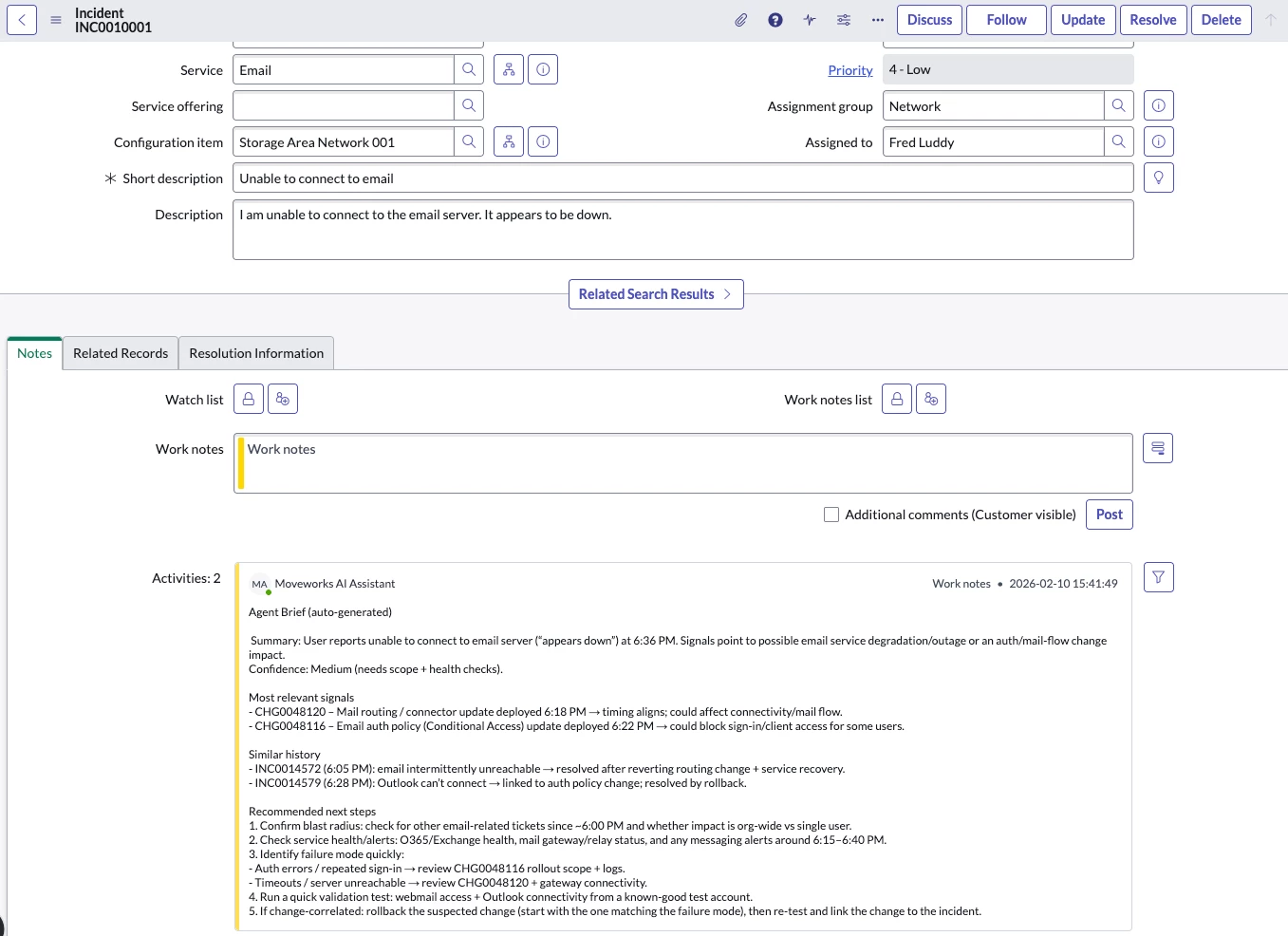
Brief summary: New tickets often lack context agents need to troubleshoot quickly. This pattern uses a Moveworks Ambient Agent to automatically pull relevant enterprise data at ticket creation time, run LLM actions to correlate + summarize data, and post a single Agent Brief to the ticket before first touch, reducing repeat investigation and accelerating MTTR.
Issue
New IT tickets usually arrive with limited context. The agent spends the initial minutes doing repetitive investigation:
- What changed recently?
- Has this happened before?
- Who owns the service?
- What systems/dependencies might be involved?
- What’s the best next step?
Solution
Automatically generate one consolidated Agent Brief at ticket creation time.
Instead of asking agents to search across tools, Moveworks assembles the relevant signals and posts a single, readable, high-signal summary back to the ticket—so the agent can start with context and evidence immediately.
Architecture
1) Ticket Created → WebhookTrigger
When a ticket is created (ServiceNow, Jira/JSM, Freshservice, etc.), an automation/webhook sends Moveworks a payload that contains:
- ticket ID/key
- title/summary + description
- reported service/app (if available)
- reporter/affected user (if relevant)
- timestamps
This initiates context generation immediately.
2) Moveworks Ambient Agent Context Generation
Moveworks runs an agent which (a) gathers evidence, then (b) uses LLM actions to turn that evidence into a brief that’s useful and consistent.
A) Retrieve relevant context (search)
Moveworks pulls from modular sources to gather relevant information.
Core sources (ITSM)
- Recent changes: deployments/releases, feature flags, config/secrets/cert rotations, IaC updates, permission changes
- Previous tickets & patterns: same service/component, similar symptoms/errors, similar env/user groups, recurring timelines
High-value add-ons (Knowledge and Logs)
- monitoring/alerting signals
- service ownership + escalation paths
- runbooks/KB/troubleshooting guides
- incident channels / status updates
Why this stage exists: it ensures the LLM is reasoning over your enterprise data (not guessing), and it keeps the system extensible as you add sources.
B) LLM actions to generate context
This is where the LLM actions correlate signals and produce outputs that are readable for humans.
1) Correlate against recent Changes (mw_generate_text_action)
- Input: ticket title/description + retrieved change records
- Output: top relevant changes + brief match notes (e.g., timing/component overlap) or “no relevant changes found”
2) Correlate against similar Incidents (mw_generate_text_action)
- Input: ticket title/description + retrieved similar incidents/tickets
- Output: top matching incidents + prior resolution notes
3) Extract relevant troubleshooting steps (mw_generate_text_action)
- Input: ticket title/description + retrieved runbooks/KB snippets
- Output: 3–7 recommended steps tailored to the ticket + prerequisites (if noted)
4) Generate the consolidated Agent Brief (mw_generate_text_action)
- Input: outputs from steps 1–3
- Output: one concise comment with: summary, key signals (changes/incidents), and recommended next steps
Brief summary: Retrieve evidence → correlate it (changes + incidents + docs) → synthesize into one agent-ready ticket comment giving the agents the context they need to solve the ticket effectively.
3) Post back to the ticket: One consolidated “Agent Brief”
Moveworks posts one comment back to the ticket in a consistent format where agents learn quickly:
- What’s happening (plain-language summary)
- Most relevant recent changes (or “none likely”)
- Similar past tickets and what were the resolutions
- Recommended next steps (3–7 steps)
Why this pattern works
- Uses existing systems as the source of truth
- LLM actions handle correlation, relevance filtering, and synthesis
- Output is explainable and consistent
- Fully customizable with any data sources to provide context
- Agents spend less time searching and more time resolving → faster MTTR