


Your plugin returns the right data. The agent ignores it.
Hey,
Why would a plugin that returns the right data produce a wrong answer? I keep seeing the same thing: builders format their response into a clean paragraph using an LLM action, return it as text, and the assistant loses the ability to work with it.
It comes down to what your output mapper returns.
How the Engine Processes Your Tool Response
When a plugin runs and returns data, that response passes through a processing step before the reasoning engine sees it. What the engine can do with your data depends entirely on whether it's structured JSON or flat text.
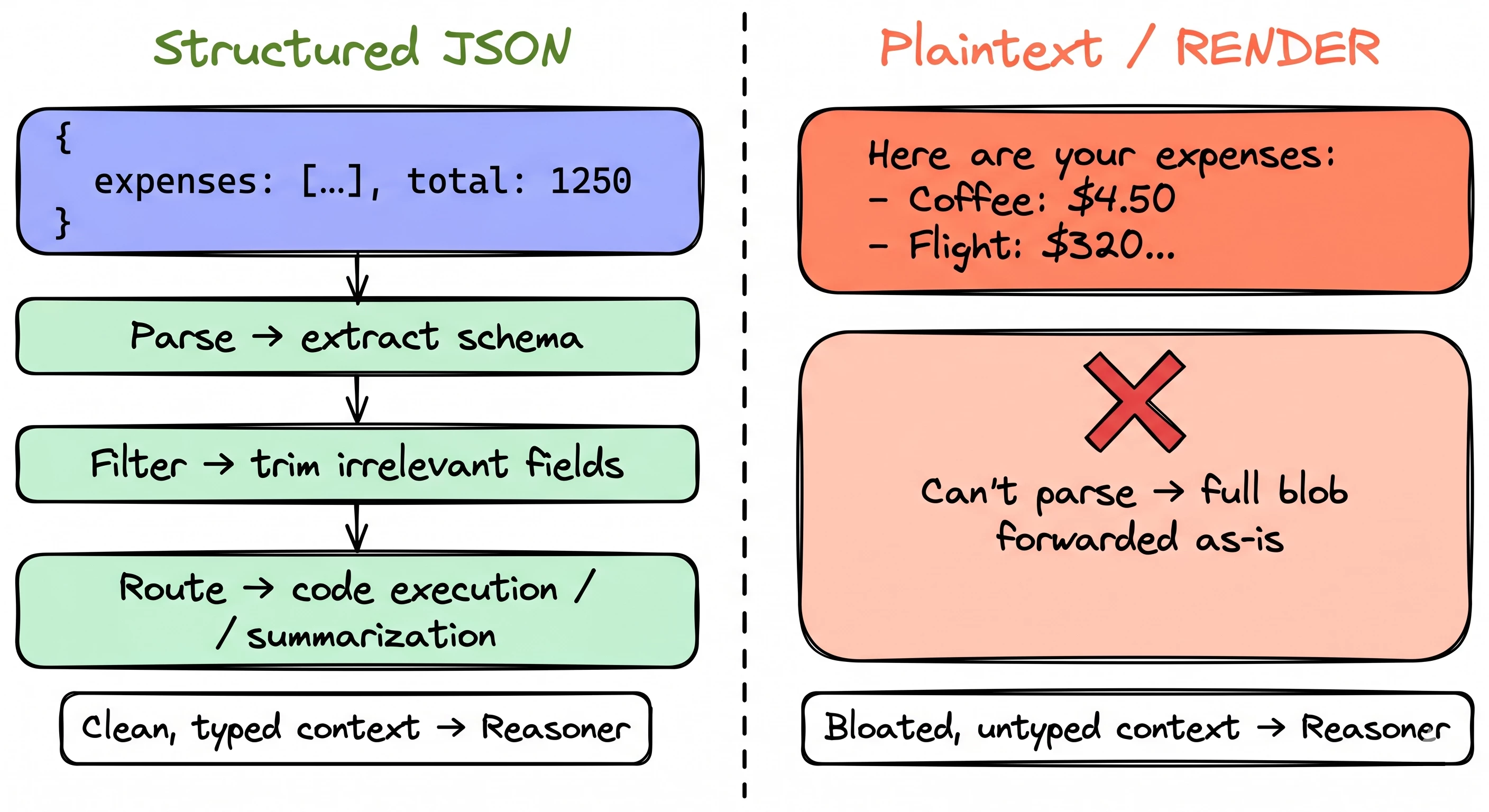
Structured JSON gets parsed. The engine extracts the schema, trims irrelevant fields, and routes pieces to downstream tools like code execution or summarization. Only the relevant subset reaches the reasoner. Context stays clean.
Flat text can't be parsed. The entire string gets forwarded to the reasoner as-is. No filtering. No routing. No intelligence applied.
Think of it like a mail room. Structured JSON is a labeled package with a packing slip: the mail room reads the label, sorts it, routes it to the right desk. A plaintext string is an unmarked envelope. The mail room can't open it, sort it, or do anything except pass it along and hope the recipient figures it out.
The loop that makes this matter
The engine isn't a single LLM call. It's an iterative loop that runs up to 10 times per user message, blending ReAct (reasoning-and-acting) and CodeAct. Each iteration: plan what to do, execute an action, process the result, loop back.
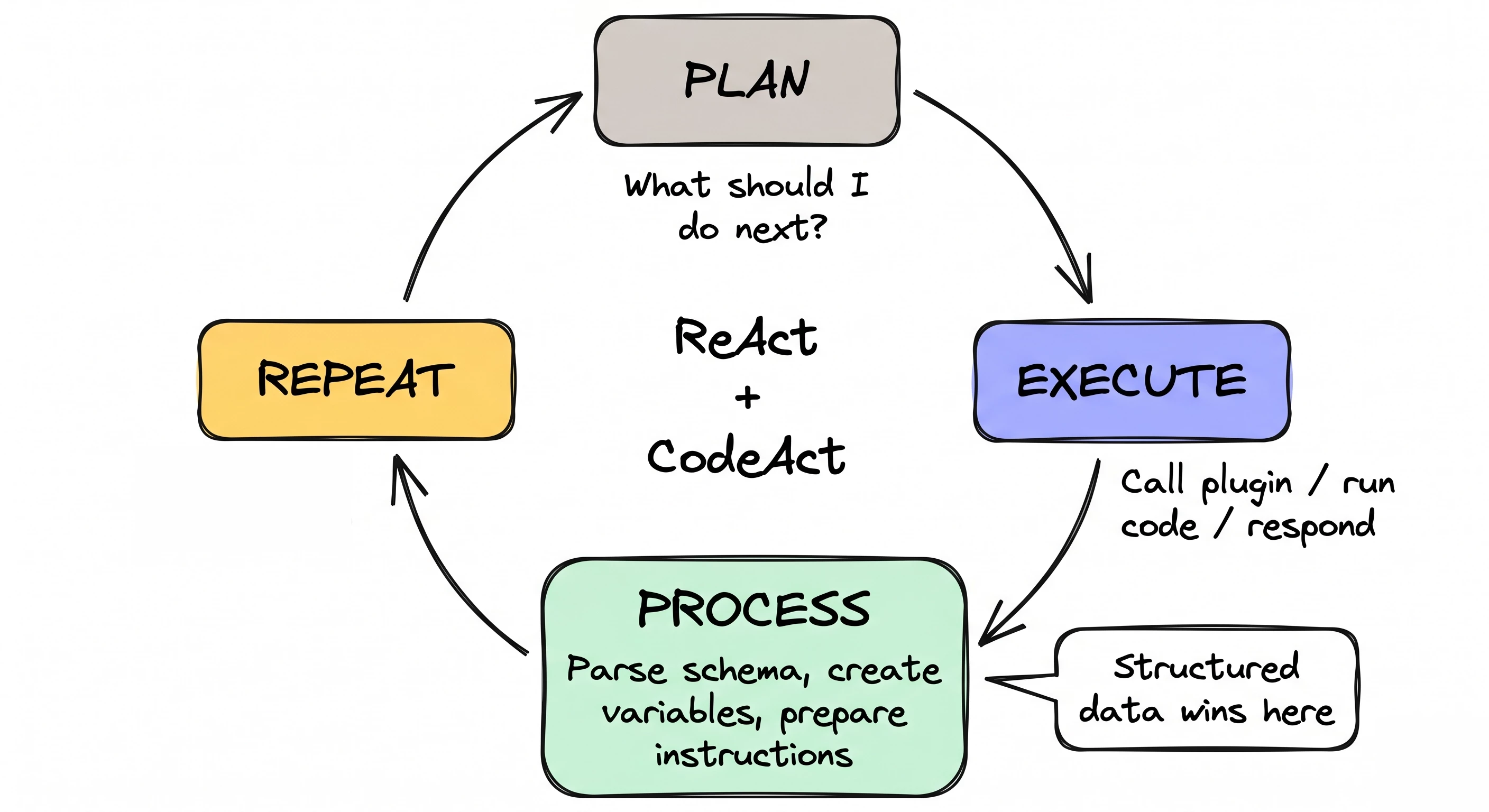
The "process" step is where it all happens. That's where the engine parses structured data, extracts schemas, creates variables, and prepares instructions for the next iteration. Plaintext responses skip all of that. They can never trigger code execution. They can't become variables. They can't be handed to the code interpreter for sorting or filtering.
What this looks like in your output mapper
A structured output mapper using $MAP():
output_mapper:
  expenses:
    MAP():
      items: data.expenses
      converter:
        description: item.description
        amount: item.amount
        category: item.category
  total_amount: data.total_amount
  expense_count: data.expenses.$LENGTH()
The engine receives this and can do real work: schema extraction, field-level filtering, tool routing, variable storage. If the dataset is large (we're talking 7K+ tokens, though fair warning, there's no log entry telling you when this threshold triggers), the engine stores the full response as a variable and tells the planner: "use code execution if the preview doesn't have what you need."
Now the same data as plaintext via RENDER:
output_mapper:
  expense_summary:
    RENDER:
    template: |
      Here are your submitted expenses:
      {{#each expenses}}
      - {{this.description}}: ${{this.amount}} ({{this.category}})
      {{/each}}
      Total: ${{data.total_amount}}
    args:
      expenses: data.expenses
The engine can't parse it. No schema. No filtering. No code execution path. If the list has 200 expenses, that's 200 lines dumped into context. The reasoner has to parse it visually, like reading a wall of text instead of querying a table.
Where it really diverges: large responses
When a structured response crosses the ~7K token threshold, the engine triggers Structured Data Analysis:
- Schema extraction. Parses the JSON, builds a schema.
- Truncated preview. Long text fields get trimmed (first + last portions, middle replaced by ellipsis).
- Variable storage. Full response stored as a named variable. The reasoner gets: schema + preview + instruction to use code execution if needed.
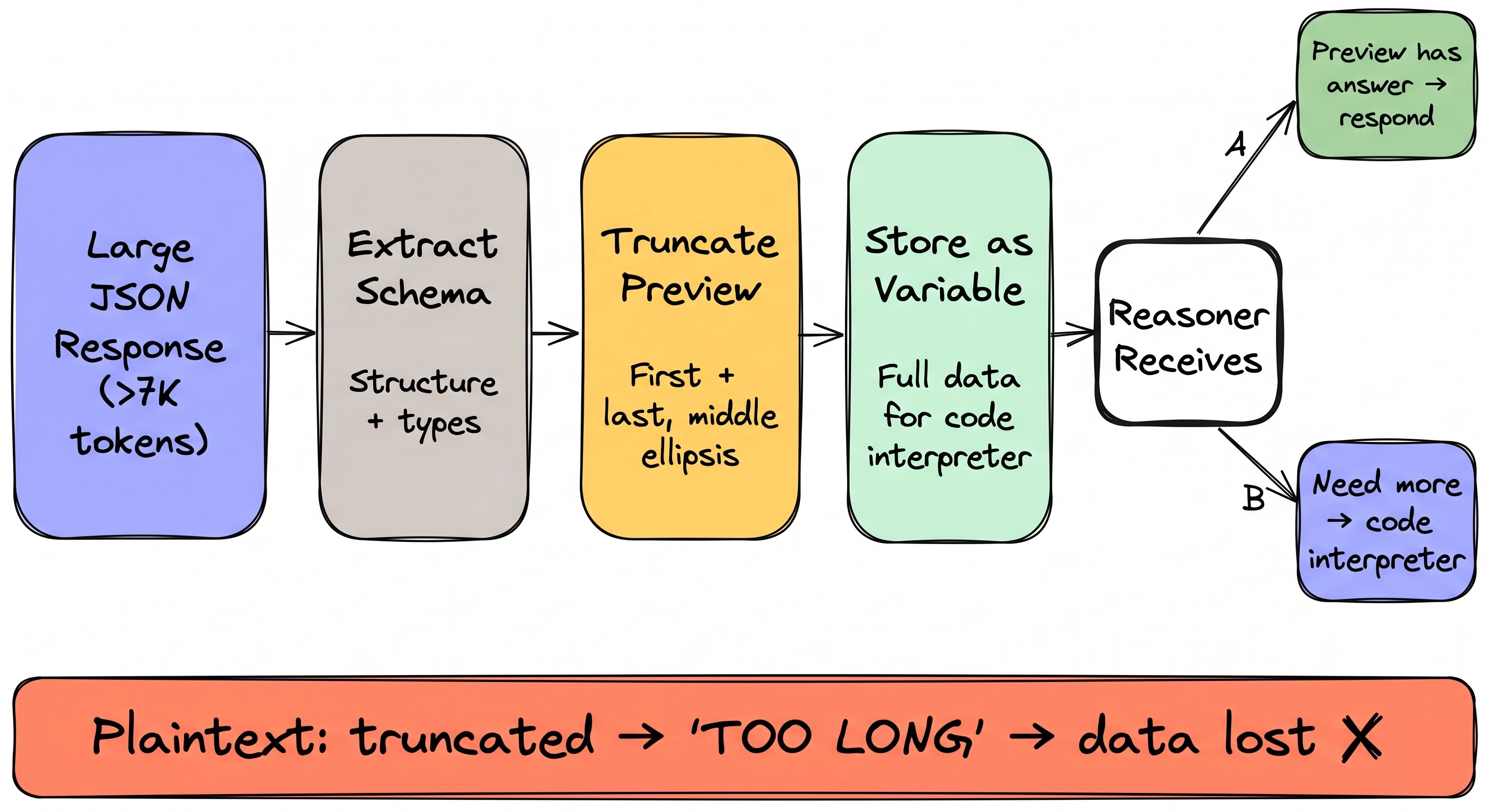
The reasoner can either answer directly from the preview or write Python against the stored variable. Context stays compact even with massive payloads.
Plaintext? A text string that's too long just gets truncated. No variable. No schema. No code interpreter. The reasoner works with whatever fragment it has and acts erratically — garbled summaries, missing fields, made-up values.
One more gotcha worth knowing: if your API returns JSON but your output mapper wraps it in a string field, the engine sees a string, not an object. It takes the plaintext path. The data is JSON, it's just not being treated as JSON by the time the engine sees it.
→ Use $MAP() for lists. Direct field mapping for single objects. Save RENDER for cases where you genuinely need a static text string and nothing else.
Read the full deep dive with interactive diagrams: Why Your Plugin Returns the Right Data But the Agent Gets It Wrong
Quick Hits
→ Image OCR with LLM Actions — You can now pass images from File Slots directly into generate_text_action for OCR. Receipts, invoices, screenshots. Pair a File Slot with gpt-4o and you're reading images inside your plugin.
→ Community Roadmap Revamp — The roadmap page got a facelift. Filters are in, the layout is cleaner, and it's way easier to find the features being worked on vs. the ideas in the pipeline.
→ Full Blog: How the Engine Processes Tool Responses — Everything in this issue plus interactive diagrams showing the structured vs plaintext paths, the ReAct loop, and how the code interpreter gets invoked.
Worth Reading
- Writing Effective Tools for AI Agents — Anthropic's engineering team on tools as a "new software contract" between deterministic systems and non-deterministic agents. Same conclusion we landed on: structured interfaces with typed parameters and predictable response shapes beat freeform text every time.
- LLM Structured Outputs: The Silent Hero of Production AI — A real production crash caused by regex-parsing plaintext LLM responses instead of structured JSON. If you want a cautionary tale for why format matters in agentic pipelines, this is it.
Join the Community
Building plugins and hitting weird behavior with tool responses? Come share what you're seeing in the community.
Office Hours are back for 2026. Sign up here.
-- Kevin
Developer Advocate @ Moveworks | Agent Studio
P.S. If you've had a plugin that worked perfectly in testing but gave weird results with real user queries, reply with what happened. I'm collecting the patterns.