URL - Markdown to Send Clickable Link for Email Mailto: from Webhook
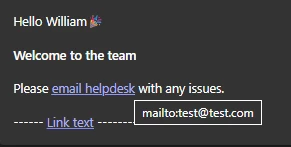
Sharing Solution to HTML-encoded string passed from Webhook call to present URLs to users through Teams Notification (includes mailto: clickable link and URL)
Notify action to handle link:
steps:
- action:
action_name: mw.get_user_by_email
output_key: mw_get_user_by_email_result
input_args:
user_email: data.email
- notify:
output_key: output_notification
recipient_id: data.mw_get_user_by_email_result.user.id
message:
RENDER():
template: "Hello {{name}}{{& message}}"
args:
name: data.mw_get_user_by_email_result.user.first_name
message: data.message.$REPLACE("&", "&").$REPLACE(""", "\"").$REPLACE("<", "<").$REPLACE(">", ">")Markdown Syntax Reference Documentation
Sample JSON Payload to Webhook:
{
 "event": "employee.created",
 "data": {
   "employee_id": "12345",
   "name": "John Doe",
   "email": "william@test.com",
   "department": "🚀 Engineering",
   "message": "🎉\n\n**Welcome to the team** \n\nPlease <a href=\"mailto:test@test.com\">email helpdesk</a> with any issues. \n\n------ [Link text](https://www.example.com) ---------"
 }
}
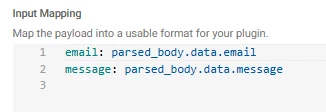
Parse Input from Webhook from Sample JSON above from Plugin:
Result: