

How to suppress intermediate "in-progress" message from a compound action

  • May 29, 2026
  • 5 replies
  • 27 views

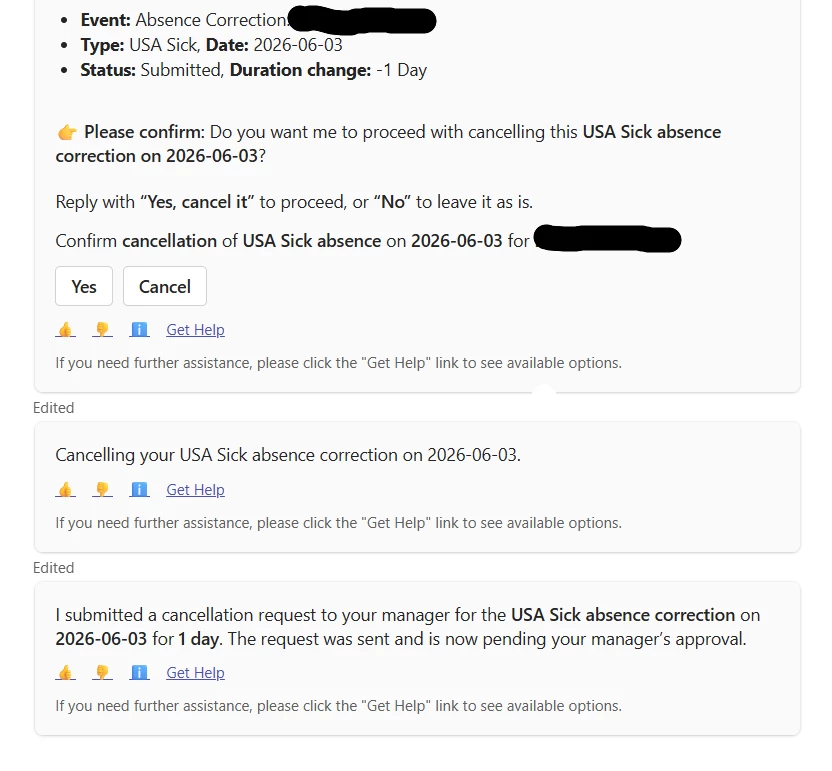
My compound action sends two visible messages to the user: an intermediate "Cancelling your request..." message that appears while the action is executing, then the final "has been cancelled" confirmation after the action 
returns. I want only the final message to show.

I've tried strengthening display_instructions_for_model on the return mapper to explicitly suppress intermediate narration ("Do NOT generate any in-progress messages, output ONLY the final confirmation"), but the duplicate 
still appears.

Is there a plugin-level, CA-level, or workspace-level setting that controls whether intermediate progress messages are streamed? If not, is there a documented workaround?

Platform: Agent Studio
Channel: Teams
 

5 replies

Kevin Mok
Forum|alt.badge.img+2
  • Community Manager
  • May 29, 2026

Hey ​@MichaelWilliams  - Currently there isn’t a workaround to remove the intermediate message. When a CA gets triggered it sends a “in progress” message and then the next message is its result


Hi Kevin, thanks for your quick response. 

I’ve noticed inconsistent behavior with compound actions in Agent Studio (Teams channel):

  • In some cases, users see only the final result message
  • In other cases, users see both an intermediate “in-progress” message (e.g., “Cancelling your request…”) and the final confirmation

From my understanding, a CA typically emits an “in-progress” message followed by the final result. However, this doesn’t seem consistent across scenarios.

My question:
Is there any underlying rule or mechanism—beyond the MW platform UI—that determines when intermediate “in-progress” messages are shown versus suppressed?


Kevin Mok
Forum|alt.badge.img+2
  • Community Manager
  • May 29, 2026

Hey ​@MichaelWilliams - I did some digging.


It's not the UI deciding — it comes down to how long the action takes to run on that particular execution.

If a compound action finishes quickly, the assistant just shows the final result. If it runs longer than usual, the assistant posts a short in-progress message ("Cancelling your request…") so the user isn't left waiting, then updates with the final confirmation once it completes.
 

That's why the same flow behaves differently across runs. It's tied to execution time, not the scenario itself. When the action resolves fast, you see only the final message. When a step takes longer on a given run; a slower API response, more data to process, an external system taking its time, the in-progress message appears first. So the same compound action can show it one time and skip it the next, depending purely on how long that run took.


So there's no setting suppressing it, it's a timing threshold. Faster than the threshold, with no in-progress message; slower, you get one.


Thanks for your response. I will try to reduce the threshold


Kevin Mok
Forum|alt.badge.img+2
  • Community Manager
  • June 2, 2026

Sounds good, I understand is an UX pain that we currently have to live with. I hope this doesn’t stop you from building other plugins and spending time on what matters most. We are working diligently to make the UX better and have future plans to make the chat experience a lot smoother.