


Question

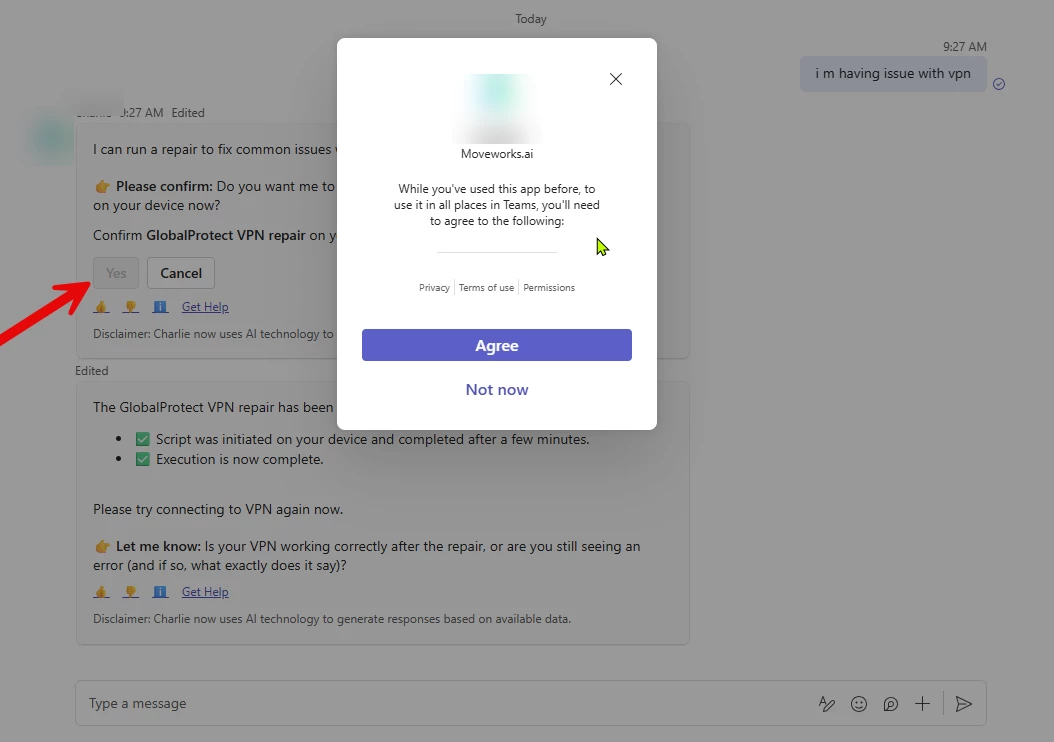
Getting popup when clicking on Agent studio skills button

  • February 17, 2026
  • 2 replies
  • 39 views

Guruprasad.Marathe
Forum|alt.badge.img+2

Since from two days many users are reporting a popup issue, there is no change made from our end like manifest file for anything w.r.t our bot. its not specific to certain skill, happening for all. when yo cancel it or “Not now”

this shows “this card action is disabled because of you blocked the bot”


anybody facing similar issue? 
 

2 replies

rgeroulo
Forum|alt.badge.img
  • Employee
  • February 23, 2026

@Guruprasad.Marathe this popup modal would be specific to your Microsoft tenant’s permissions.

This message means the Teams app requires new or broader permissions to function in chats, channels, or meetings, often due to an update or tighter organizational security policies. To resolve this, you generally need to review the app's updated permissions in the popup and click "Accept" to grant consent as an end user.

If this issue persists, working with your Entra and O365 teams would be the best path forward.

Best,

Ryan


Guruprasad.Marathe
Forum|alt.badge.img+2

Hello Ryan,

thank you, the issue was with MS and they fixed it immediately but teams cache was still showing the popup.. after clearing cache it worked but the tenant permissions were never changed also we did not make any changes to the bot. maybe the MS issue propagated to clients and never got cleared even if the issue was fixed.