

Participating Frequently
August 26, 2026
Question

Customizing the Confirmation Prompt in Conversation Flows

  • August 26, 2026
  • 3 replies
  • 114 views

Hi everyone,
 

I’m working on a Moveworks conversation flow where an action is executed with the Confirmation Policy enabled:
 

Require consent from the user before executing this activity.

The default confirmation prompt displays some information about the action before asking the user to confirm. However, I have a requirement to display additional fields/details in the confirmation step so the user can review all relevant information before clicking Yes/Confirm.

For example, I would like the confirmation screen to show additional details such as:

  • Request/transaction details

  • Additional input fields

  • Dates and times

  • Leave/request type

  • Number of hours

  • Other dynamically generated values

Is there a supported way to customize or extend the confirmation prompt/card generated by the Confirmation Policy?

Specifically, I’m looking for a workaround or recommended approach to:

  1. Add additional fields to the confirmation UI.

  2. Display dynamic values from the conversation/action inputs.

  3. Allow the user to review these values before the action executes.

  4. Keep the confirmation/consent behavior intact.

I’ve attached screenshots showing the current confirmation experience and the conversation flow.

Has anyone implemented something similar in Moveworks? Any guidance on the supported approach or workaround would be greatly appreciated.
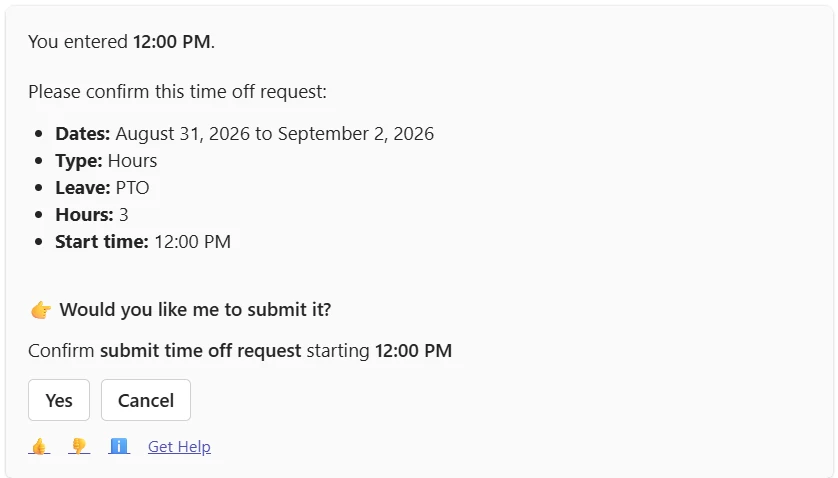


@Kevin Mok ​@DIANA.TWC 

3 replies

rgeroulo
Community Manager
August 27, 2026

The current Require consent from the user before executing this activity. will confirm the slots gathered before kicking off an Action.

I assume these other values are not slots, correct? Updating the slot name will help make the key values more descriptive as a potential add to the use case.

RakeshTWCAuthor
Participating Frequently
September 1, 2026

Thanks for the clarification. Yes, the additional value we wanted to display is primarily a dynamically calculated value rather than a slot.

For example, in our use case, the user selects multiple time-off dates and a duration type (such as Full Day or Partial Day). Based on these inputs, we calculate the total number of time-off hours across all selected days.

If the duration type is Full Day, we calculate the hours for each selected day and then display the total hours before the user confirms and the Action is executed.

So, while the dates and duration type are gathered as slots, the total hours is a derived/calculated value. We were looking for a way to include this calculated value in the confirmation step so the user can review the final total before providing consent.

Is there anyway that we can assign a output value of an script action to a slot so, that we can see it in confirmation screen.

rgeroulo
Community Manager
September 2, 2026

@RakeshTWC not today - there is no way to confirm a value, unless it is a slot value