

Solved

Button with link

  • March 26, 2026
  • 8 replies
  • 178 views

rajeev.saraf
Forum|alt.badge.img+4

Hi ,


I have a use case where I am using compound action to create buttons, i would like to give links to these button.

or

Are there any way to display the buttons with link using html tags. 

Best answer by rgeroulo

Hi ​@rajeev.saraf!

If wanting to provide buttons, you would use the Notify expression to send the user a static card with buttons, where each button is tied to a Content Activity, System Action, or Conversational Process.

In your case,  configure an action button as a Content Activity and set its message to your target URL.
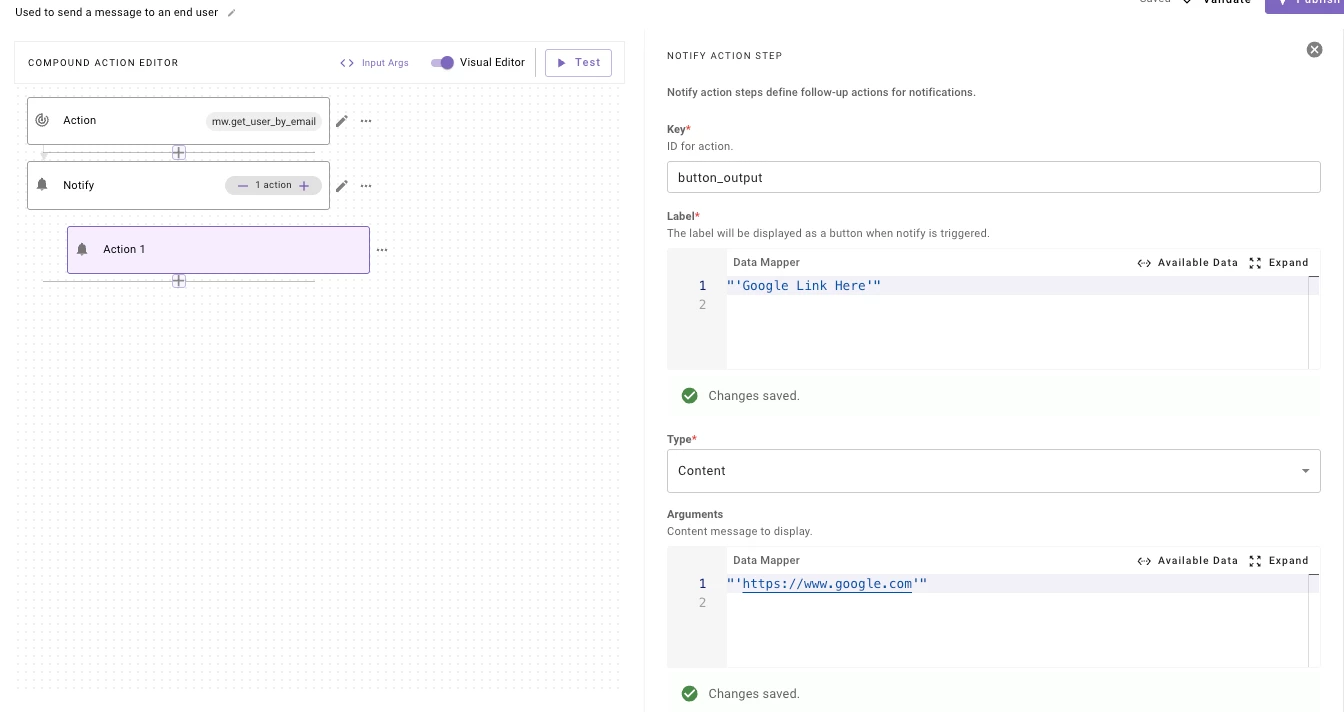
Compound Action
Button in-chat that links to a URL

Best,

Ryan

8 replies

rgeroulo
Forum|alt.badge.img+2
  • Community Manager
  • Answer
  • March 26, 2026

Hi ​@rajeev.saraf!

If wanting to provide buttons, you would use the Notify expression to send the user a static card with buttons, where each button is tied to a Content Activity, System Action, or Conversational Process.

In your case,  configure an action button as a Content Activity and set its message to your target URL.
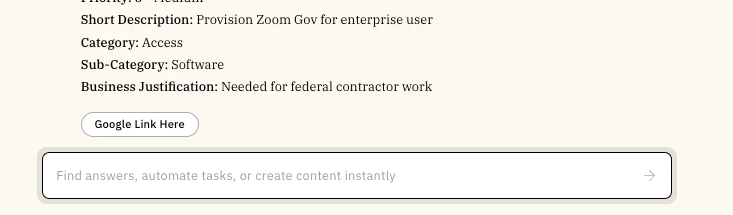
Compound Action
Button in-chat that links to a URL

Best,

Ryan


rajeev.saraf
Forum|alt.badge.img+4
  • Author
  • Known Participant
  • March 27, 2026

@rgeroulo Thanks for the response, If I understood you correctly →  the link can be dynamic, with definite set of button?


rgeroulo
Forum|alt.badge.img+2
  • Community Manager
  • March 27, 2026

@rajeev.saraf yes, the link can be dynamic as seen below. This link can be served from a string slot, as seen in this example where

  • data.my_variable = “https://www.google.com”


rajeev.saraf
Forum|alt.badge.img+4
  • Author
  • Known Participant
  • March 28, 2026

@rgeroulo - Thank you for you help, I am going to try it now.


rajeev.saraf
Forum|alt.badge.img+4
  • Author
  • Known Participant
  • April 1, 2026

@rgeroulo - I found the link is not always working, sometime it ask user to click on a generated link.


Kevin Mok
Forum|alt.badge.img+2
  • Community Manager
  • April 2, 2026

@rajeev.saraf if you want to format the link use RENDER() such as:

RENDER():
args:
link: data.my_link_variable
template: "To do what you need to do, please [Click here]({{link}})"


rajeev.saraf
Forum|alt.badge.img+4
  • Author
  • Known Participant
  • April 12, 2026

Hi ​@Kevin Mok,  ​@rgeroulo 

The root cause was identified as a character limit constraint rather than a URL generation error. While the URL is constructed correctly, exceeding the supported character threshold prevents the expected pop-up from appearing, incorrectly triggering a user prompt instead.


question - is it possible to make the URL tiny within the planform the way it works for all the other Moveworks generated URL.


Kevin Mok
Forum|alt.badge.img+2
  • Community Manager
  • April 13, 2026

Hey ​@rajeev.saraf - If you want to have a tiny URL, you may have to use your own service that shortens URLs because we don't have that exposed.