


Solved

Ability to Export Complete Use Case Configurations Between Environments?

  • January 6, 2026
  • 1 reply
  • 30 views

hundleymf
Forum|alt.badge.img+4

I found Moveworks documentation showing that we can export plugins between environments, but I don’t see anything about exporting HTTP actions, conversational processes, script actions, compound actions, etc.

Is there a way to export everything related to a use case—not just the plugin—so we can move our work between environments?

Right now, we usually build directly in production and just use test users, but sometimes we build and test in sandbox first. When we do that, it’s a hassle to manually copy and paste everything from sandbox to production. It would be extremely helpful to have an easy way to export all of this work between environments.
Best answer by rgeroulo

Hi ​@hundleymf!

When you export a plugin, this will automatically export all HTTP actions, the Conversational Process, Script Actions, Compound Actions, etc. that is used for said plugin. The only asset that is not exported is the Connector. This is by design as Connectors have sensitive credentials and they are typically different between a dev and prod instances.

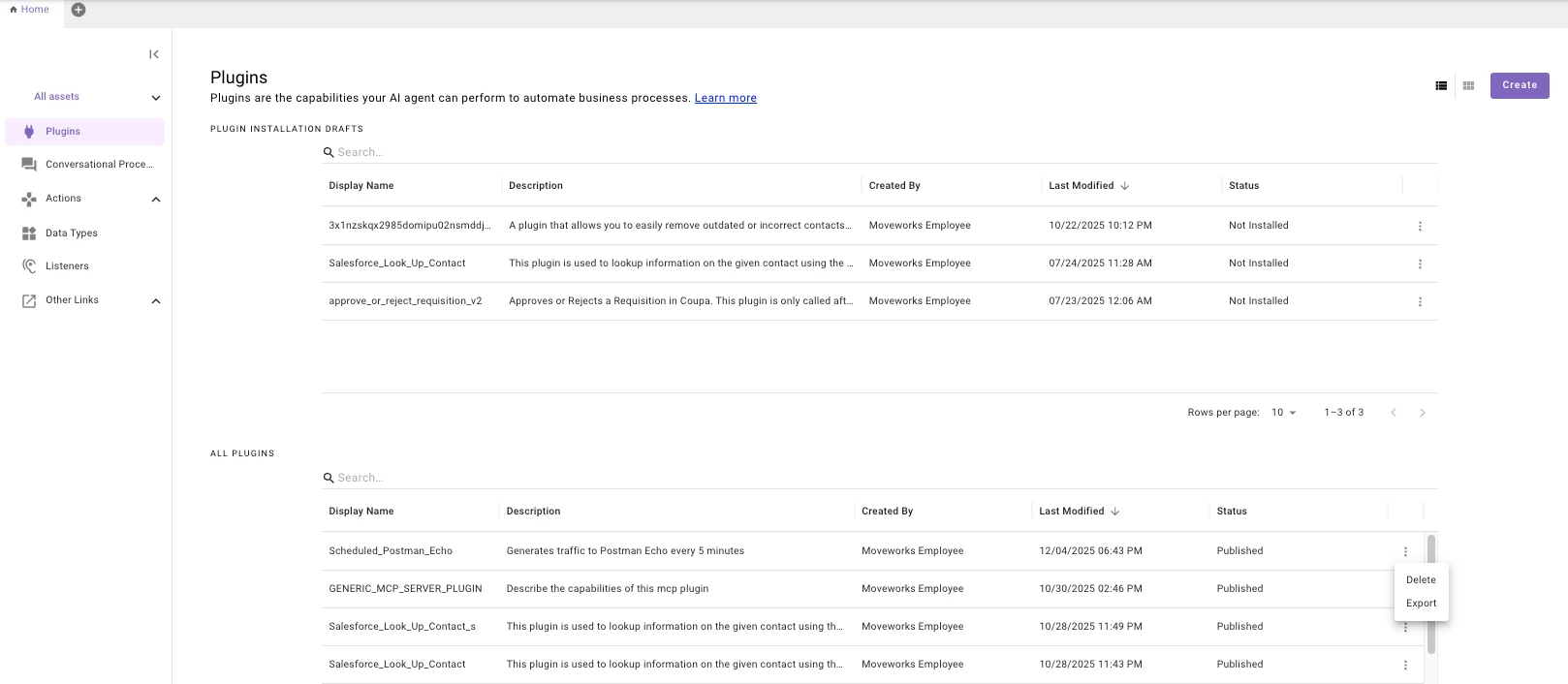
You can export a plugin and all of its assets by clicking on the vertical three dots next to the plugin as seen below.

This will then provide a temporary link that you can paste into the browser, choose which tenant you want to import all the assets into, and then the import wizard will have you validate all the import assets/address any duplicate naming conventions.

Best,

Ryan

1 reply

rgeroulo
Forum|alt.badge.img
  • Employee
  • Answer
  • January 6, 2026

Hi ​@hundleymf!

When you export a plugin, this will automatically export all HTTP actions, the Conversational Process, Script Actions, Compound Actions, etc. that is used for said plugin. The only asset that is not exported is the Connector. This is by design as Connectors have sensitive credentials and they are typically different between a dev and prod instances.

You can export a plugin and all of its assets by clicking on the vertical three dots next to the plugin as seen below.

This will then provide a temporary link that you can paste into the browser, choose which tenant you want to import all the assets into, and then the import wizard will have you validate all the import assets/address any duplicate naming conventions.

Best,

Ryan