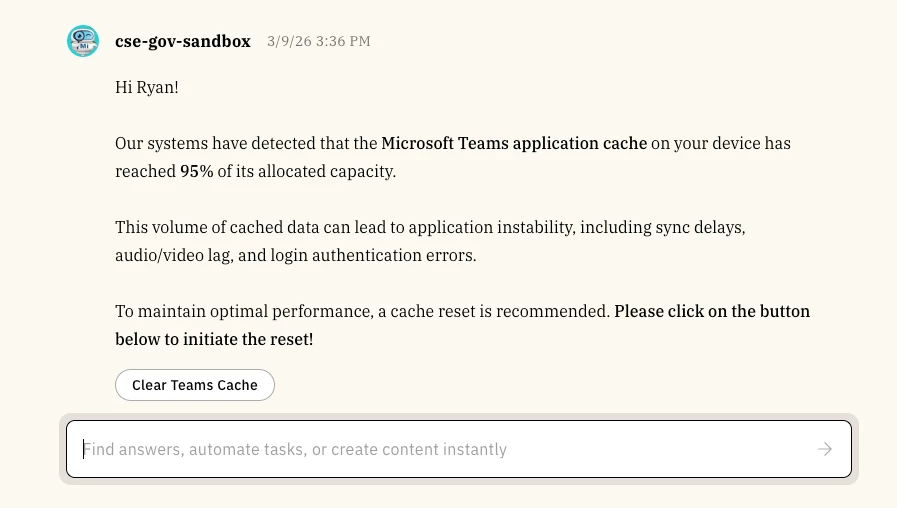
💡 Nexthink Device Management Ambient Agents

  • March 9, 2026
  • 7 replies
  • 188 views

rgeroulo
Forum|alt.badge.img+1

Hello Community!

I wanted to share a set of practical use cases for managing device health that empowers end-users to take action when their hardware needs attention. While these notifications and workflows leverage Nexthink, other device management tools can be substituted using a similar architecture.

The Solution: Nexthink Ambient Agents

Nexthink offers a Remote Actions API to initiate tasks, native webhooks for real-time alerts, and Nexthink Query Language (NQL) to define data triggers. Combining these capabilities allows ambient agents to listen, notify, and assist users with actions such as:

  • Clear Device/Teams Cache
  • Restart Device
  • Disk and Recycling Bin Cleanup
  • Repair Office 365

Architecture Overview

  1. Nexthink Webhook

    1. Nexthink natively supports webhooks based on NQL queries. When a query condition is met, it sends a payload that Moveworks monitors in real time. The Configuring webhook NQL conditions and Configuring webhook fields: Method, Resource, and Payload are great resources for defining NQL queries in Nexthink.

  2. Agent Studio Ambient Agent

    1. Within Agent Studio, a plugin configured for System Triggers listens for and processes the incoming payload.

  3. User Engagement

    1. The payload is passed to a Compound Action, which sends a notification to the end user. These messages can include interactive buttons that trigger a Nexthink Remote Action—like clearing a Teams cache—directly from the chat interface.

This architecture provides users with real-time, machine-related notifications and the ability to resolve issues with a single click.

Have you implemented any of these or other Nexthink-related plugins? Let me know in the comments!

7 replies

Forum|alt.badge.img+5
  • Known Participant
  • March 9, 2026

At Leidos, we did the teams cache reset capability - but i like this proactive approach, i will see if the team wants to enhance it.  Our team is currently working on a nexThink capability to do hardware attestations, we have to do these every 6 months as employees , so we have the agent checking the due dates from ServiceNow, getting the serial number from the device, the user email and asking NexThink if the user has logged into that specific machine in the last 7 days, if it has , the agent will complete an auto attestation for them handle the service now RITM associated and capture the details in an audit log. If the agent successfully does the auto attest, its sends the user a notification telling them what happened and hte associated RITM.  If the bot can’t do the attestation , it doesn’t send the user anything and just relies on the normal workflow of the user receiving emails from SN or a notification from the chatbot.

  • Nexthink automation for six‑month attestations in development.
  • Agent workflow: check due date (24 days out) → get hardware serial & user email → query Nexthink → auto‑attest if logged in within 7 days → complete RITM → audit log → notify user.
  • If auto‑attest fails, standard notification/workflow remains in place.

rgeroulo
Forum|alt.badge.img+1
  • Author
  • Community Manager
  • March 9, 2026

Awesome use case ​@jaime.renn. Including the ServiceNow ticketing portion as well for tracking is a great addition that can be included in any of these use cases!


mrukavina
Forum|alt.badge.img+2
  • Employee
  • March 24, 2026

​@rgeroulo thanks for the info! Curious when it would make sense to utilize these use cases vs A2A (with Spark AI) functionality. I know we don’t have A2A available yet, but I’d love to hear your guidance on how to think about these different workflow options. 


rgeroulo
Forum|alt.badge.img+1
  • Author
  • Community Manager
  • March 24, 2026

​@mrukavina great question!

Ultimately, Spark AI utilizes the same Remote Action APIs and NQL queries to execute these tasks. Since both Moveworks and Spark AI share these capabilities, the decision rests on whether you prefer a single assistant for all troubleshooting or multiple specialized assistants. Each approach has its pros and cons.

While Spark AI is more deeply integrated into Nexthink, Moveworks is fully capable of serving as a centralized hub for any use case requiring Remote Action APIs and NQL.


Danielle.K
Forum|alt.badge.img+7
  • Known Participant
  • March 25, 2026

I’d love to implement a flow where a user asks for access to a shared network drive, and the bot pings Nexthink to check if they have access already--if they do, it checks if the user is on VPN, and then maps the drive for them. If they don’t, it helps them submit their request for access, then pings them once it is approved and maps the drive for them. I’d love any thoughts on how to achieve this!


rgeroulo
Forum|alt.badge.img+1
  • Author
  • Community Manager
  • March 25, 2026

​@Danielle.K this type of use case would be done using Remote Actions API and NQL. After doing some discovery, I believe the below would be the high-level steps and Actions to use. For this use case, there is some branching logic as seen below that you would want to incorporate using Switch statements in Agent Studio:

High-level overview

Here is the outline of the specific APIs and Remote Actions that would be relevant (can differe per tenant):

1. Check Drive Access
Since drive access is typically governed by Active Directory (AD) or Entra ID groups, you have two main options:

  • Nexthink Flow - Entra ID Connector: Use the Check if a user is in a group thinklet. This is a low-code way to ping your identity provider directly via Nexthink to verify membership in the specific security group for that drive.
  • NQL API: If you sync your AD groups into Nexthink as "User Tags" or "Custom Fields," you can run a simple NQL query to check membership:
    • users | where name == "insert_username_here" | compute groups

2. Check VPN Access
The next step is ensuring the user is on the VPN.

  • Remote Action: "Get Network Connections" (Library Pack): Nexthink has a pre-built Remote Action in the Network Management library pack. You can trigger this via API to return the current interface type (Ethernet, Wi-Fi, or VPN).
  • Custom NQL Check: You can check the device.network_interfaces table via the NQL API to see if a virtual adapter (VPN) is currently up.

3. Mapping the Drive
Once access and VPN are confirmed, you trigger the "heavy lifting" script.

  • Remote Action: "Map Network Drive" (Library Pack): Nexthink provides a standard "Map Network Drive" Remote Action.
    • Parameters needed: Drive, Network Path, and Maximum Delay In Seconds.
    • API Trigger: You would call the Remote Actions API using the POST /remoteactions/{id}/executions endpoint, passing the user’s device_id and the drive parameters.

This is just an outline of the use case after doing some discovery, feel free to deviate from this, but this should help to get you off the ground!

Best,

Ryan


Danielle.K
Forum|alt.badge.img+7
  • Known Participant
  • March 25, 2026

This is great! Thanks so much, Ryan!