

Architecting a solution for buttons to retain information when process has aborted
I’ve built a plugin that sends notifications when Jira approvals are needed. The approvers of the Jira ticket receive the notification and have buttons to approve or deny the Jira ticket. In order to approve or deny, the user must first authenticate a Moveworks Connector with their Jira (Atlassian) account. This all works fine, but after authenticating, the approve and deny buttons no longer work because the information that was stored in them is wiped. Is there a way to work around this so the information in the buttons are not wiped? Or to send another set of buttons to the user after authenticating? Or some other workflow to accomplish this?
Here is how the plugin is built..
- Jira ticket sends information to a Moveworks webhook listener when an approval is required.
- Plugin is triggered with the webhook and runs a compound action that sends a notification to the approvers about the Jira approval, and also included are approve and deny buttons to action on.
- When the user selects either button, the buttons run a conversation action (one for approval flow, one for denial). Passed to the conversation actions upon button press is information from the Jira request (Jira key, approval ID). These conversation actions then run HTTP actions and pass the same Jira information (Jira key, approval ID) to them.
- The HTTP actions send a post request with the information passed in (Jira key, approval ID) to a Jira endpoint to approve or deny the Jira.
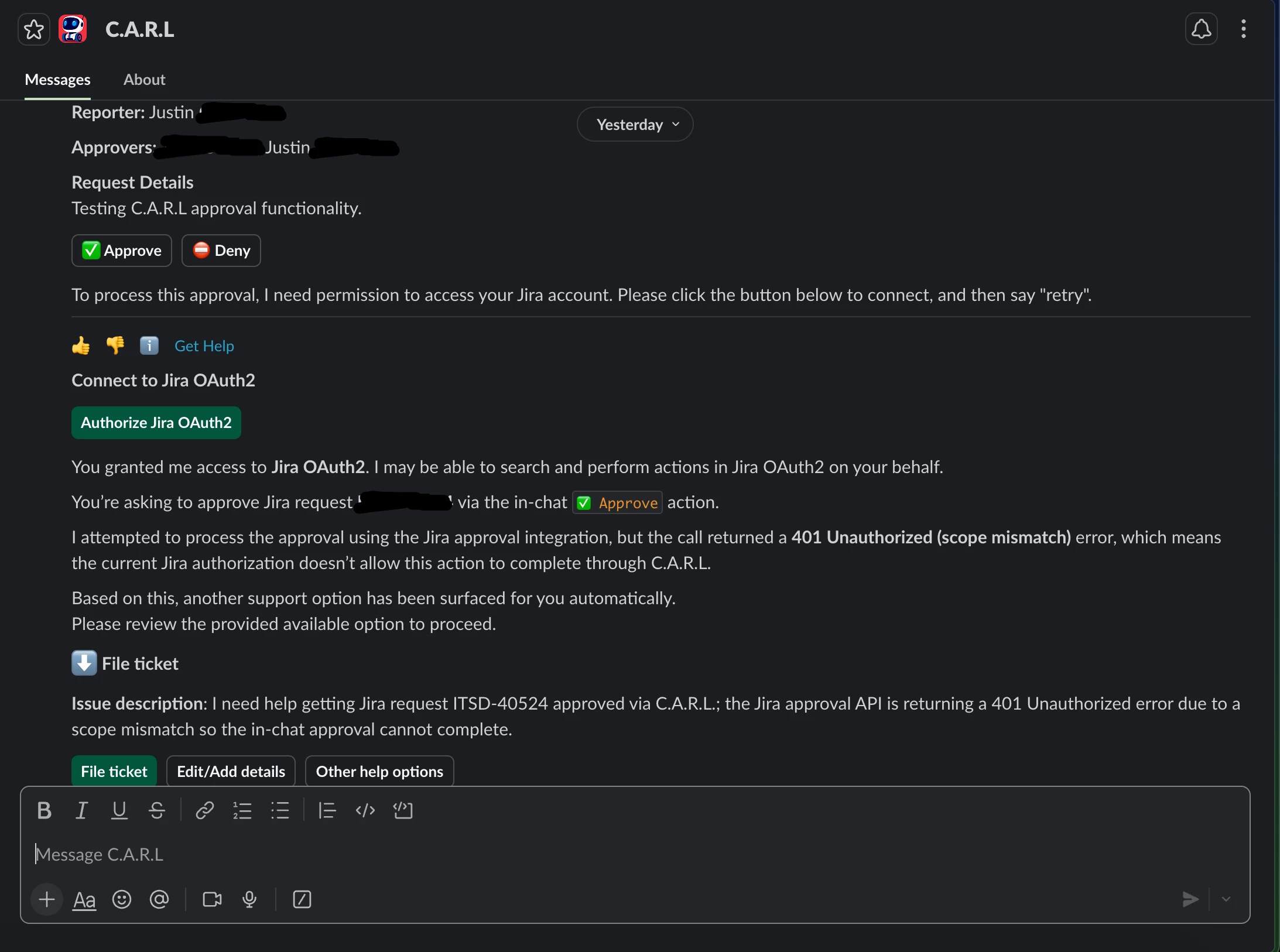
- If the user has not yet authenticated their Moveworks Connector with their Jira (Atlassian) account, they are prompted to authenticate when selecting the buttons with a new button, and when selecting that, it brings up an Atlassian web page to authenticate.
- After successfully authenticating on the Atlassian web page and when the user returns to the agent’s notification, when they select the buttons, they receive a 401 unauthorized error.
- Debugging this further with Moveworks Logs and Agent Architect shows that the buttons no longer contain the required Jira information (Jira key, approval ID). Agent Architect says this is because when Moveworks saw the missing authentication token, it aborted the process, and because of that the working memory and button information was wiped. Other things like typing “retry” also fails.
Also note that after the initial authentication, the buttons work in future notifications without any issue, since the process isn’t aborted.
I tried another way to go about this but haven’t found a solution, and Agent Architect tells me this isn’t something that can be worked around, but I think there must be a better way. For example, from the compound action, I tried using system actions connected directly to the HTTP actions, rather than the conversation actions, but I experienced similar behavior along with other issues where the agent returned information that wasn’t necessary, and it wasn’t guaranteed to return the prompt for the user to authenticate their Moveworks Connector with their Jira (Atlassian) account. Using the conversation actions resolved all of those behaviors.
Ideally we would first check to see if a user has authenticated before presenting them with the approve and deny buttons, and if they hadn’t yet authenticated, they would have to do that first, and then they would receive the buttons after but I’m not sure that’s possible and Agent Architect doesn’t think it is. Another flow that could work is if the approve and deny buttons were sent again after authenticating, but again I’m not sure that’s possible and Agent Architect says it’s not.
Here is a screenshot of what the user receives when the plugin is triggered and when they select the approve or deny button. I can include other screenshots or information too.
Thank you for the help!
Justin